16
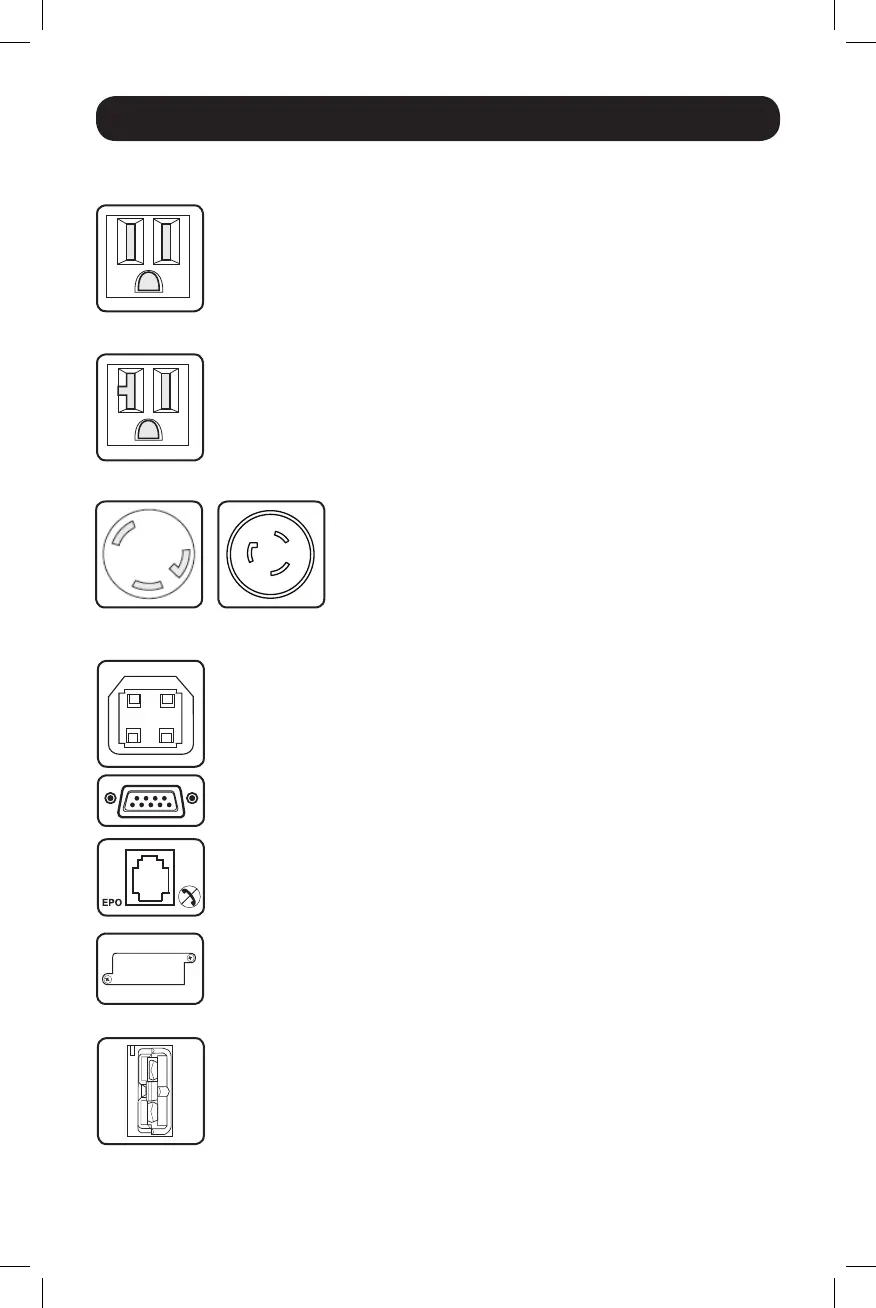
15A 120V
NEMA 5-15R
20A 120V
NEMA 5-20R
30A 120V
NEMA L5-30R
20A 120V
NEMA L5-20R
Basic Operation continued
Other UPS Features (Rear Panel)
AC Outlets: AllmodelsincludeNEMA5-15Rand/orNEMA
5-20Routlets.SelectmodelsalsoincludeNEMAL5-30Rand/orNEMAL5-20R
outlets.TheseoutletsprovideyourconnectedequipmentwithAClinepower
during normal operation and battery power during blackouts and brownouts. The
UPSprotectsequipmentconnectedtotheseoutletsagainstdamagingsurges
andlinenoise.IfyouhaveaserialorUSBconnectiontoyourUPS,youcan
remotelyrebootconnectedequipmentbyturningtheoutletsOFFandONusing
Tripp Lite’s PowerAlert Software. The outlets are divided into one or more load
banks(labelled“LOAD1,”etc.)whichmayberemotelyswitchedOFFandON
withoutinterruptingpowertoequipmentconnectedtotheotheroutlets.Outlets
labelled“UNSWITCHED”maynotberemotelyswitchedoff.
Communications Ports (USB or RS-232): TheseportsconnectyourUPSto
anyworkstationorserver.UsewithTrippLite’sPowerAlertSoftwareandincluded
cables to enable your computer to automatically save open files and shut down
equipmentduringablackout.AlsousePowerAlertSoftwaretomonitorawide
varietyofAClinepowerandUPSoperatingconditions.ConsultyourPowerAlert
Software manual or contact Tripp Lite Customer Support for more information.
See“USBandRS-232SerialCommunications”inthe“OptionalInstallation”
section for installation instructions.
EPO (Emergency Power Off) Port: YourUPSfeaturesaEPOportthatmaybe
usedtoconnecttheUPStoacontactclosureswitchtoenableemergency
invertershutdown.SeeOptionalInstallation.
Accessory Slot: Remove the small cover panel from this slot to install optional
accessoriestoremotelymonitorandcontrolyourUPS.Refertoyouraccessory’s
manual for installation instructions. Contact Tripp Lite Customer Support at
www.tripplite.com/supportformoreinformation,includingalistofavailable
SNMP, network management and connectivity products.
External Battery Connector (optional on select models): Usetoconnect
TrippLiteexternalbatterypacksforadditionalruntime.Refertoinstructions
available with the battery pack for complete connection information and safety
warnings.Visitwww.tripplite.com/support/battery/index.cfmtolocatethe
supportedbatterytype(s)foryourUPS.
14-03-028-93-3088.indb 16 3/20/2014 4:08:50 PM




 To Next Page