7
1A
1B
2A
2B
Optional Installation
These connections are optional. Your UPS will function properly without these connections.
1
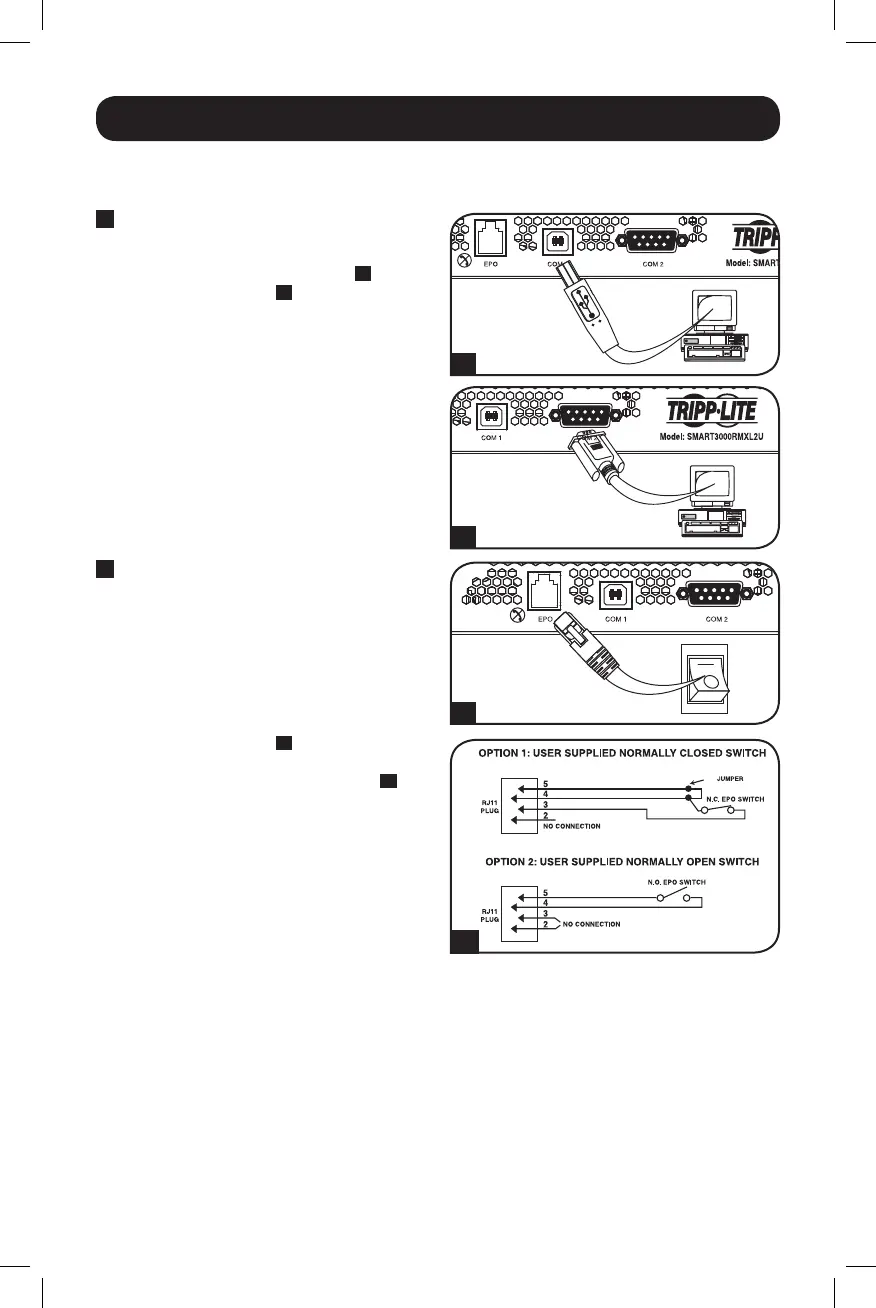
USB and RS-232 Serial
Communications
UsetheincludedUSBcable(see
1A
) or
DB9serialcable(see
1B
) to connect the
communication port on your computer to
thecommunicationportofyourUPS.Install
on your computer the Tripp Lite PowerAlert
Software appropriate to your computer’s
operating system.
2
EPO Port Connection
This optional feature is only for those
applicationswhichrequireconnectiontoa
facility’sEmergencyPowerOff(EPO)circuit.
WhentheUPSisconnectedtothiscircuit,it
enablesemergencyshutdownoftheUPS’s
inverter.
Usingthecableprovided,connecttheEPO
portofyourUPS(see
2A
)toauser-supplied
normally closed or normally open switch
according to the circuit diagram (see
2B
).
TheEPOportisnotaphonelinesurge
suppressor;donotconnectaphonelineto
this port.
14-03-028-93-3088.indb 7 3/20/2014 4:08:41 PM




 To Next Page