101
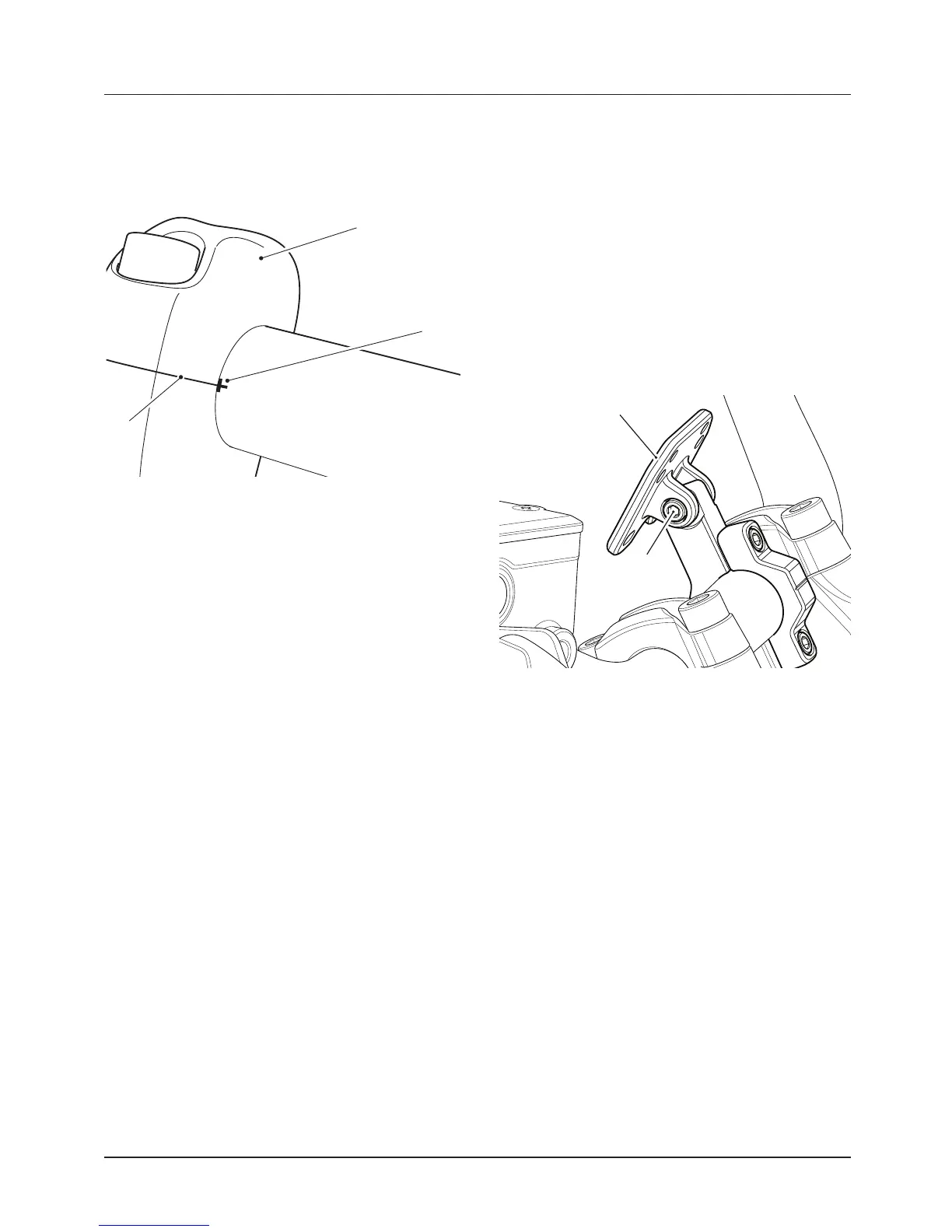
• Rotate the handlebar so that the
alignment marking on the
handlebar aligns with the split line
on the upper clamps/risers.
1. Upper clamp
2. Clamp split line
3. Alignment marking (Tiger 800 XRX
shown)
• Tighten the 0.39 in (10 mm) fasteners
to 26 lbf ft (35 Nm).
• Reinstall the 0.31 in (8 mm) fasteners
to the front positions and tighten to
19 lbf ft (26 Nm).
Satellite Navigation Mounting
Bracket (if equipped)
The satellite navigation bracket features
a mounting plate that is compatible with
Garmin Nuvi® Satellite Navigation
Systems 660 and 220.
Other satellite navigation systems may
be compatible.
When installing a satellite navigation
system, refer to the manufacturer’s
instructions.
1. Mounting plate
2. Pivot bolt
To adjust the mounting plate:
• Loosen the pivot bolt.
• Set the mounting plate to the
desired position.
• Retighten the pivot bolt to 44 lbf in
(5 Nm).
The satellite navigation mounting
bracket is available as an accessory kit
from your authorized Triumph dealer.












 To Next Page