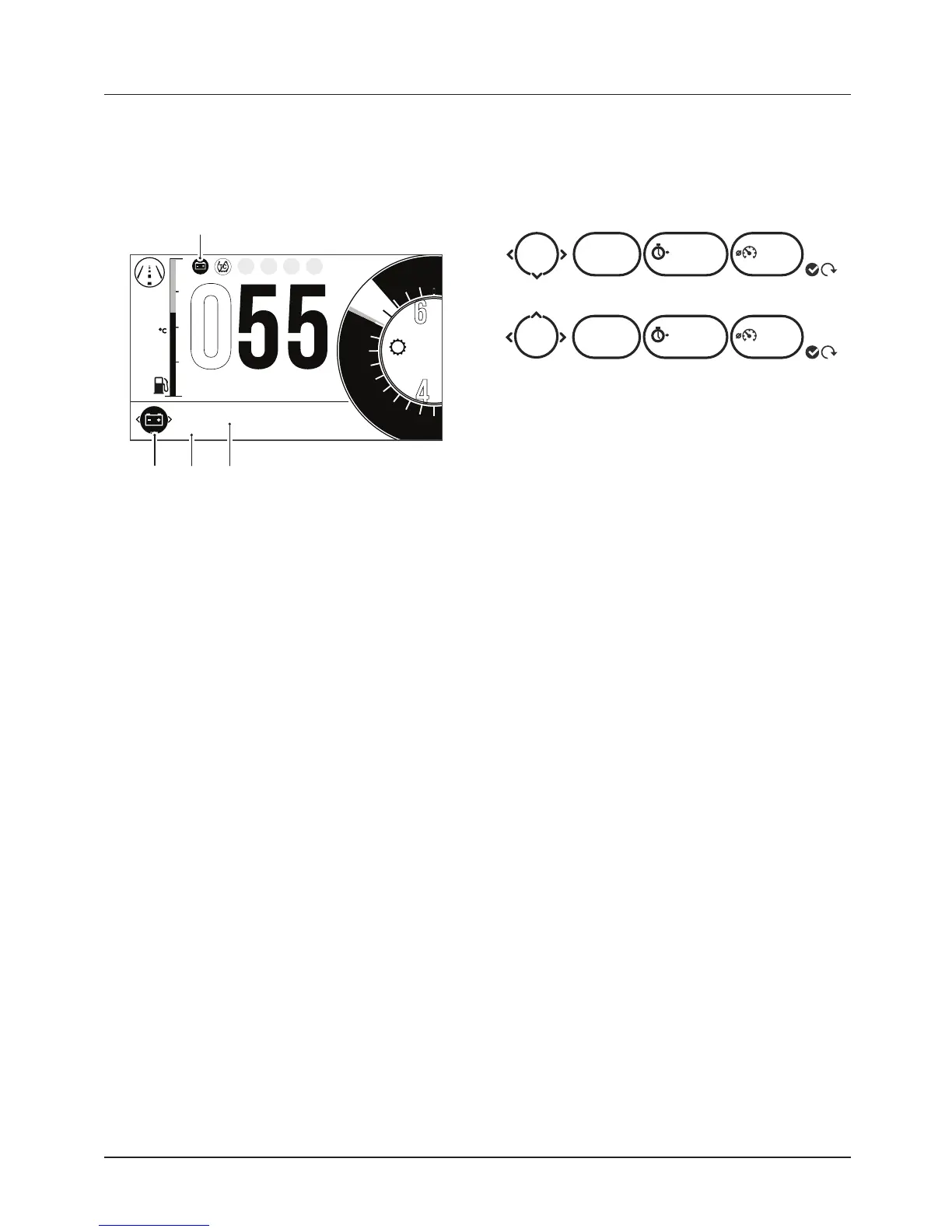
1. Low battery warning
2. Warning counter
3. Warning description
To view the warnings:
• Push the joystick left/right to scroll
through the options until the
warning review is shown.
• Push the joystick down/up to
review each warning (if more than
one). The warning counter will show
the amount of warnings that are
present.
• Push the joystick left/right to
return to the information tray.
Low Battery Warning
If items such as the heated grips and
accessory fog lights are installed and
are on with the engine at idle, over a
period of time, the battery voltage may
drop below a predetermined voltage and
a warning message will be shown in the
Warnings tray.
Trip Meter
There are two trip meters that can be
accessed and reset in the information
tray.
1
0123 02:25 42.5
TRIP
mi
TRIP
HH:MM
mi
mph
HH:MM mph
2
0246 04:50 42.5
Trip Meter Information Tray
To view a specific trip meter:
• Push the joystick left/right to scroll
through the information tray items
until Trip 1 meter is shown.
• Select TRIP 1 or TRIP 2 by pushing
the joystick down/up.
Note:
• TRIP 2 meter can be shown or
hidden from the information tray.
For more information, see page 49.
To reset a trip meter:
• Select the trip meter to be reset.
• Press and hold the joystick center
for more than one second.
• The trip meter will then be reset.
The trip meter can also be reset from
the Main menu, see page 48.










 To Next Page