20 21
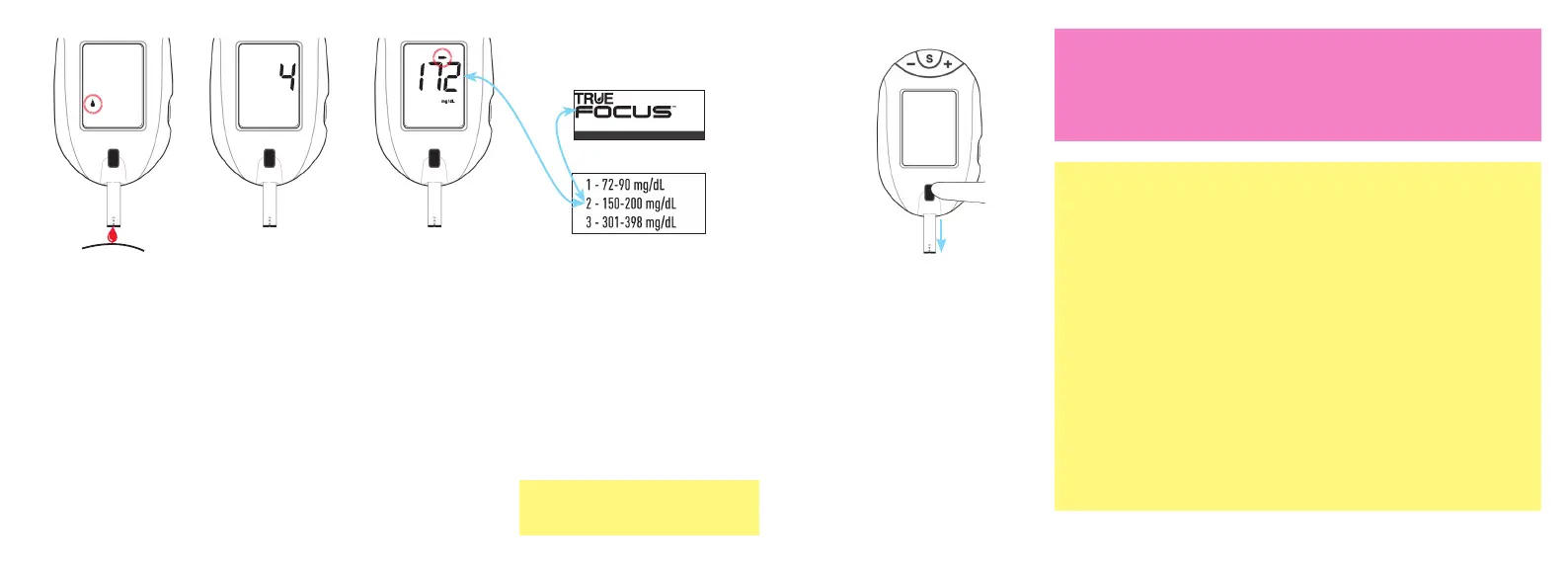
8. With test strip
still in meter,
touch Sample
Tip to top of
drop. Allow
drop to be
drawn into test
strip.
9. Remove test
strip from drop
when Display
begins to count
down from 4.
Meter is testing.
10. After testing is
finished, result
appears in the
meter Display
with the Control
Symbol.
11. Compare result to Control
Test Range printed on
the test strip vial label for
the control solution you
are testing. If result is in
range, the blood glucose
monitoring system can be
used for testing blood.
If result is not within range,
perform Control Test again.
Test Strip Vial Label
Control Solution
Bottle Label
Control Solution/Solución de Control
Level/Nivel 2 3 ml
U5TVH02 Rev. 40 - U5TVH72
Manufactured for/Fabricado para:
Fort Lauderdale FL 33309 USA
For in vitro diagnostic use only.
Store in a dry place at room temperature between
59-86F (15-30C). DO NOT REFRIGERATE
OR FREEZE.
LOT
8LOA18
EXP
2018-10-31
12. After result is shown,
hold meter with test
strip pointing into an
appropriate waste
container. Press Strip
Release Button to release
and discard the test strip.
Meter turns off. Recap
control solution bottle
tightly.
Caution!
• If Control Test result is still outside range after a second Control Test, do
not use the blood glucose monitoring system for testing blood. Call for
assistance (see cover for phone number).
~ If test strip has been out of the vial too long before testing, an error
message appears upon insertion of the test strip into the meter.
Discard old test strip and retest using a new test strip.
~ If test strip is removed before testing is finished, an error message
appears. Discard old test strip and retest using a new test strip.
~ Do not put control solution drop on top of test strip.
~ If meter does not begin testing soon after drawing up sample,
discard test strip. Repeat with a new test strip. If problem persists,
see Troubleshooting.
~ Removing the test strip before result is displayed cancels the test.
An error message appears and the result is not stored in Memory.
Retest with a new test strip and do not remove before result is
displayed.
(Examples only and do not represent
actual Control Test ranges)
Tfocus_OB_GutsENG_UE4TVH03r43.indd 20-21 4/19/18 07:42


 To Next Page