8 9
Troubleshooting ........................................................................................................................................30
Display Messages ......................................................................................................................................32
Out of Range Warning Messages ...............................................................................................................36
TRUE FOCUS Blood Glucose Monitoring System and Laboratory Testing ....................................................37
Meter Set Up ..............................................................................................................................................38
Meter Memory ...........................................................................................................................................40
View Averages (1-, 7-, 14-, and 30-day) ...................................................................................................40
View Results .............................................................................................................................................41
Blood Glucose Monitoring System Care .................................................................................................43
Test Strip Care ...........................................................................................................................................43
Control Solution Care ................................................................................................................................43
Meter Care, Cleaning and Disinfecting ......................................................................................................44
Lancing Device Care, Cleaning and Disinfecting ........................................................................................ 48
Changing Battery ......................................................................................................................................51
Blood Glucose Monitoring System Specifications ..........................................................................................53
References ....................................................................................................................................................54
Blood Glucose Monitoring System Components ............................................................................................55
Notes .............................................................................................................................................................56
KNOW YOUR BLOOD GLUCOSE MONITORING SYSTEM
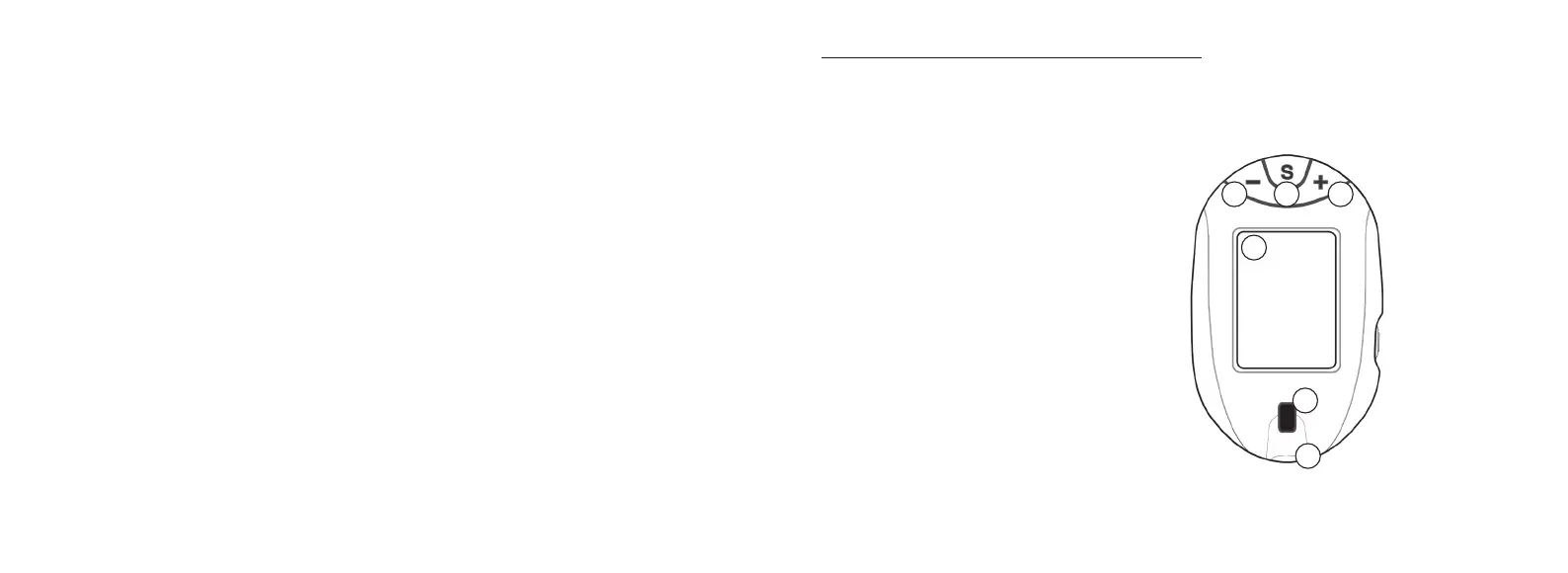
Meter
① “ - ” Button - Decreases numbers in Meter
Set Up; marks/unmarks test result; scrolls
Memory results backwards by date/time.
② “ S ” Button - Turns meter on to see
Memory results, average values, and to go
to Meter Set Up; sets options in Meter Set
Up.
③ “ + ” Button - Increases numbers in Meter
Set Up; marks/unmarks test result; scrolls
Memory results forward by date/time.
④ Display Screen - Shows results, messages,
user prompts, information.
⑤ Test Port - Insert TRUE FOCUS Test Strip
here, contact blocks facing up.
⑥ Strip Release Button - Push to release
test strip after testing for disposal.
6
5
4
Front of Meter
1
2
3
Tfocus_OB_GutsENG_UE4TVH03r43.indd 8-9 4/19/18 07:41


 To Next Page