40 41
METER MEMORY
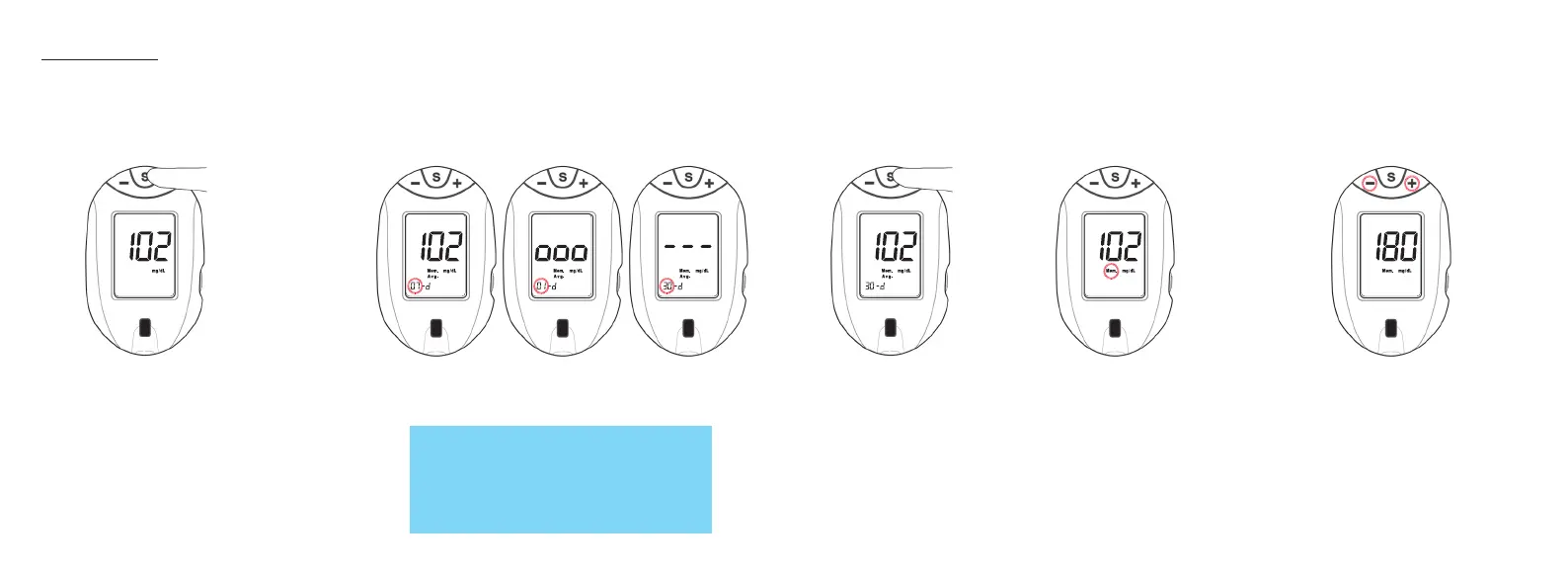
View Averages (1-, 7-, 14-, 30-day)
Averages allows you to view the average of all blood glucose results within a 1-, 7-, 14-, or 30 day period.
1. With meter off, press
and release "S" Button.
The full Display is shown
followed by the last test
result.
2. Press "S" Button to scroll through the
1-, 7-, 14-, and 30-day Averages.
View Memory
Memory stores 400 results which are displayed from most recent to oldest. When Memory is full, the oldest
result is replaced with the newest result.
1. After meter
displays the
30-day Average,
press and
release "S"
Button again.
2. The most recent result is
shown with the Memory
Symbol.
If there are less than 2 results in Memory, the
Display shows "000". If there are no average
values, three dashes are displayed for 7-,
14-, and 30-day Averages.
3. Press "-" Button to scroll backwards
through results or "+" to scroll
forwards through results.
Tfocus_OB_GutsENG_UE4TVH03r43.indd 40-41 4/19/18 07:42


 To Next Page