38 39
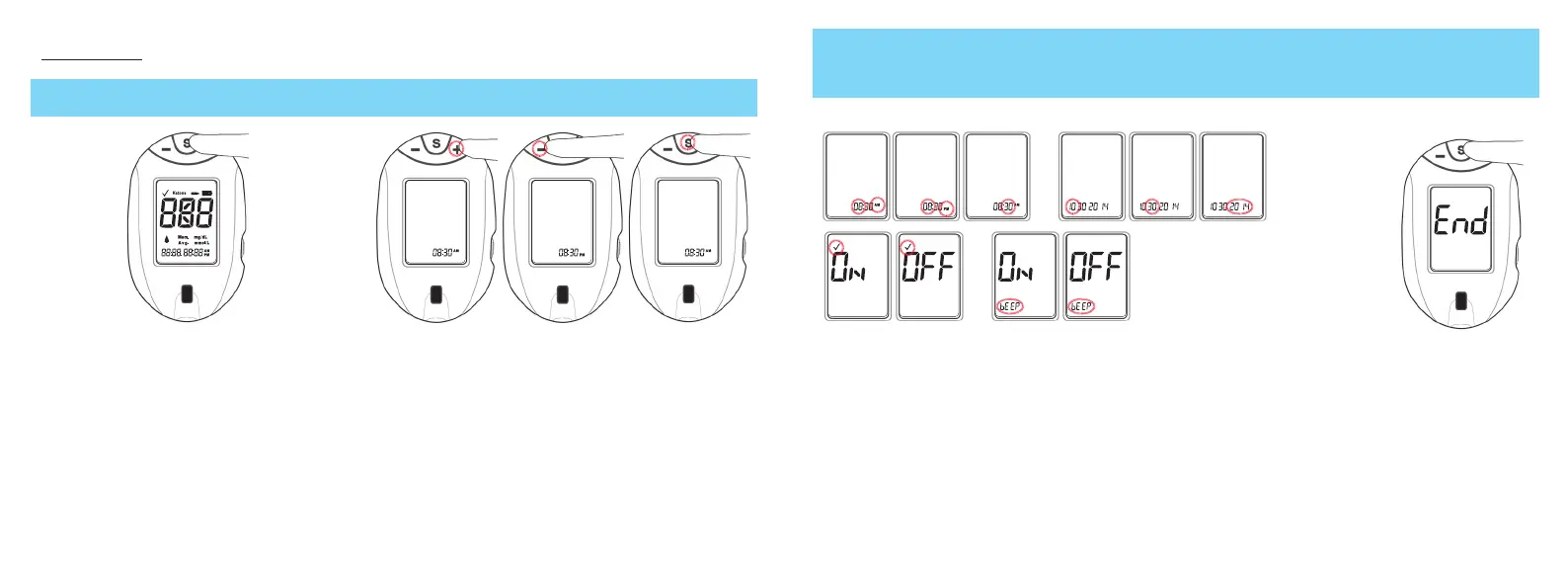
METER SET UP
~ If meter turns off at any time during Set Up, go back to Step #1 and begin again.
1. Start with the meter off. Press and
hold the "S" Button until the full
Display appears and begins to blink.
Release "S" Button.
2. Meter is in Set Up option for time. Press "+" or "-"
to change. Press "S" to set and move to the next Set
Up option.
3. Press "+" or "-" Button to change and
"S" Button to set and move to next
option.
4. When "END"
appears in the
Display, there
are no more Set
Up options.
After the time, date, marker and beep is set up, pressing the "S" Button allows you to scroll through the set items
again. Wait 30 seconds or press and hold the "S" Button to turn the meter off.
Set Up options are (in order):
- hour with AM or PM
- minute
- year
- month
- day
- Beep (on/off)
- Test Mark (on/off).
Tfocus_OB_GutsENG_UE4TVH03r43.indd 38-39 4/19/18 07:42


 To Next Page