10 11
Meter
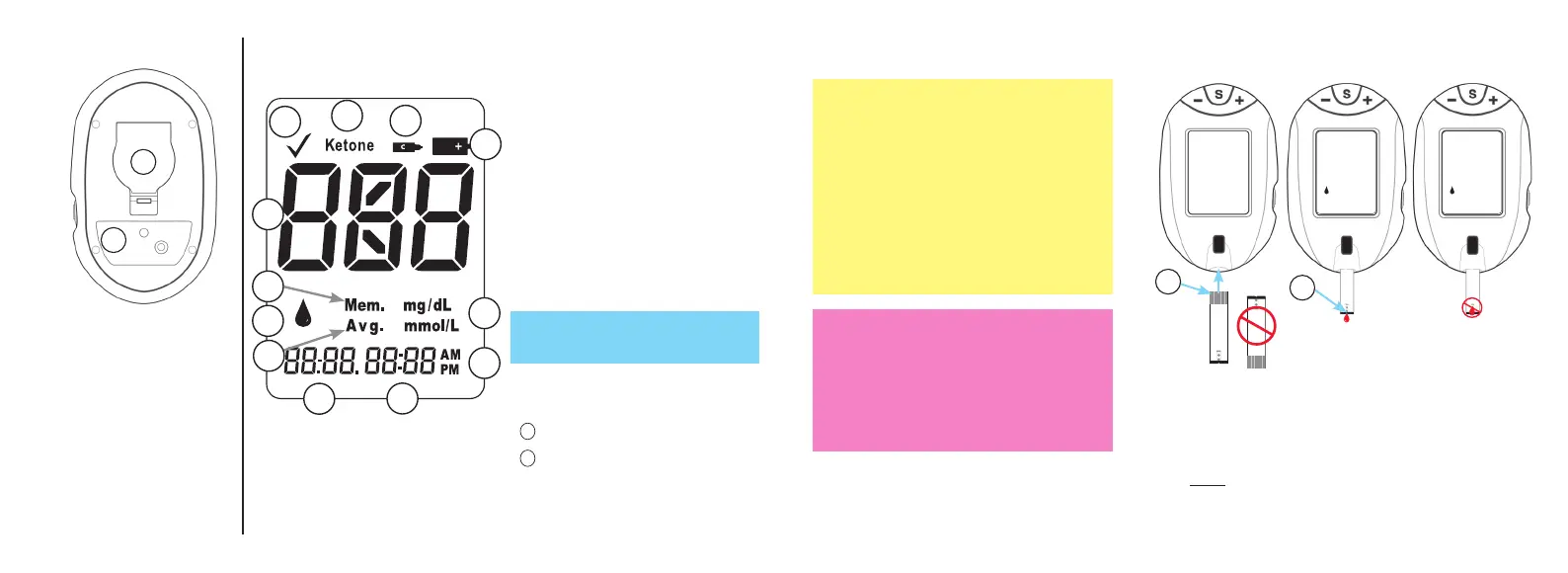
Full Display Screen
3
6
7
5
8
9
10
11
4
2
1
12
① Test Result
② Memory Result
③ Drop Symbol
④ Average Result
⑤ Date
⑥ Time
⑦ AM/PM
⑧ Units of Measure
~ Factory set to mg/dL,
cannot be changed by user.)
⑨ Low Battery Symbol
⑩ Control Symbol
Ketone Symbol
Marked Test Symbol
12
11
Test Strip
Insert test strip into meter before touching
Sample Tip to top of blood or control solution
drop. Allow drop to be drawn into the test
strip until dashes appear in the Display.
~ Do not apply sample to top of test strip.
~ Do not smear or scrape drop with test
strip.
Caution!
• DO NOT insert Sample Tip into meter.
This may damage meter.
• Do not apply more sample to the test
strip after testing begins.
1. Contact End - Insert test strip into meter with
contacts (blocks) facing up.
2. Sample Tip - Touch Tip to top of drop of sample
after Drop Symbol appears in the meter Display.
1
2
1
2
Back of Meter
① Battery Door - Use
one non-rechargeable
3V lithium battery
(#CR2032), positive
(“+”) side up (see
Changing Battery).
② Meter Label - Contains
serial number of meter.
Tfocus_OB_GutsENG_UE4TVH03r43.indd 10-11 4/19/18 07:41


 To Next Page