28 29
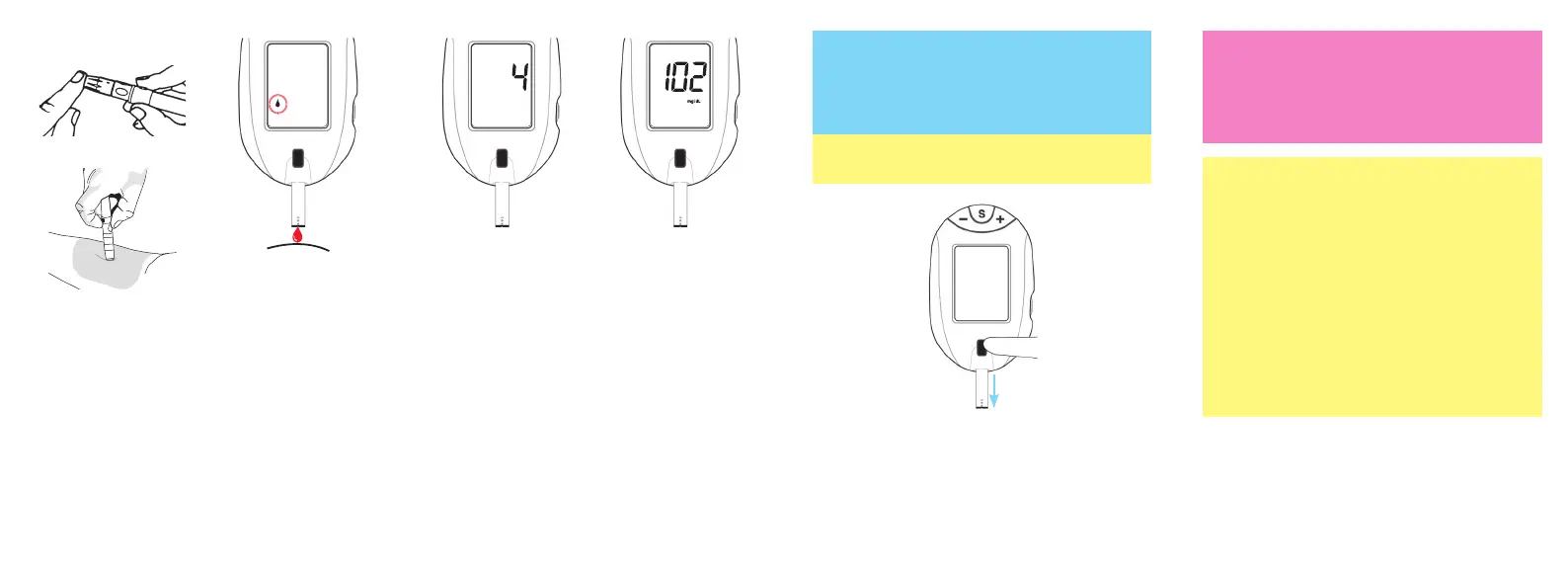
8. With test strip
in Meter, touch
Sample Tip to
top of blood
drop and allow
blood to be
drawn into the
test strip.
9. Remove test
strip from drop
when meter
begins to count
down from 4.
Meter is testing.
11. Hold meter with test strip pointing into an
appropriate waste container. Press Strip
Release Button to discard test strip. Meter
turns off. Result is stored in the Memory.
10. After testing is
finished, result
appears in the
meter Display.
Record result in
log book.
~ If you wish to mark the result, press the "+"
Button before the Strip Release Button is
pressed or the meter turns off (30 seconds). To
remove the mark, press the "-" Button.
~ Marked test results are not included in
Averages.
Caution!
• Used test strips and lancets are considered
biohazardous. Dispose used test strips and
lancets in an appropriate waste container.
~ If test strip is removed before testing is
finished, an error message appears. Discard
old test strip and retest using a new test strip.
~ Do not place blood drop on top of test strip.
~ Removing the test strip before result is
displayed cancels the test. An error message
appears. Result is not stored in Memory.
Retest with a new test strip. Do not remove
before result is displayed.
7. Lance fingertip
(or forearm).
Allow blood
drop to form
(see Obtaining a
Blood Sample).
Fingertip Testing
Forearm Testing
Tfocus_OB_GutsENG_UE4TVH03r43.indd 28-29 4/19/18 07:42


 To Next Page