32 33
If error message still appears, any other error message appears, or troubleshooting does not solve
the problem, call for assistance toll free: 1-800-803-6025 or local: 1-954-677-4599.
Messages
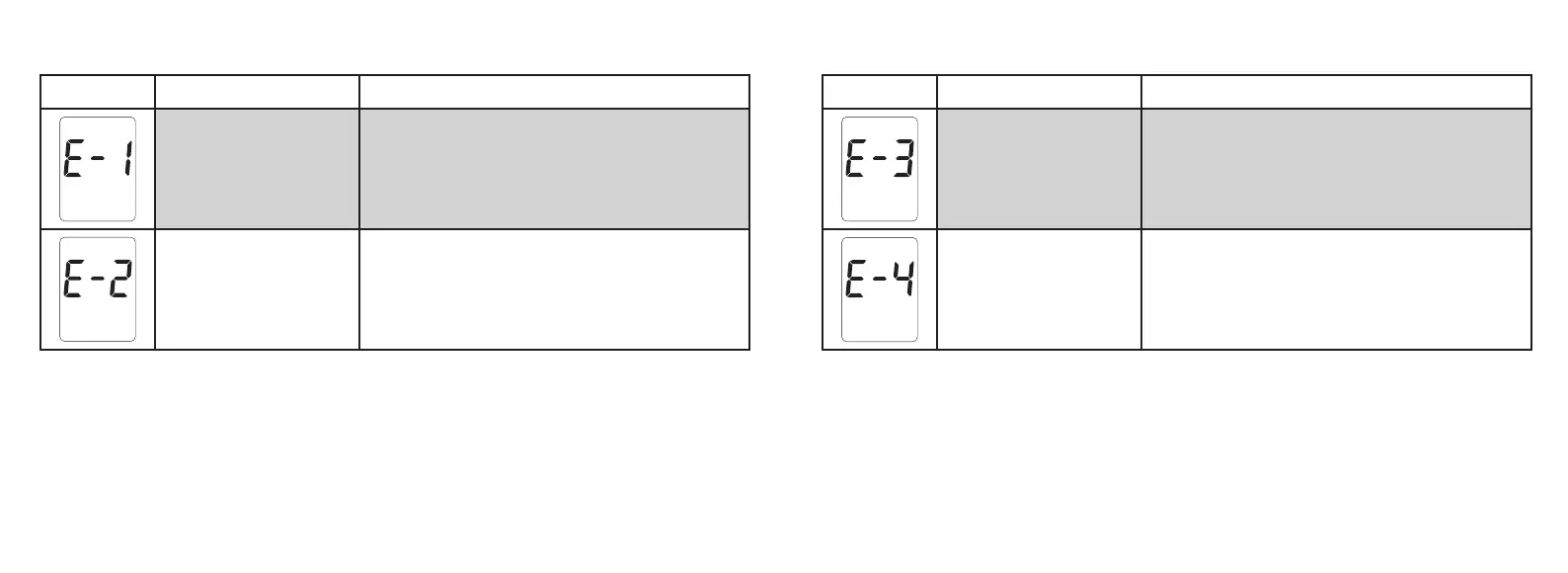
Display Reason Action
Operating
Temperature
Error
Meter is outside testing temperature range.
Move meter and test strips to an area between
57°F and 104°F. Wait 10 minutes before testing.
Sample
Error
Incorrect application of blood or control solution
to the test strip or test strip may be damaged.
Discard test strip. Repeat with new test strip.
Display Reason Action
Used/Damaged
Test Strip
Error
Discard old test strip.
Repeat test with a new test strip.
System
Hardware or
Software
Error
Call for assistance.
If error message still appears, any other error message appears, or troubleshooting does not solve
the problem, call for assistance toll free: 1-800-803-6025 or local: 1-954-677-4599.
Tfocus_OB_GutsENG_UE4TVH03r43.indd 32-33 4/19/18 07:42


 To Next Page