10 11
Pairing
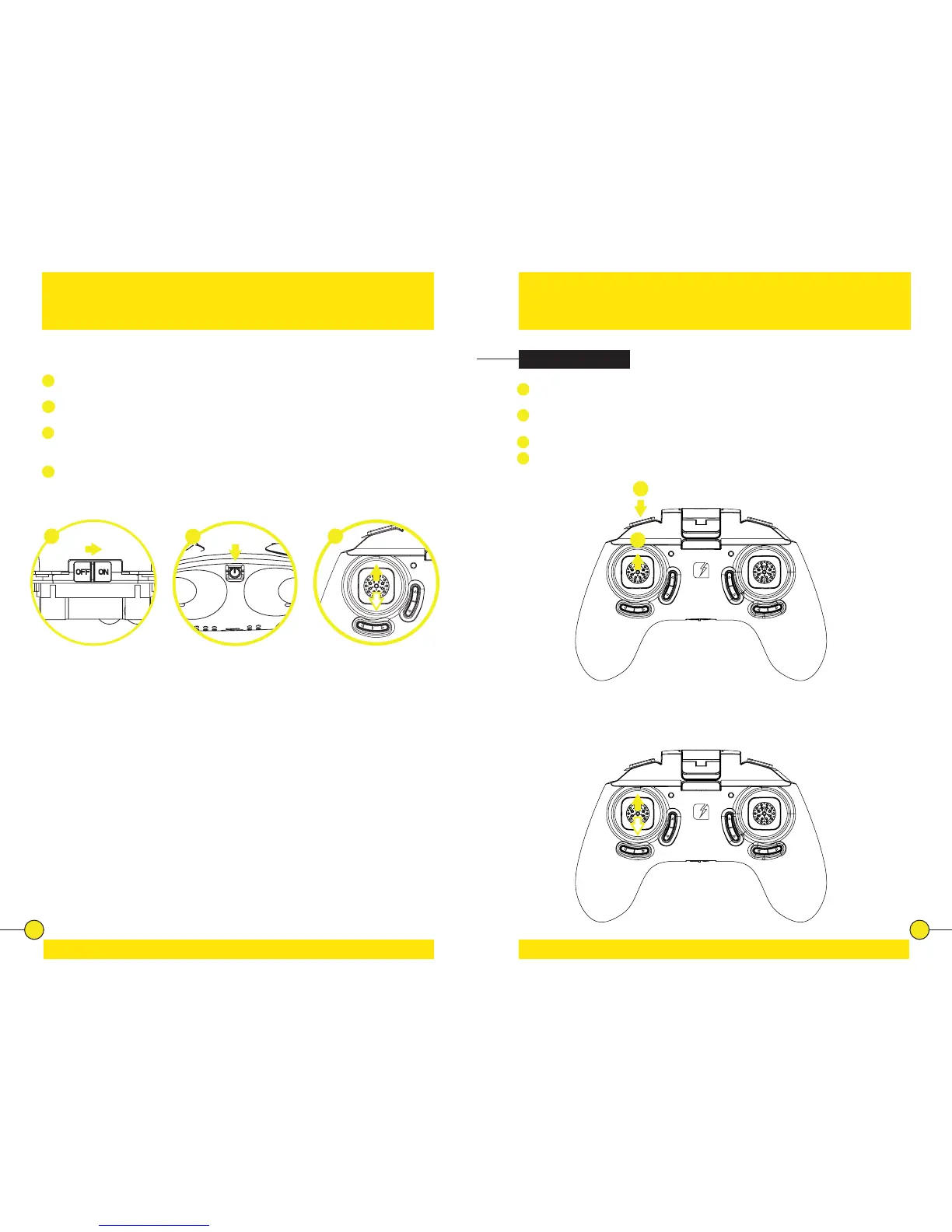
Place the drone on a at and level surface.
1
Slide the Power Switch to turn on the Controller. The Red Indicator Light on
the Controller starts ashing slowly.
2
Press the Power Switch to switch the drone ON. The LED lights of the drone
starts ashing fast.
3
Push the Throle/Rotate sck to the full up posion, then to the full down
posion. The Red Indicator Light on the controller turns o and the LED
lights on the drone turn solid.
4
The drone is ready to y.
Pilong
1
Pushing the ULES Buon will cause the rotors of the drone to spin without
taking o.
2
To take o the drone push the Throle/Rotate buon. The drone will hover
at approximately 1.5 meter.
When ying, push the ULES Buon again to land the drone.
In case of an emergency, press and hold the ULES Buon for 3 seconds. This
will stop the rotors and cause the drone to fall out of the sky.
Take-O & Land
Throle Control
To y higher, push the Throle/Rotate sck cauously forward. To y lower, push
the Throle/Rotate sck cauously backward.
3
4
31
2
1
2


 To Next Page