16
OPTIONAL STEP 2—INSTALL 220V POWER INLET ASSEMBLY
TC0441BK
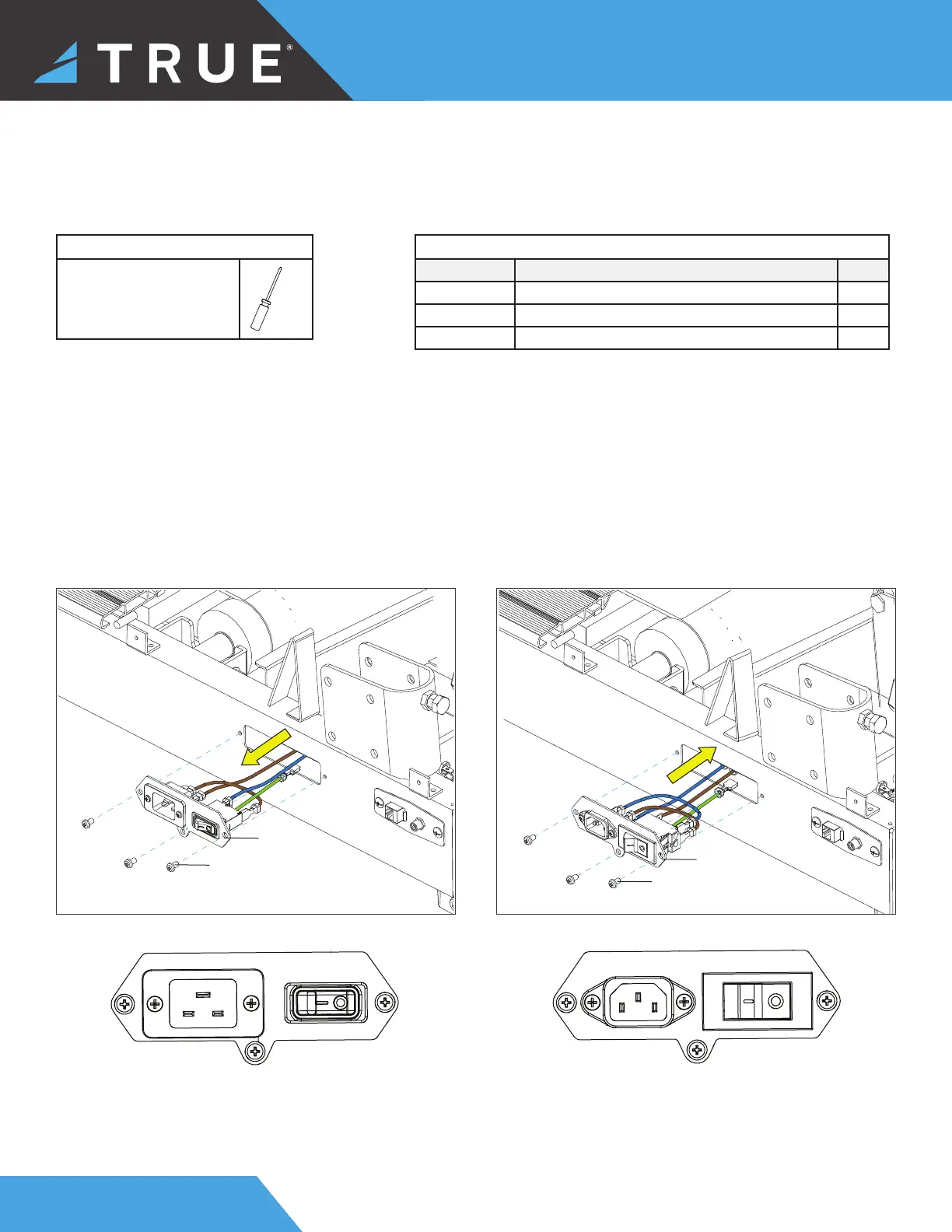
220V Power Inlet Assembly110V Power Inlet Assembly
Tools Used in this Step
#2 Phillips Screwdriver
NOTE: This step is only for units that will be used on a circuit having a nominal rating of more than 110-V.
Parts Used in this Step
PART DESCRIPTION QTY
TC0033 BOLT M5XP0.8X8 3
TC0441BK POWER INLET ASSEMBLY 110V 1
00603800BK POWER INLET ASSEMBLY 220V 1
1. Using a #2 Phillips screwdriver, remove the 110V power inlet assembly.
2. Disconnect the wires from the 110V power inlet assembly and transfer them to the 220V power inlet assembly.
IMPORTANT! The 220V panel has a green, blue, and brown dot. The dot color corresponds to the cable color.
• Move the green cable to the green dot.
• Move the blue cable to the blue dot.
• Move the brown cable to the brown dot.
3. Using a #2 Phillips screwdriver, secure the 220V power inlet assembly to the frame.
TC0033
00603800BK
TC0033



 To Next Page