11
Callers Code - The Callers Code is by default the last two
digits of the serial number on the barcode label on the
underside of the trueCall unit. You can change this to
something more memorable (up to 4 digits long) using the
handset menu (page 14), or the Internet Control Panel (page
19).
Managing the Trusted Caller and Zap lists - It’s easy to put
people onto the Trusted Caller list or the Zap list using either
the handset menu (page 14), or the Internet Control Panel
(page 19).
Voicemail - If you are using trueCall Secure we recommend
that you don’t use the network 1571 voicemail service. You
can use an answering machine built into your phone, or
trueCall Secure has its own built in voicemail system that you
can turn on at the Internet Control Panel (page 19).
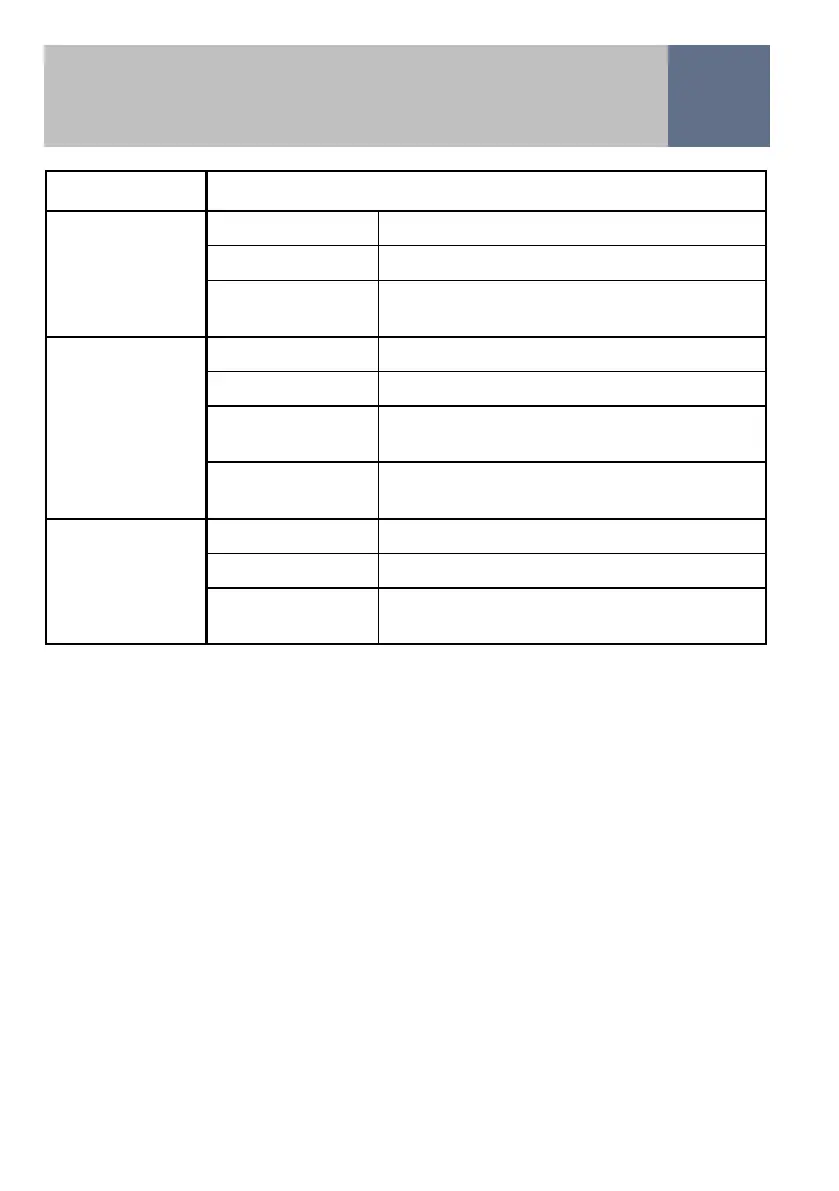
Managing incoming calls
Profile Call handling
Filter Trusted callers Ring the phone
Zap list callers Block the call with Zap announcement
Anyone else Ask the caller to press the Shield
Breakthrough Number
Filter Trusted callers Ring the phone
(International)
Zap list callers Block the call with Zap announcement
International
callers
Ask the caller to ring the alternative
number (with Callers Code override)
Anyone else Ask the caller to press Shield
Breakthrough Number
Trusted Callers Trusted callers Ring the phone
Only
Zap list callers Block the call with Zap announcement
Anyone else Ask the caller to ring the alternative
number (with Callers Code override)


 To Next Page