V 07/07
24 • Start-up and operation OptiSelect manual powder gun
2.2 2.3
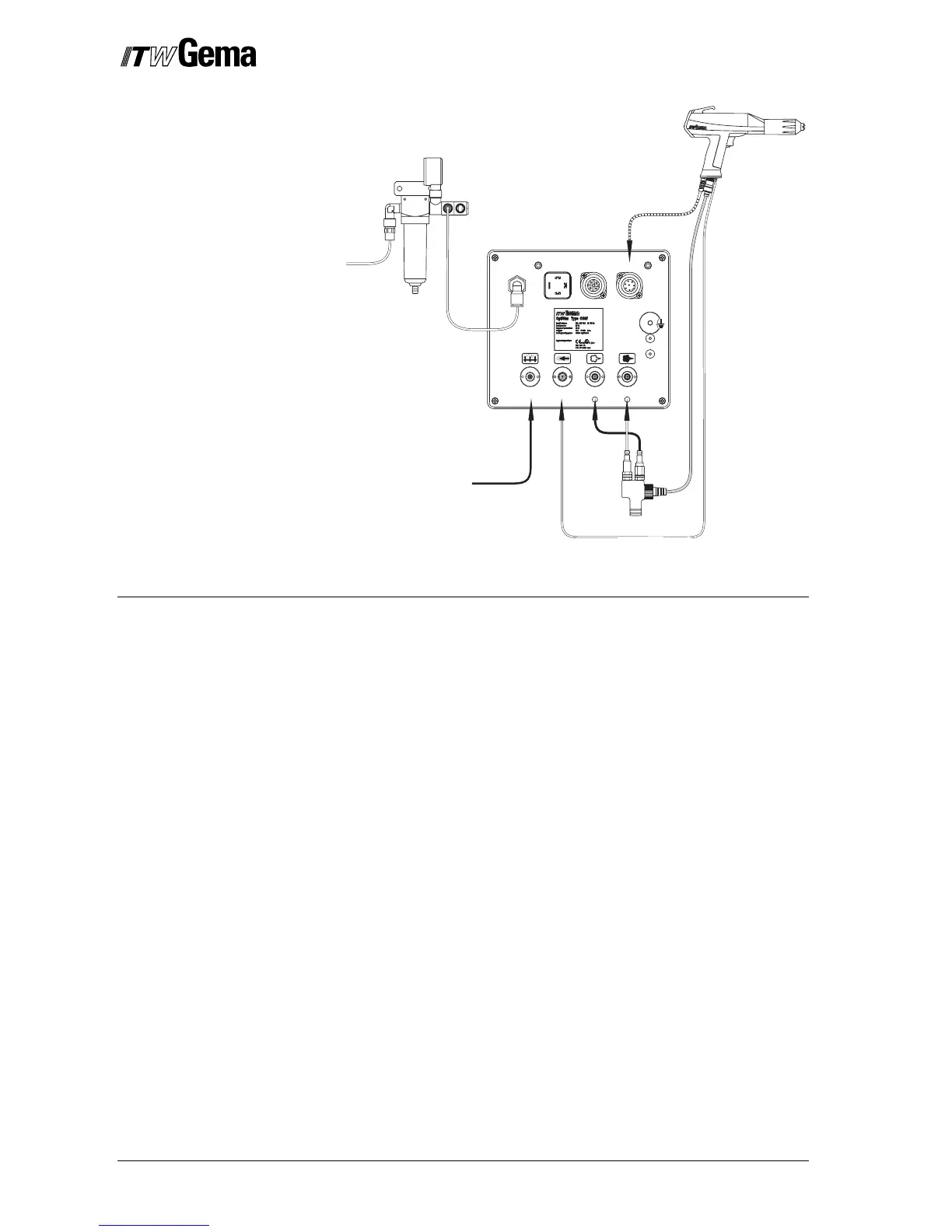
GunAuxPower INAir supply IN
2.1
6 - 10 bar
87 - 145 PSI
1.5 1.4 1.3 1.2
Connecting guide - overview
Function check
1. Turn on the gun control unit
2. Press the desired application key (Preset or Program Mode)
on the control unit (see gun control unit operating instruc-
tions)
3. Pick the gun up and point it at a grounded object, at a dis-
tance of approx. 20 cm
4. Press the powder gun trigger
- The display for current and high voltage on the control
unit shows the actual value. The high voltage is present
in the OptiSelect gun, and the LED illuminates
- The high voltage can be set with the corresponding keys
(See also the control unit operating instructions)
5. Select the powder output and total air volume
- The display indicates the powder output in % and total
air volume in m³/h
6. Press the corresponding key for the rinsing air on the control
unit (according to the nozzle used)
7. Check the remote control by pressing the + or - key on the
back of the powder gun, and the modified powder output
value is displayed on the control unit. By simultaneous press-
ing of the + and - key, the application modes can be changed
on the control unit
When all the checks are positive, the gun is ready for operation.
Filter unit
Injector
Gun
Fluidizing air


 To Next Page