12
REPLACE AND DISASSEMBLE THE PROPELLERS
The propellers might be damaged in case of a strong impact. You can replace the damaged propellers by
unscrewing the screw (as shown in the picture). Carefully press the new propeller down as far as it goes;
otherwise, in fact, it might detach during a flight and this will lead to you losing control over the drone.
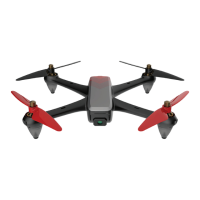
Make sure you replace the propellers in the correct position according to the picture below:
• Left front propeller shown with letter A
• Right front propeller shown with letter B
• Left back propeller shown with letter B
• Right back propeller shown with letter A
CONTROL THROUGH APP
Download the App “TWODOTS HARRIER” for iOS and Android from your store of reference.
Switch on the drone and connect it to the Wi-Fi network by selecting “TWODOTS HARRIER”.
Once you are connected, open the app to start take-off.
WARNING
To prevent incoming phone calls while using the drone – which might cause you to lose control over it –
activate the “airplane mode” on your smartphone before take-off and then activate the Wi-Fi (this procedure is
fundamental to connect the drone and the smartphone).
STORAGE
Store the drone in a dry place, away from any heat sources and direct sunlight. Even if you are not using the
drone, charge the batteries once a month to extend their lifetime.
WARRANTY
Please, keep the payment receipt as a proof of purchase so that you are entitled to warranty pursuant to the
law. The warranty is be structured as follows:
• 2 years’ warranty for the drone, except for the battery;
• 6 months’ warranty for the battery.
Warning – The warranty does not cover the following conditions:
• Malfunctioning caused by incorrect use
• Malfunctioning caused by unauthorized changes, by the disassembly of components or by reparations
completed by the user
• Damage or malfunctioning originating from incorrect storage
• No or non-compliant proof of purchase
• Damage caused by long flights in the rain or by plunging the device into the water


 To Next Page