http://www.tyan.com
37
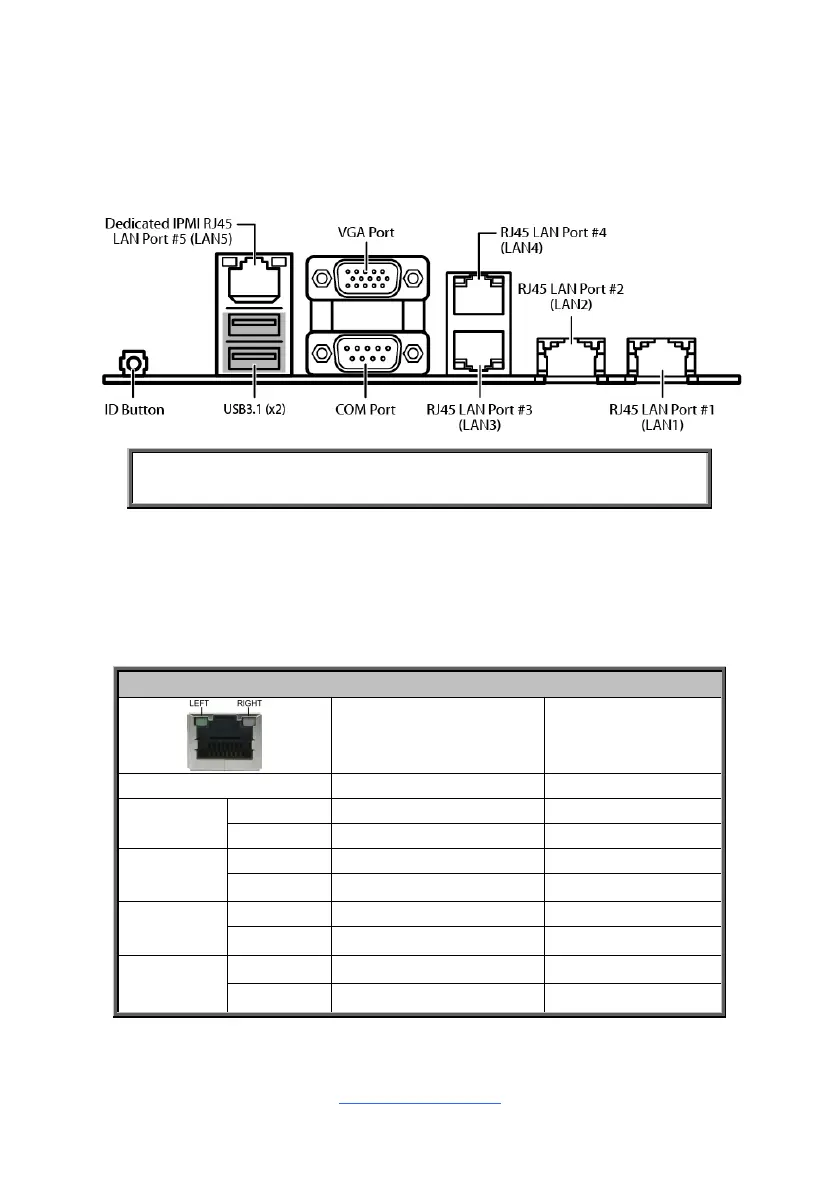
2.11 Connecting External Devices
Connecting external devices to the motherboard is an easy task. The motherboard
supports a number of different interfaces through connecting peripherals. See the
following diagrams for the details.
NOTE: Peripheral devices can be plugged straight into any of these
ports but software may be required to complete the installation.
Onboard LAN LED Color Definition
The five (5) onboard Ethernet ports have green and yellow LEDs to indicate LAN
status. The chart below illustrates the different LED states.
10Mbps/100Mbps/1Gbps/10Gbps LAN Link/Activity LED Scheme
Left LED Right LED
No Link Off Off
10Mbps
Link Green
Off
Active Blinking Green
Off
100Mbps
Link Green
Solid Green
Active Blinking Green
Solid Green
1Gbps
Link Green
Solid Yellow
Active Blinking Green
Solid Yellow
10Gbps
Link Green Solid Yellow
Active Blinking Green
Solid Yellow



 To Next Page