EasyManua.ls Logo

Tycon Power Systems TP3000WC - Page 36

Tycon Power Systems TP3000WC
73 pages
Print Icon
To Next Page IconTo Next Page
To Previous Page IconTo Previous Page
Loading...
8000060 Rev 3 19-Feb-19 TyconSystems.com
36
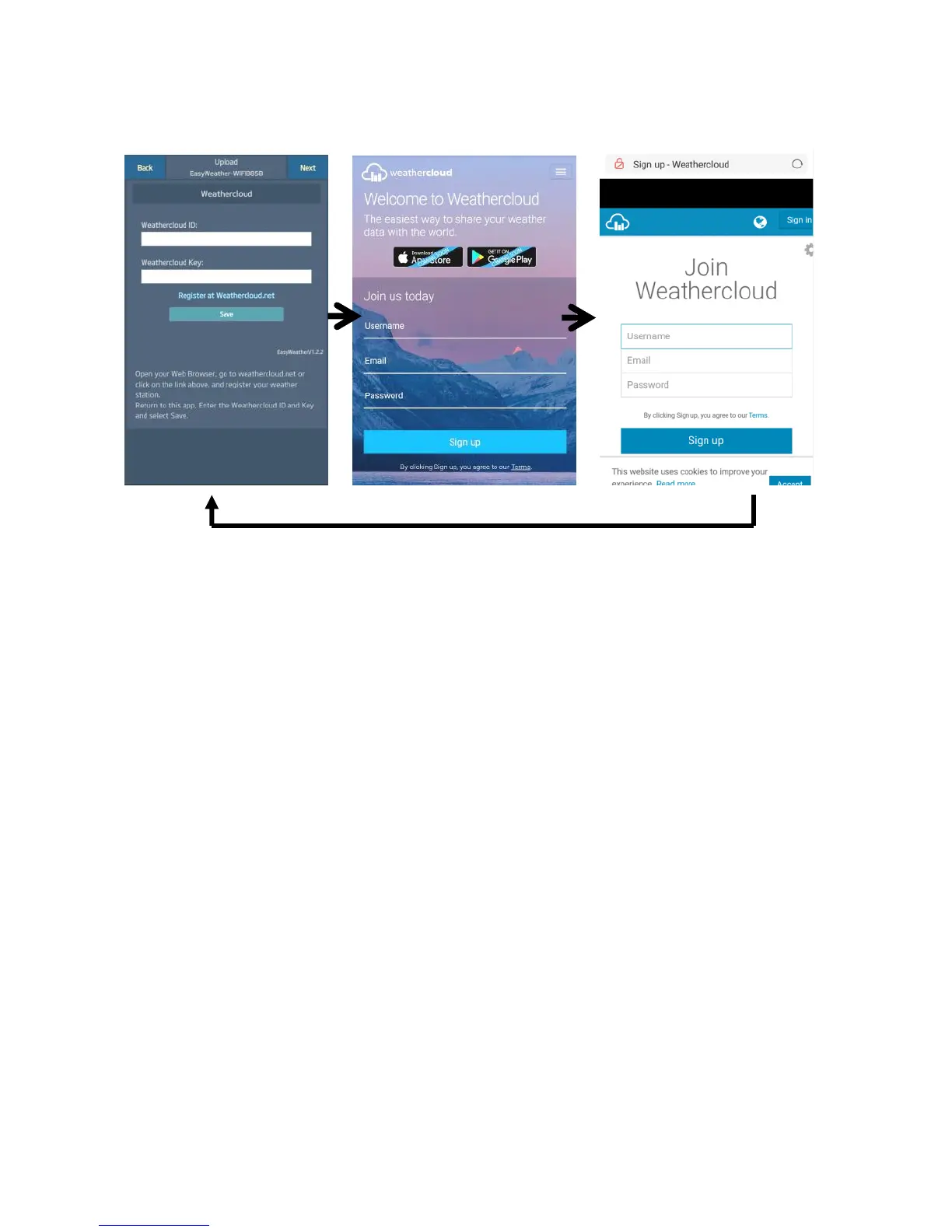
b. Upload your weather data to Weathercloud.net
1)
Upload your weather data to
Weathercloud.net
Input Weathercloud ID &
Weathercloud Key, press
Save then press Next.
If you don’t have
Weathercloud ID and Key,
press “Register at
Weathercloud.net”
2)
Register at
Weathercloud.net
Visit
weathercloud.net and
enter a Username,
Email and Password
to sign up
Respond to the
validation email from
Weathercloud (it may
take a few minutes)
3)
You will then be
prompted to add a
device/ Select “Create
device” and enter your
station’s information.
Select Fine Offset as
the manufacturer and
WH Series as the
Model. Select WS Tool
as the Link Type. Fill in
other information as
needed
After registering your
station, take note of the
Weathercloud ID” and
“Key” presented to you.
Enter these values in
the mobile application
and press Save