DocNo.FM0411issueJPage26
24.ZONINGSET‐UP
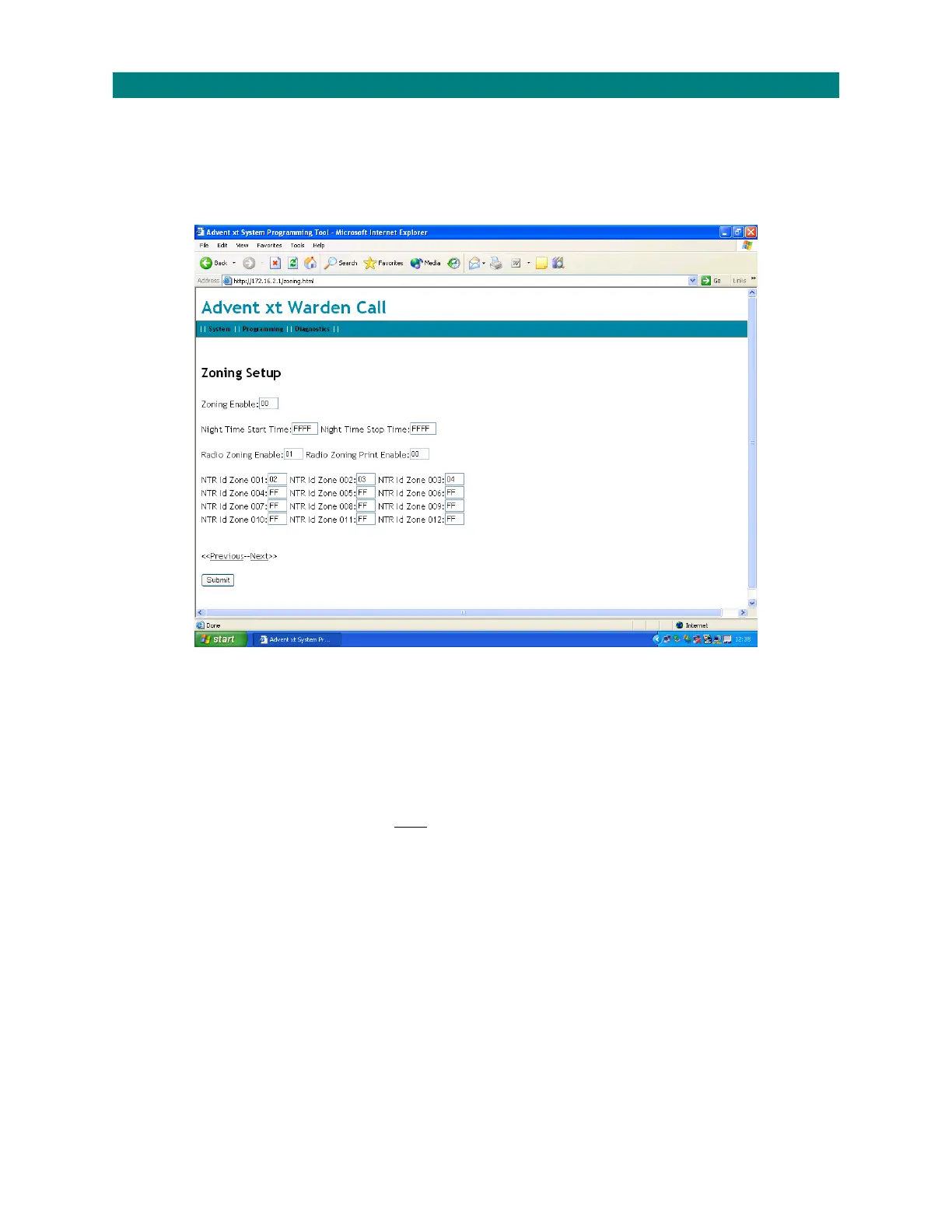
FromtheProgrammingmenu,select“ZoningSet‐up”toenablezonedcallingandzonednetworkreceivers;
Zonedcallingallowseachintercomtocalldifferentextensionsduringtheday/night.ZonedcallingisonlypossiblewithaPanasonicKX‐
TDA30PBX.FordetailsonPanasonicprogrammingpleasecontactTynetec’sCustomerSupportDept.
ZonedNetworkReceivers(NTR’s)allowtheAdventxtsystemtoidentifytheareaofthebuildingwherearadiopendanthasbeen
activated.Amaximumof12zonedNTR’scanbefittedpersite.
Enterthefollowing;
ZoningEnable:00=zonedcallingdisabled,01=zonedcallingenabled.
NightTimeStartTime:FFFFtodisable.Enternighttimestarttimeusing24hourclockeg.2200(10PM).
NightTimeStopTime:FFFFtodisable.Enternighttimestoptimeusing24hourclockeg.0600(6AM).
RadioZoningEnable:00=zonedNTR’sdisabled,01=zonedNTR’senabled.
RadioZoningPrintEnable:NoFunction(printingisenabled/disabledusingtelephonecode70 04)
NTRIdZone001‐NTRIdZone012:EntertheID’sofzonedNTR’sonly*
*Note;standardNTR’sandzonedNTR’smustbeset‐upwithuniqueID’sstartingfrom01andrunningsequentiallytoamaxof16.
Amaxof12zonedNTRID’sareenteredhereandthetotalnumberofNTR’sfittedonsitemustbeenteredontheGeneralSet‐up
page.
ThedifferencebetweenthetotalnumberofNTR’sandthenumberofzonedNTRID’senteredheredeterminesthenumberofstandard
NTR’sonthesystem.
Click“Submit”toenteranychanges.


 To Next Page