TYPHOON BLUETOOTH™ 56K WIRELESS MODEM KIT
Article Number: #20006
Version 2.0 All specifications and information are subject to changes without further notices
10
and use as if they were actual physical ports. Each Bluetooth™ service that this computer is capable of providing can
be started automatically when Bluetooth™ starts. Each service can be setup to require security measures before
allowing a remote Bluetooth™ device to connect. Bluetooth™ services require a Bluetooth™ application on the
remote device; services and applications usually have coinciding names; i.e., there is a Bluetooth™ Fax Service and a
Bluetooth™ Fax Application.
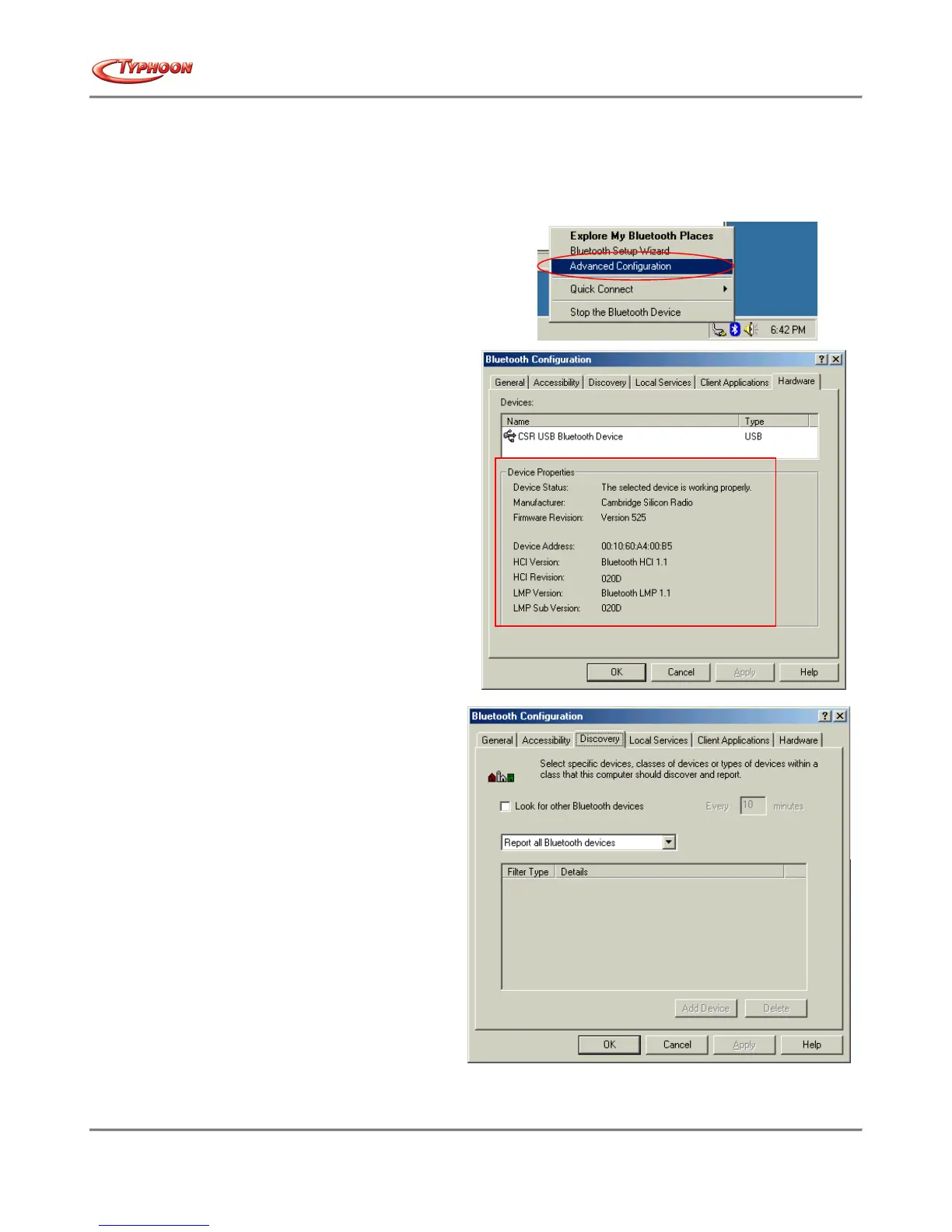
3vi. To confirm if the Bluetooth™ device installed is
properly.
From the Bluetooth™ menu, select "Advanced Configuration".
Under the "Hardware" tab, verify the Bluetooth™
address is present along with the driver and firmware
version info.
If such information is not present, please unplug then
plug in the USB adapter to initiate the driver.
For CF Bluetooth™ card, please reboot the system with
the CF Bluetooth™ card securely inserted in the
PCMCIA slot.
Repeat the installation steps for other USB adapters
or CF card on other PCs.
3vii. Periodic Search for Devices
Bluetooth™ can be configured to automatically
search for devices on a regular basis (Bluetooth™
Configuration Panel > Discovery tab). One of the
advantages of Bluetooth™ is the mobility that the
wireless connections allow. However, mobility
means that devices may move in or out of
connection range during the time between the
automatic updates performed by Bluetooth™. To
be certain that the displayed list of devices in the
neighborhood is current, or if automatic periodic
inquiry is not enabled, force an update of the
device list using the technique described in Search
for Devices, above.
- end of Bluetooth™ software installation section -



 To Next Page