TYPHOON BLUETOOTH™ 56K WIRELESS MODEM KIT
Article Number: #20006
Version 2.0 All specifications and information are subject to changes without further notices
31
Specifications
• Communication software compatible AT
command sets
• 3.3V low power consumption
• Bluetooth™ or RS-232 (D-SUB9) interface
Switch
• Provides LEDs for showing status information
Certification
• FCC Part 68 , 15 and CE
Mechanical
• Dimension :96 x64 x 22.1 mm (L x W x H)
Environment Operating Ranges
• Operation : 0 ~ 50, Humidity 10 ~ 90%
• Storage : -20 ~ 90, Humidity 10 ~ 90%
Power Consumption
• Operation : 175mA / 5V (Avg), 220mA/5V
(Max)
• Standby : 52mA/5V
LED Indication
• Power LED: Power ON/OFF
• Link LED: Bluetooth™ Link
• ACT LED: Bluetooth™ Active
• OH LED: Off-Hook
• TX LED: Data Transmit
• RX LED: Data Receive
Driver Support
• Windows® 98SE, Windows® ME,
Windows® 2000, and Windows® XP
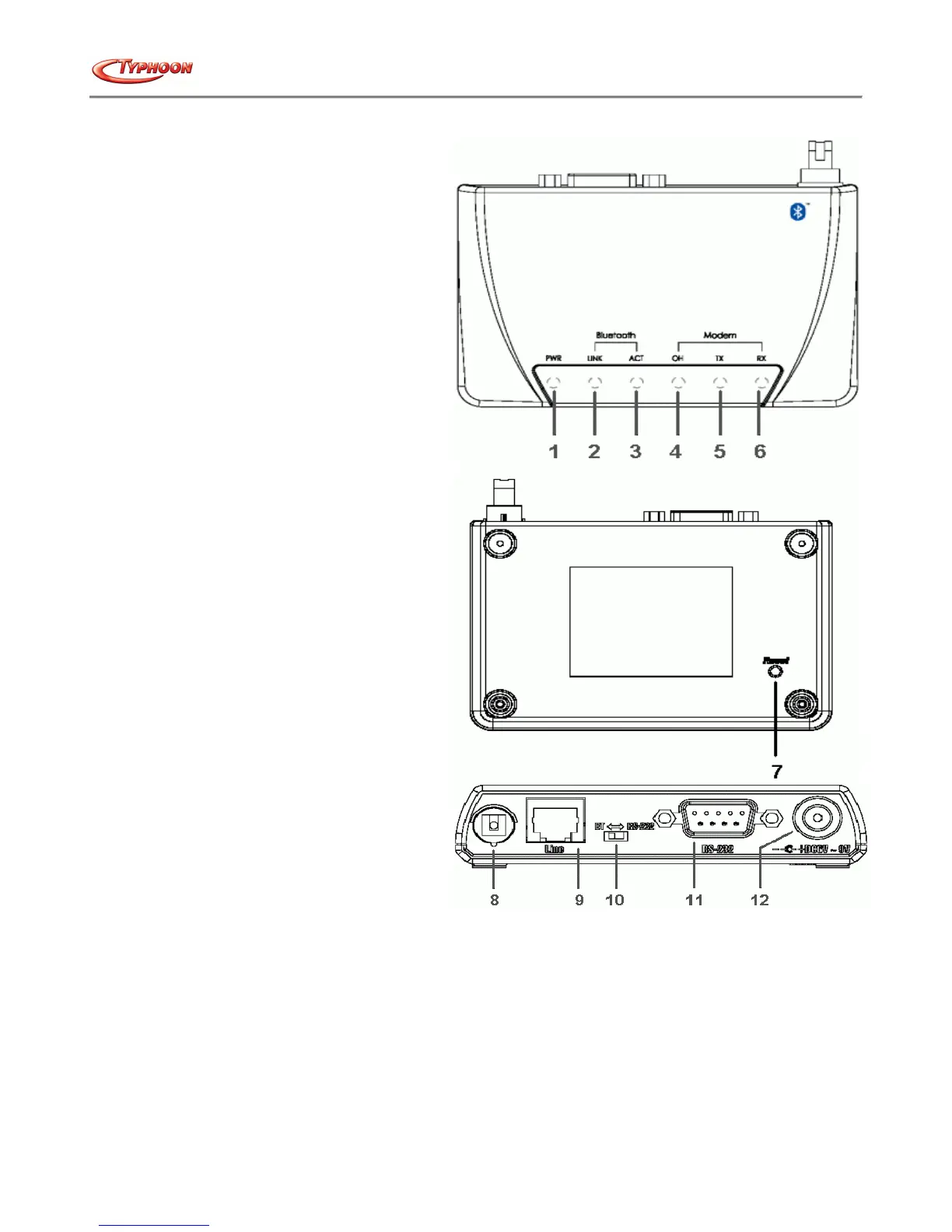
Product schematic
1.
Power LED indicator
: Lights steady when the Bluetooth™ Modem powers on.
2.
Link LED indicator
: Lights steady when a remote device links with the Bluetooth™ Modem.
3.
ACT LED indicator
: Blinks when data is being transferred via Bluetooth™ connection.
4.
OH LED indicator
: Lights when Bluetooth™ Modem is dialing or gets connected.
5.
TX LED indicator
: Blinks when Bluetooth™ Modem is transmitting data.
6.
RX LED indicator
: Blinks when Bluetooth™ Modem is receiving data.
7.
Reset Button
: To reset Bluetooth™ Modem.
8.
Antenna
: Bluetooth™ 2.4GHz antenna.
9.
RJ-11 Socket
: PSTN (Analog telephone) Line in for Modem.
10.
Switch
: To select generic or Bluetooth™ Modem mode.
11.
RS-232 connector
: Connects to PC's COM port when it is in generic mode.
12.
Power Jack
: DC power source input
- end -



 To Previous Page