TYPHOON BLUETOOTH™ 56K WIRELESS MODEM KIT
Article Number: #20006
Version 2.0 All specifications and information are subject to changes without further notices
9
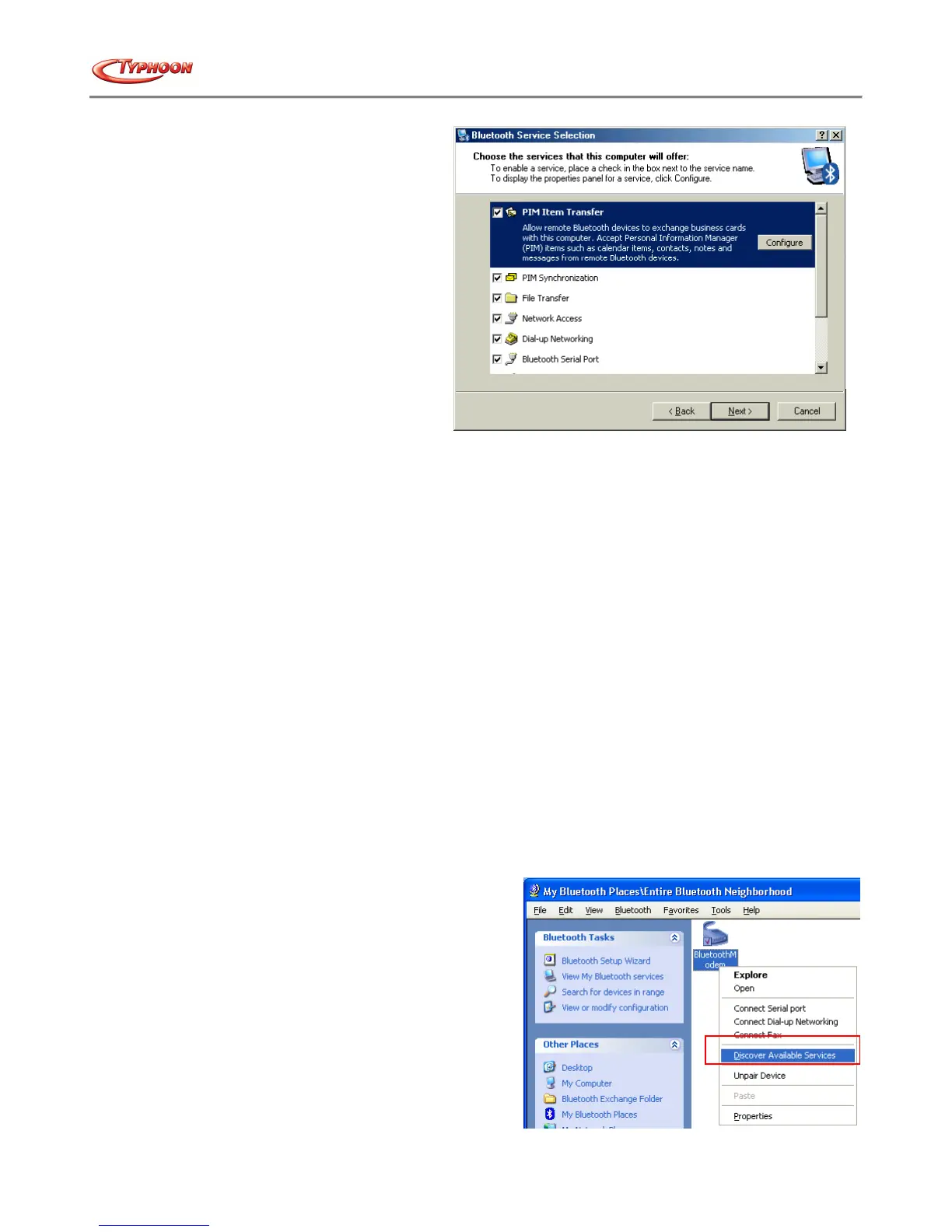
The services supported by Bluetooth™ are:
• Bluetooth™ Serial Port-a wireless connection between two devices. This connection can be used by applications
as though a physical serial cable connected the devices.
• Dial-up Networking-allows a device to use a modem that is physically attached to another Bluetooth™ device.
• Fax-allows a device to send a fax using a remote Bluetooth™ cell phone, modem, or computer.
• File Transfer-allows a device to perform file system operations on another Bluetooth™ device; browse, open,
copy, etc.
• Headset-allows a Bluetooth™ headset to be used as the audio input/output mechanism for another Bluetooth™
device, such as a computer or cell phone.
• PIM Item Transfer-allows two Bluetooth™ devices to exchange Personal Information Manager data such as
business cards, calendar items, email messages, and notes.
• PIM Synchronization-allows two Bluetooth™ devices to synchronize Personal Information Manager data.
• Network Access-allows a device to access a Local Area Network via a second Bluetooth™ device that is
physically connected to the network or allows a remote device to become part of an ad hoc network provided by
the Bluetooth™ server.
• Audio Gateway-allows the microphone/speakers on Bluetooth™ device (typically a computer) to be used as the
audio input/output mechanism for a remote Bluetooth™ device, such as a cell phone.
All Bluetooth™ servers do not necessarily provide all of these services. For example, network gateways may provide only
the Network Access service.
3v. FIND A SERVICE
The process of determining the services that a device provides is called Service Discovery.
You can follow the wizard's on-screen instructions to find a service to use or click "Skip" button to skip this step.
To initiate a Service Discovery, in the Folders pane of My
Bluetooth™ Places, right-click a device name and select
Discover Available Services from the shortcut menu.
Bluetooth™ services are those things that this computer can
do for remote Bluetooth™ devices. For example, if this
computer allows a remote Bluetooth™ device to send a fax
using a fax modem that is physically attached to this
computer, then this computer is providing the Bluetooth™ fax
service. Some services are hardware dependant; this computer
cannot provide the fax service unless it has a physical fax
modem, for example. Some Bluetooth™ services use virtual
hardware. The Bluetooth™ Serial Port service, for example,
does not use a physical port on this computer. Instead, it
creates virtual serial ports that Windows applications can see



 To Next Page