TYPHOON BLUETOOTH™ 56K WIRELESS MODEM KIT
Article Number: #20006
Version 2.0 All specifications and information are subject to changes without further notices
27
4. Troubleshooting
Q1: Why doesn't my Bluetooth™ device find any nearby Bluetooth™ devices?
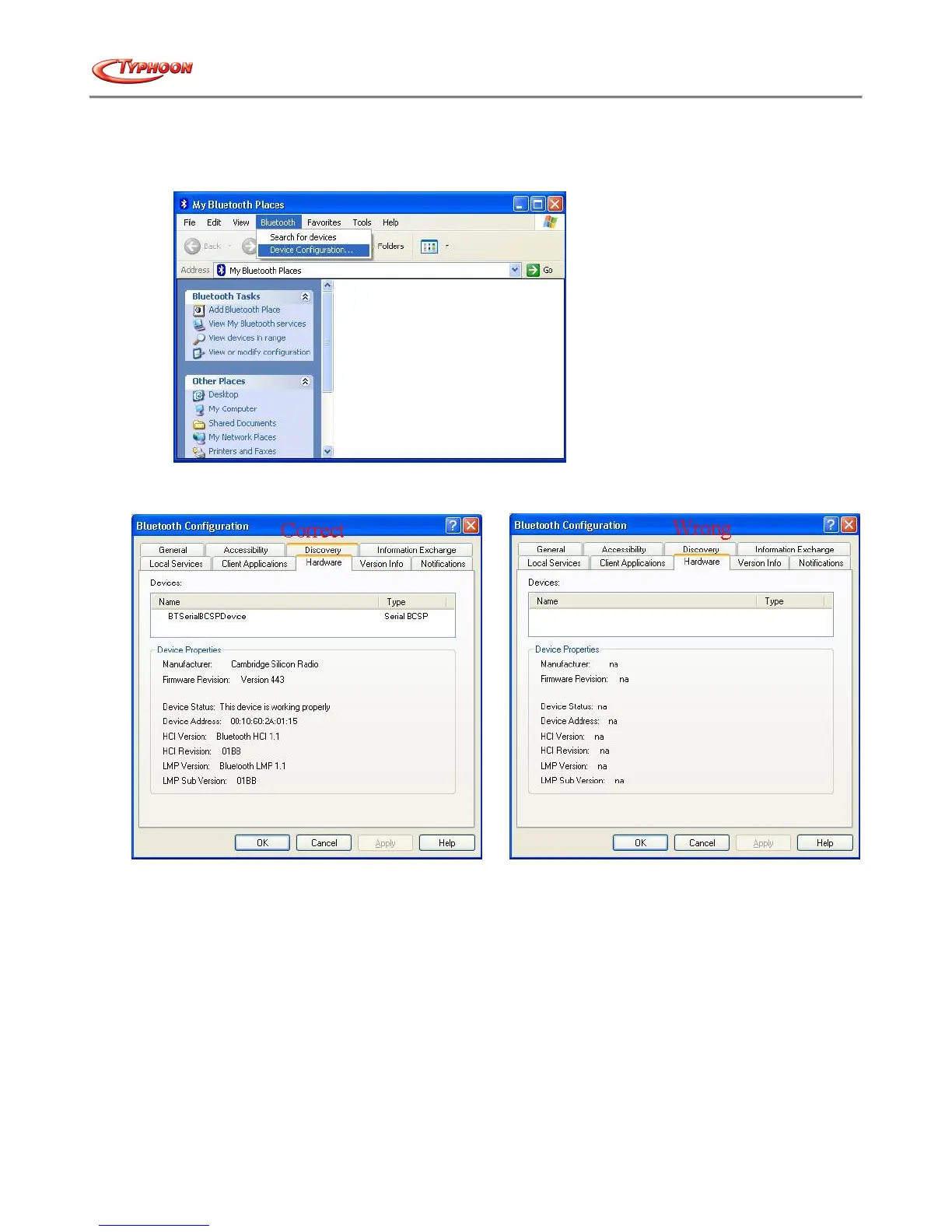
A1: 1) Please check that your Bluetooth™ device is enabled by opening the Bluetooth™ Configuration window.
2) If the Bluetooth™ device is enabled, you will see something of the following nature.
3) Otherwise, for USB Bluetooth™ adapter, please unplug then plug in the USB Bluetooth™ adapter to enable the
device.
For CF Bluetooth™ card, please reboot the system with the CF Bluetooth™ card securely inserted in the PCMCIA slot.
Q2.: Why doesn't my CF card work after I unplug and later plug-in again?
A2.: CF Bluetooth™ card is not a plug-n-play device.
Please reboot the system with the CF Bluetooth™ card securely inserted in the PCMCIA slot to enable the driver again.
Q3.: Why can't I transfer files from Nokia 7650 to my PC?
A3.: If you are having trouble sending files from Nokia 7650 to your notebook or PC, follow the steps below:
1) Execute "regedit" from the Run command (Start->Run)
2) Locate the key: HKEY_CURRENT_USER\Software\Widcomm\BTConfig\Services\0004, and locate the entry
"Accept other".



 To Next Page