TYPHOON BLUETOOTH™ 56K WIRELESS MODEM KIT
Article Number: #20006
Version 2.0 All specifications and information are subject to changes without further notices
6
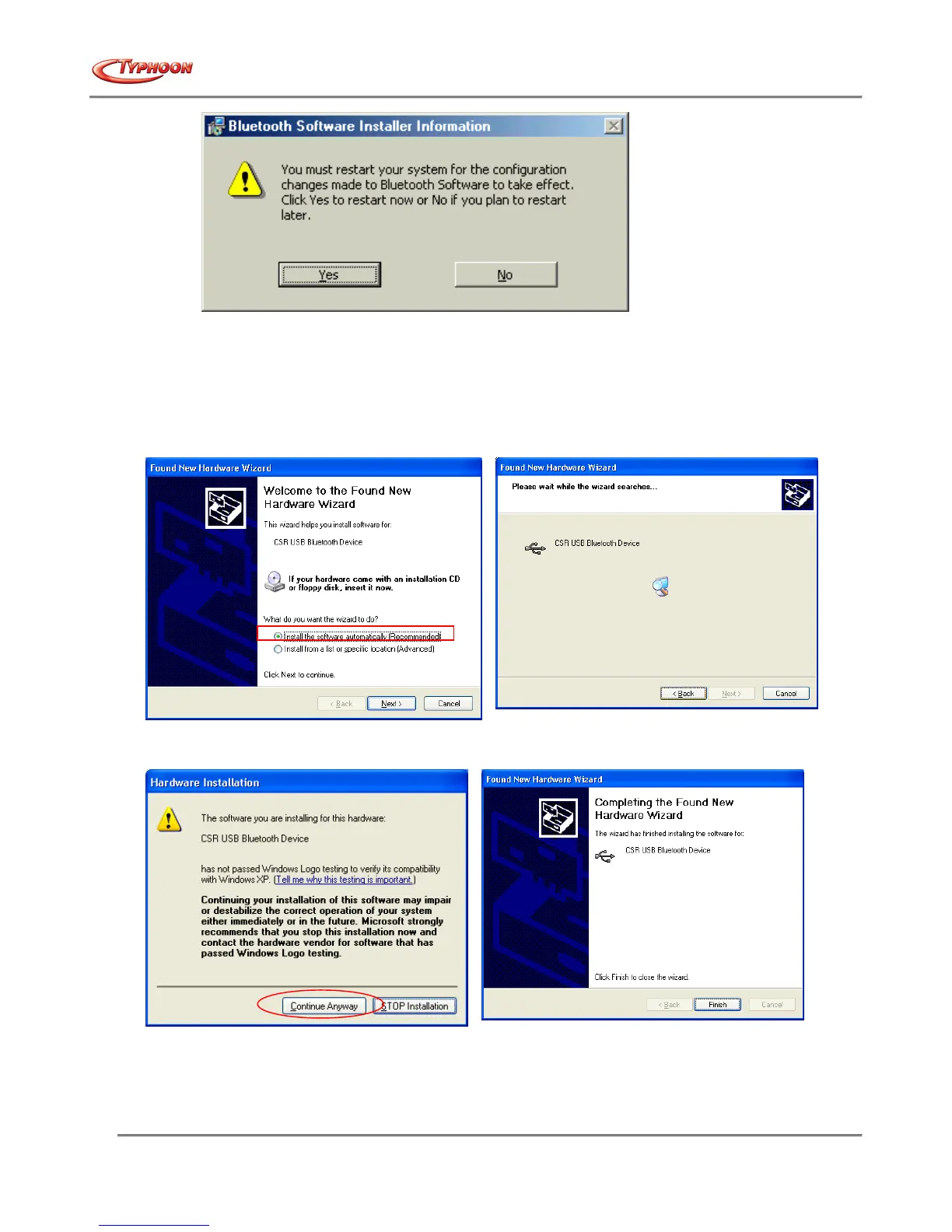
14. Click "Yes" to restart your computer. If you plan to restart later, click "No". Note: this step might be different
depending on the operating system. For Windows® XP users, please do restart without the need of the screen
above.
15. After rebooting the computer, insert your USB Bluetooth™ adapter into the USB port. If this is the first insertion,
Windows will install the driver automatically.
16. When prompted by the “Found New Hardware Wizard, select “Install the software automatically”, and click on
“Next” button to proceed. Windows will assign the installed drivers to the device.
17. Next, for Windows® XP users – the Windows Logo testing dialog screen will appear. Click on “Continue
Anyway” to begin the driver installation.
18. Click on “Finish” button to end the device driver installation process.
19. No need to reboot from this point, the Bluetooth™ device is now ready to be used.
- end of software installation -



 To Next Page