SonixTouch Service Manual 00.053.058, Revision D Chapter 4: Performance Testing
4-3
4.5 PULSED DOPPLER SOUND TEST
To Conduct a Pulsed Doppler Sound Test:
1. Ensure the system is powered on and has completed the initialization sequence.
2. Ensure the system has an exam screen showing.
3. Tap the touch screen PW button.
4. Press the console button.
5. Tap Audio and turn the associated dial clock-wise until it reaches 100% .
6. The sound of static should be audible.
4.6 LICENSES
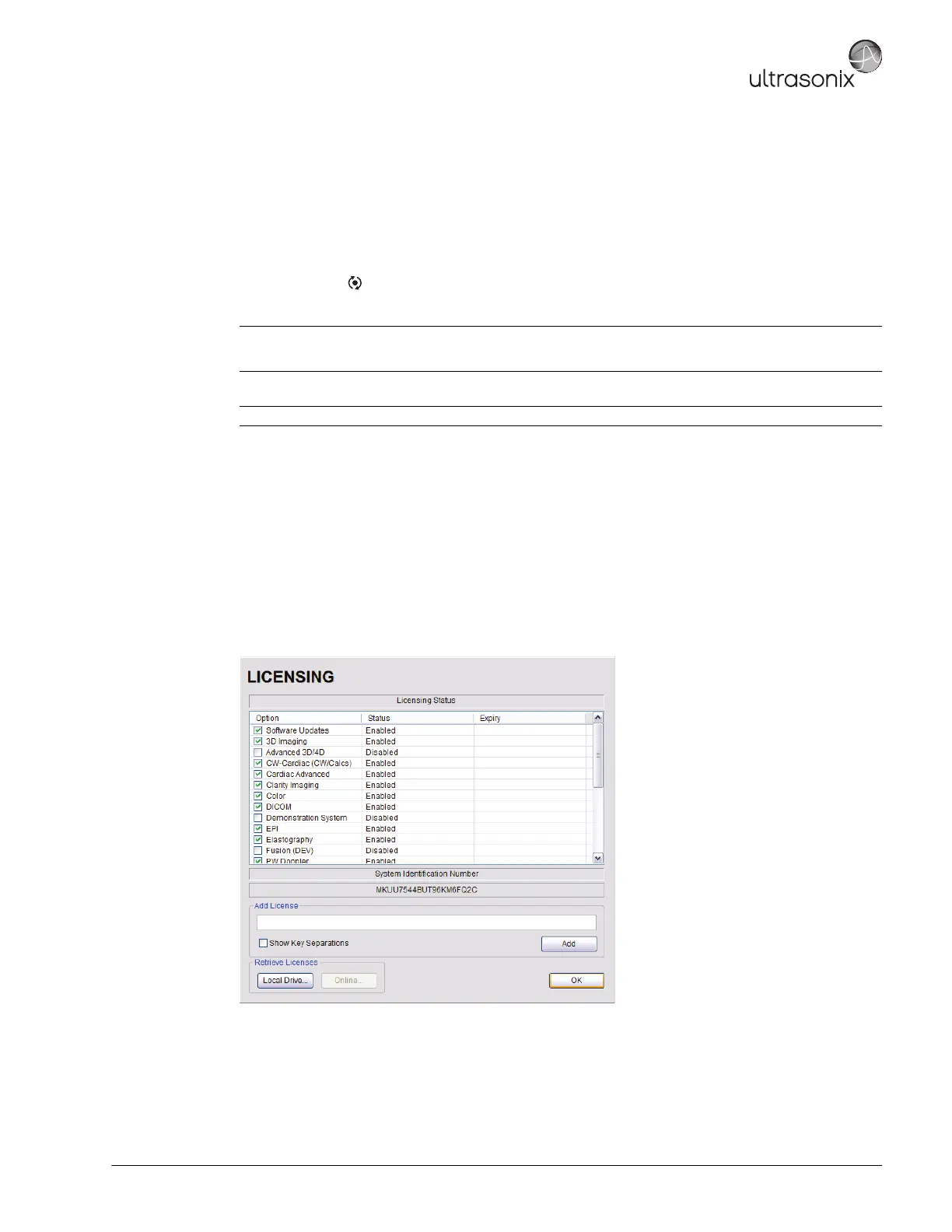
Check to ensure the system is configured with at least some Active licenses. If no licenses are Active, the license.txt file will
have to be reloaded.
To Check System Licensing:
1. Tap the touch screen Menu button.
2. Select Administrator > Licensing.
3. If none of the licenses are Active, reload license.txt following the instructions in section Chapter 10:
License.txt Importation.
Note: There is a level indicator on the LCD display.
Refer to Table 4-1 for more information on the touch screen dials.
Note: If static is not audible, use the trackball to move the gate away from the top of the LCD display.



 To Next Page