5-6. 땀수 조절 법 / Adjus ting the stitch length
☞
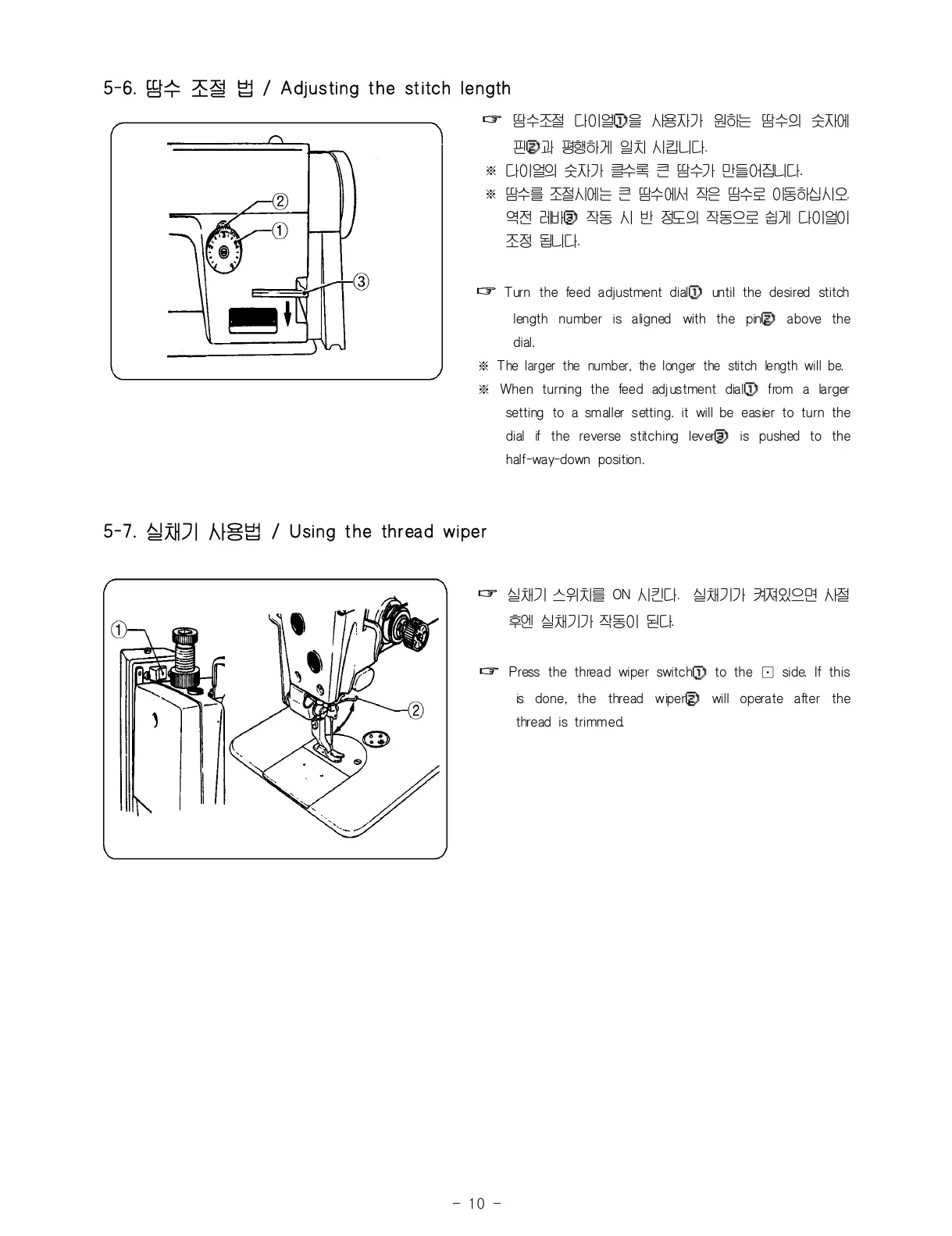
땀수조절 다이얼①을 사용자가 원하는 땀수의 숫자에
핀②과 평행하게 일치 시킵니다.
※ 다이얼의 숫자가 클수록 큰 땀수가 만들어집니다.
※ 땀수를 조절 시에는 큰 땀수에서 작은 땀수로 이동하십시오.
역전 레바③ 작동 시 반 정도의 작동으로 쉽게 다이얼이
조정 됩니다.
☞
Turn the feed adjustment dial① until the desired stitch
length number is aligned with the pin② above the
dial.
※ The larger the number, the longer the stitch length will be.
※ When turning the feed adjustment dial① from a larger
setting to a smaller setting. it will be easier to turn the
dial if the reverse stitching lever③ is pushed to the
half-way-down position.
5-7. 실채기 사용법 / Using the thread wiper
☞
실채기 스위치를 ON 시킨다. 실채기가 켜져있으면 사절
후엔 실채기가 작동이 된다.
☞
Press the thread wiper switch① to the ⊡ side. If this
is done, the thread wiper② will operate after the
thread is trimmed.



 To Next Page