11
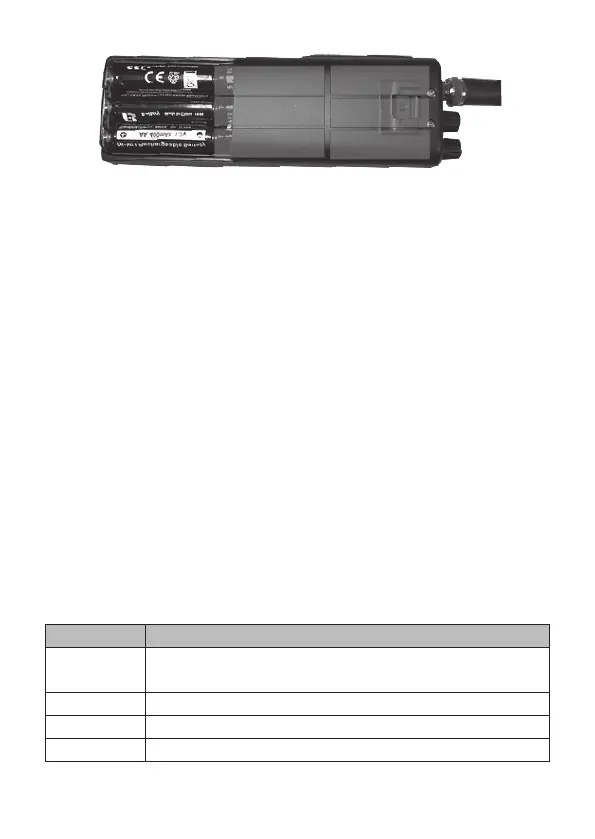
3 Close battery cover.
Charge the Radio
NiMH rechargeable batteries are not fully charged when rst installed
in the radio. After installing the rechargeable NiMH batteries for the rst
time, place the radio in the charge adapter. Let it charge for about 12
hours or until the LED on the charge adapter turns green.
Regardless of which type of batteries you use in this radio, the battery
icon ashes when power is low. Replace the alkaline batteries or
recharge the unit if using the rechargeable NiMH batteries.
Low Power Indication
The battery icon shows a reduced power level and its outline ashes.
Connect the DC power cable to a power source and to the radio to
continue to use it until you can recharge/replace the batteries.
CONNECT EXTERNAL SPEAKER
Your radio supports an external speaker for remote monitoring. The
external speaker is sold separately.
EXTERNAL SPEAKER
Function Remote receiver monitoring or substitution for internal
speaker
Impedance 8 Ohms
Rating 1 Watt
Connect to EXT.SP. jack (⅛-in/3.5 mm)


 To Next Page