14
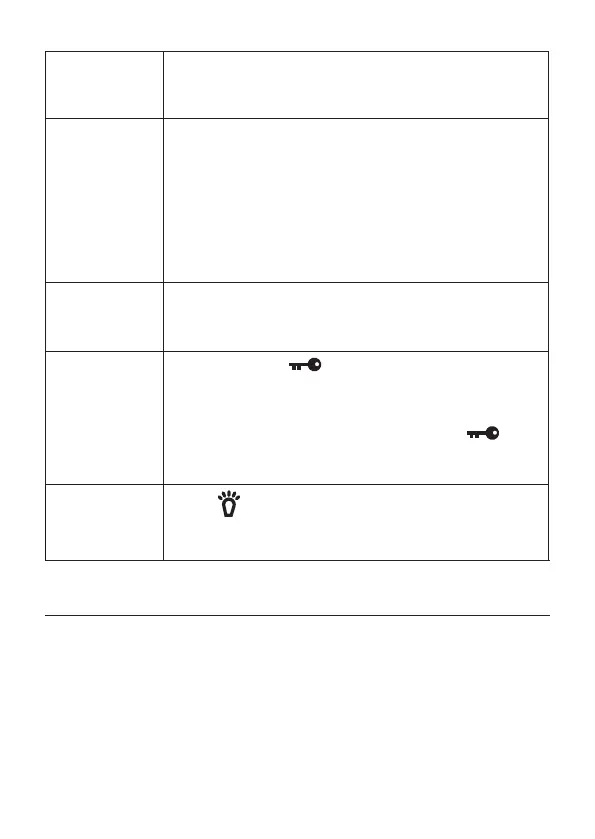
Changing the
volume
After turning the radio on, turn the Volume knob
clockwise to increase the volume; turn it counter-
clockwise to decrease the volume.
Transmitting
– Tune the radio to the channel you want to
transmit on, and listen to make sure the channel
is clear.
– Press and hold the PTT button.
– Hold the microphone about 2 inches away from
your mouth and speak in a normal voice.
– Release the PTT button to listen for a response.
Scanning
channels
Press SCAN in CB mode; the radio scans the
channels, stopping when it receives a transmission.
Press SCAN again to stop scanning
Lock keys
to prevent
accidental
activation.
Press and hold to actiate key lock; the Lock
icon displays. Only PTT, LIGHT, and LOCK keys
and the VOLUME and SQUELCH knobs are active.
With Key Lock activated, press and hold to
deactiate key lock; the Lock icon goes away and all
keys are now active.
Turn backlight
on and off
Press to turn the LCD backlight on for 10
seconds. Press it again while the backlight is on to
turn it off.
NOTE: Make sure you have read and understood part 95 of the
FCC rules and regulations before using the transmitter.
CB OPERATION
CB Communication Codes
The “10” code allows you to communicate easier in noisy
environments. The following table lists some of the most common
codes and their meaning.


 To Next Page