Go2 User Manual
© 2023 All rights reserved, Unitree Robotics 6
1) Status Indication
Go2's head indicator light can emit different lights to show the current working status of the robot
and the current operating system, please refer to the following table to learn more about the operating
status indicated by different flashing modes and colors:
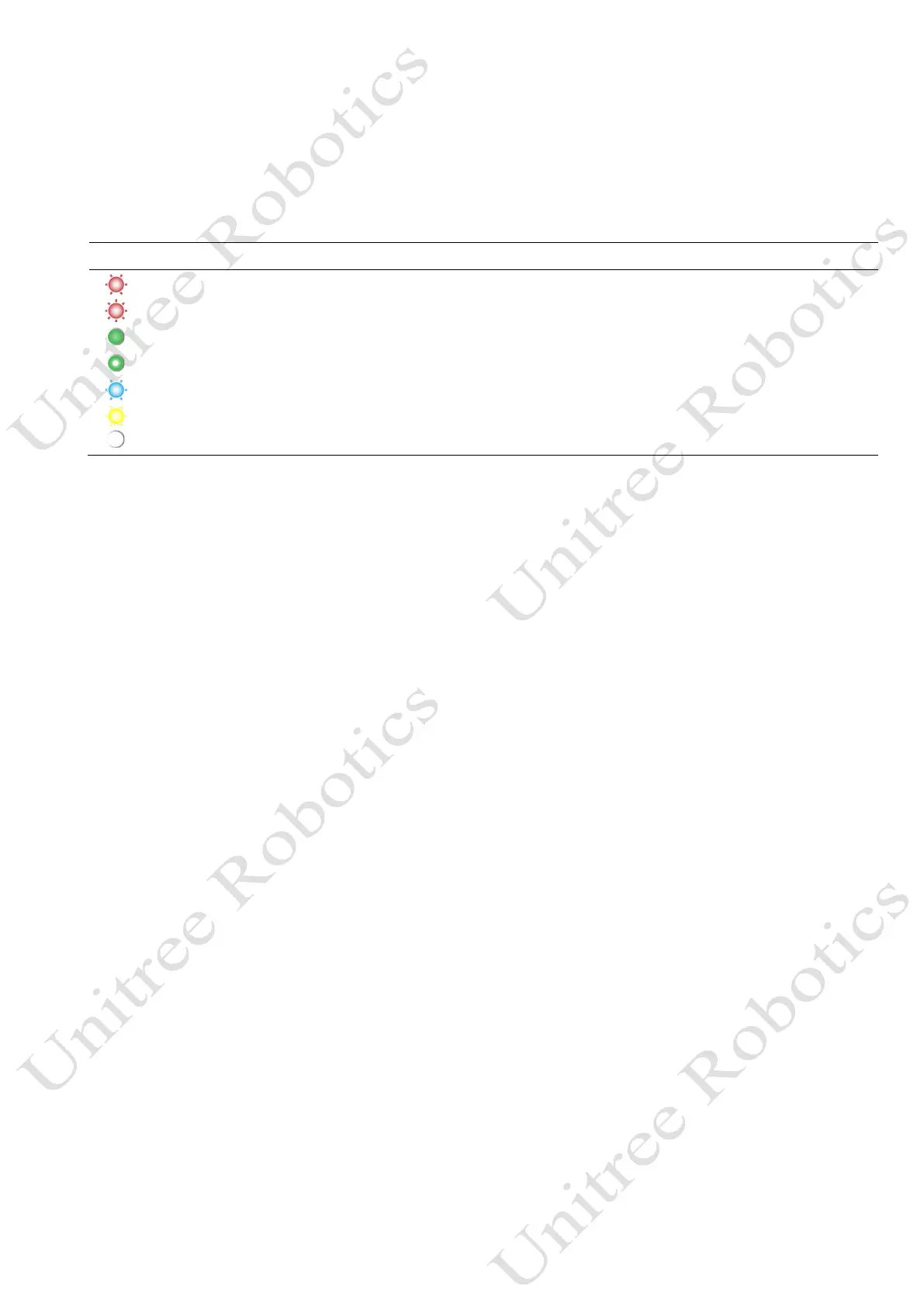
Color Color and Flashing Meaning
Low flash rate in red System abnormality, boot failure, hardware failure, need to contact after-sales service.
Fast flash rate in red Motor & IMU calibration failed
Permanently on in green Powered on
Flash in green Switching on
Low flash rate in blue Motor & IMU calibration in progress
Low flash rate in yellow Low battery warning, will automatically crouch down within 10 minutes
Permanently on in white Head indicator light
2) Intelligent Avoidance
Equipped with Unitree's self-developed 4D LiDAR L1 with 360°×90° hemispherical ultra-wide-
angle perception, boasting ultra-low blind spot, the minimum detection distance is as low as 0.05m,
which can help Go2 to achieve a blind spot-free coverage, real-time access to three-dimensional
information about the surrounding environment, and in the process of travelling according to the radar
data to carry out intelligent avoidance (only support forward obstacle avoidance), to avoid collision
and ensure the safety of the robot and the surrounding environment.
3) Intelligent Side-follow System 2.0 (ISS2.0) (Not supported by AIR)
By adopting the new wireless vector positioning and control technology, the positioning accuracy
is technically upgraded by 50%, the remote control distance is over 30m, and combined with the
optimised obstacle avoidance strategy, it can make the robot better traverse complex terrain.
4) Voice Interaction (Not supported by AIR)
Supports voice interaction and commands and built-in voice recognition module, and converts
human language into computer language to communicate with the main chip, so as to control the robot
and achieve human-machine language interaction. Reaches voice interaction response at millisecond
level, using the industry's advanced voice recognition technology with high recognition accuracy, fast
literacy.
5) App remote image transmission
With the new Unitree Go App, it provides omni-directional ultra-wide image transmission, real-
time viewing of shooting images, built-in 4G and eSIM (not supported by AIR) for more stable
connection and remote control. It intelligent OTA upgrades, which makes the operation in ultra-vision
range as simple and convenient as being in the field.



 To Next Page