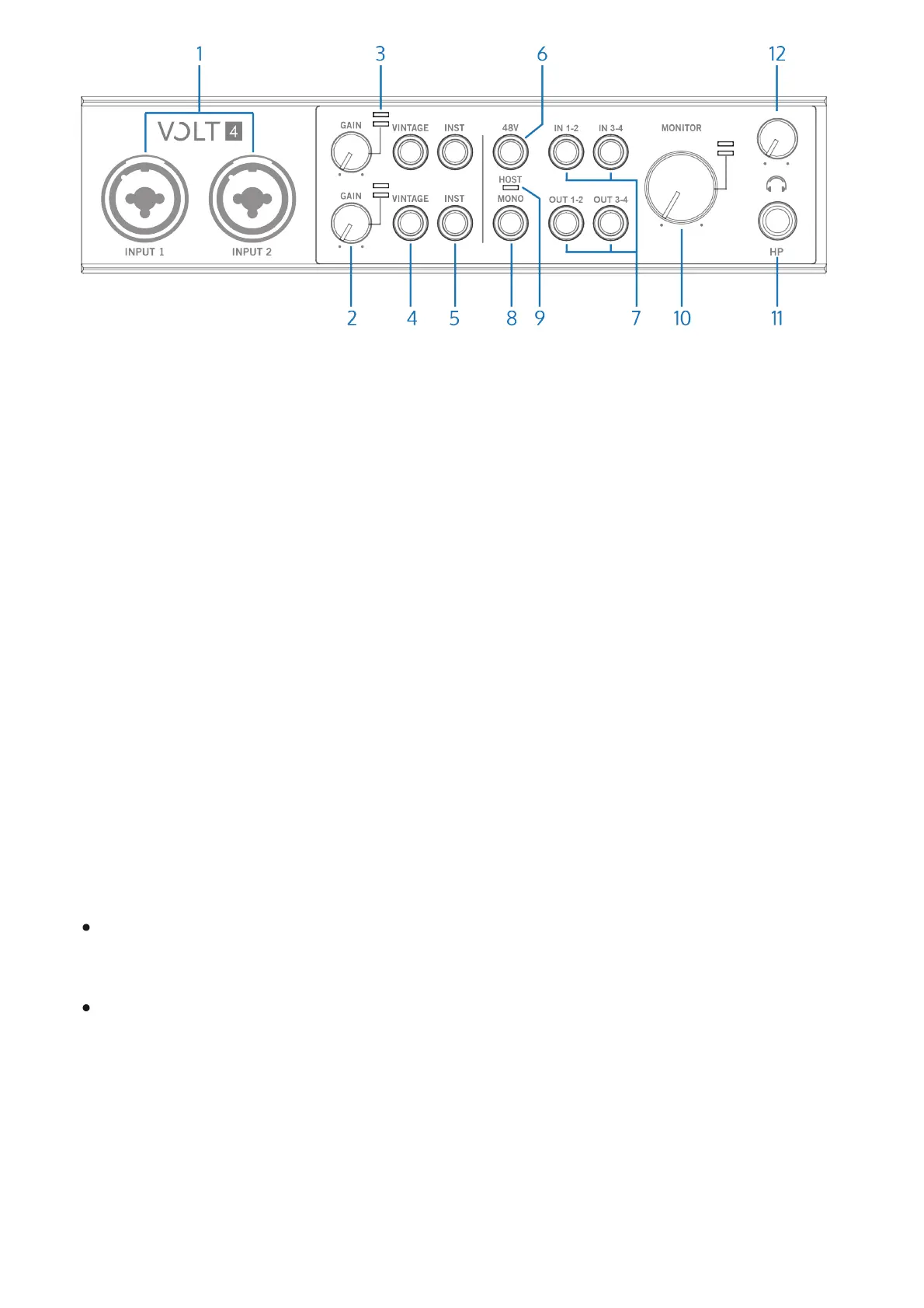
(1) XLR/TRS Combo Inputs
Connect your microphones, instruments, or line level sources here. The combo input
connectors accept XLR and ¼” (6.35 mm) plugs.
A microphone is typically connected with an XLR connector, and an instrument or line level
signal is connected with a ¼” (6.35 mm) TS or TRS plug.
Preamp gain and impedance automatically adjusts for line or mic signals, based on whether the
plug is XLR or ¼”, along with the state of the INST button.
Press the INST button to toggle the impedance and gain of the line input to accommodate a Hi-
Z instrument, such as an electric guitar or bass.
Tip: The Vintage Preamp can be used on mic, line, and instrument inputs.
Balanced and unbalanced connections
The line inputs on Volt are balanced when connected with TRS connectors to balanced
equipment.
Use TRS (balanced) audio cables for the best results with balanced audio sources.
Balanced equipment uses three conductor wiring (via TRS or XLR connectors) to reduce
interference and electrical noise, and to provide better audio quality over longer cable runs.
Use TS (unbalanced) cables for instruments that are not balanced, such as an electric guitar
or bass, or an unbalanced synth or sound module. TS connections may also be suitable for
shorter input cables, where electrical interference noise may not be an issue.













 To Next Page