TO PROGRAM A LEARNED FUNCTION
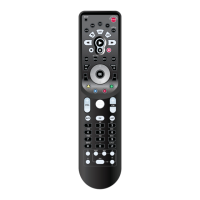
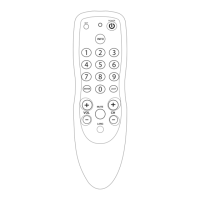
1. Place your Kameleon-C6 Remote and your orig-
inal remote control on a flat surface. Position the
remotes no more than 1 to 2 inches apart. Make
sure the ends that you normally point at your
device are facing each other. See image below.
2. On your Kameleon-C6 Remote, press Setup for
at least 3 seconds. The bottom of the IR indicator
will blink twice.
3. Press 9 7 5 on the Kameleon-C6 keypad. The
bottom of the IR indicator will blink twice.
4. On your Kameleon-C6 Remote, press the
device mode key for which you want to copy the
learned function from your original remote.
5. On your Kameleon-C6 Remote, press the key
(e.g., F1 key) you want to save the Learned
function. The bottom of the IR indicator will
blink an “incoming IR”three times and your
Kameleon-C6 Remote will switch off.
6. Press and hold the original remote control’s
key (e.g., mono/stereo key on your original
remote control) until Kameleon-C6 keypad
switches back on. The bottom of the Kameleon-
C6’s IR indicator will blink twice to indicate a
successful transfer.A long blink indicates failure.
7. If you want to copy other functions from the
same original remote, simply repeat steps 5 and
6, pressing the next key you want to copy.
8. Lastly, to exit the Learning Feature, press Setup
on your Kameleon-C6 for at least 3 seconds.The
bottom of the IR indicator will blink twice.
R
EMEMBER
• AFTER THE KAMELEON-C6 KEYPAD SWITCHES OFF IN STEP 5,YO U NEED
TO PRESS THE KEY ON YOUR ORIGINAL REMOTE WITH IN 5 SECONDS.
OTHERWISE,YO UR KAMELEON-C6 REMOTE WILL EXIT THE LEARNING
MODE.
• A
FTER 30 SECONDS OF INACTIVITY WHILE IN LEARNING FEATURE, THE
REMOTE WILL EXIT THE
LEARNING MODE.
• I
N THE LEARNING MODE, KEYS SUCH AS “TV MENU”WILL NOT CHANGE
THE SCREEN WHEN PRESSED.
• I
FYOU WANT A KEY THAT IS NOT IN THE MAIN SCREEN TO LEARN A
FUNCTION, USE THE SCROLL KEY TO CHANGE THE SCREEN.
18 The Learning Feature
KAMELEON-C6 REMOTE
KAMELEON
-C6 REMOTE
ORIGINAL
REMOTE
1 TO
2
INCHES
APART



 To Next Page