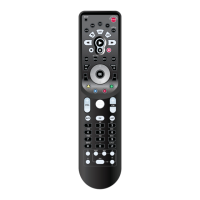
TO PROGRAM A MACRO
1. Press Cable device mode key.
2. Press Setup for at least 3 seconds. The bot-
tom of the IR indicator will blink twice.
3. Press 9 9 5 on the keypad. The bottom of the
IR indicator will blink twice.
4. Press VOD key.
5. Press Cable Device mode key followed by
0-0-1.
6. Lastly, to save the Macro, press Setup for at
least 3 seconds. The bottom of the IR indicator
will blink twice.
Now, whenever you press the programmed
custom VOD key, the Kameleon-C6 Remote will
tune the cable converter to channel 001.
REMEMBER
• EACH MACRO CAN CONSIST OF A MAXIMUM OF 15 KEYSTROKES.
• Y
OU CAN COMBINE A LEARNED KEY IN A MACRO SEQUENCE, CREAT-
ING AN EVEN MORE PERSONALIZED KAMELEON-C6 REMOTE.(IFA
L
EARNED FUNCTION USED IN A
MACRO IS SUBSEQUENTLY DELETED,
THE MACRO WILL REVERT TO THE KEY’SORIGINAL FUNCTION.)
• T
OINCLUDE AFUNCTION FROM A PARTICULAR SCREEN IN A DEVICE
MODE, USE THE SCROLL KEY.
• M
AKE SURE THAT YOU PROGRAM A
MACRO ON A SPARE KEY THAT
YOU D ON
’TUSEINANY DEVICE MODE.
• O
NCE YOU PROGRAM A MACRO ON ASPECIFIC KEY, THE SEQUENCE
WILL WORK REGARDLESS OF THE DEVICE MODE YOU ARE IN.THIS
MEANS THAT THE FUNCTION ORIGINALLY PROGRAMMED ON THAT SPE
-
CIFIC KEY WILL BE OVERWRITTEN.
• T
OAVOIDACCIDENTAL RECORDINGS,YO U MUST PRESS THE RECORD
KEY ON YOUR KAMELEON-C6 REMOTE TWICE TO RECORD.PLEASE
NOTE THAT IF YOU ASSIGN A
MACRO TO THE RECORD KEY,YOU WILL
DE
-ACTIVATE THE DOUBLE KEY PRESS– THEREFORE WE DO NOT REC-
OMMEND ASSIGNING A MACRO TO THIS KEY.
• I
FYOUHAD TO HOLD DOWN A KEY FOR A FEW SECONDS ON THE
ORIGINAL REMOTE CONTROL TO GET A FUNCTION
, THIS FUNCTION MAY
NOT WORK IN A
MACRO ON YOUR KAMELEON-C6 REMOTE.
• A
KEY THAT IS PROGRAMMED WITH A MACRO WORKS IN ANY
DEVICE MODE INCLUDED ON THAT MACRO.
You c a n delete a Macro for any of the keys that
were assigned a macro.
TO DELETE A MACRO
1. Press Setup for at least 3 seconds. The bot-
tom of the IR indicator will blink twice.
2. Press 9 9 5 on the keypad. The bottom of the
IR indicator will blink twice.
3. Press the desired custom Macro key.
4. Press Setup for at least 3 seconds. The bot-
tom of the IR indicator will blink twice.
Creating Other Macros 21
Introduction
Batteries\Keypad OverviewGlossary\Trouble Shooting Programming Remote
Advanced Options
Manufacturer Codes
ADVANCED OPTIONS



 To Next Page