BASIC SYSTEM FEATURES
Section 6-5
• CUTTING TABLE allows you to calibrate a new Z-height to the top surface of Honeycomb Cutting
Table. You need to have the Honeycomb Cutting Table installed in the PLS to activate the FOCUS
button.
• ROTARY is activated once the rotary accessory is installed. Rotary calibration should be done once
when the rotary is installed for proper engraving. For more information about the rotary read the
Accessories section on this manual.
• If the SOUNDS box is checked the computer will play the sound shown indicated once the file has
finished engraving. Be sure that your computer speakers are on and at an appropriate volume.
• MANUAL FOCUS POSITION automatically moves the focus carriage to the coordinates entered by
the user once the Z-Axis menu is entered or if the Auto-Focus button is pressed on the PLS keypad.
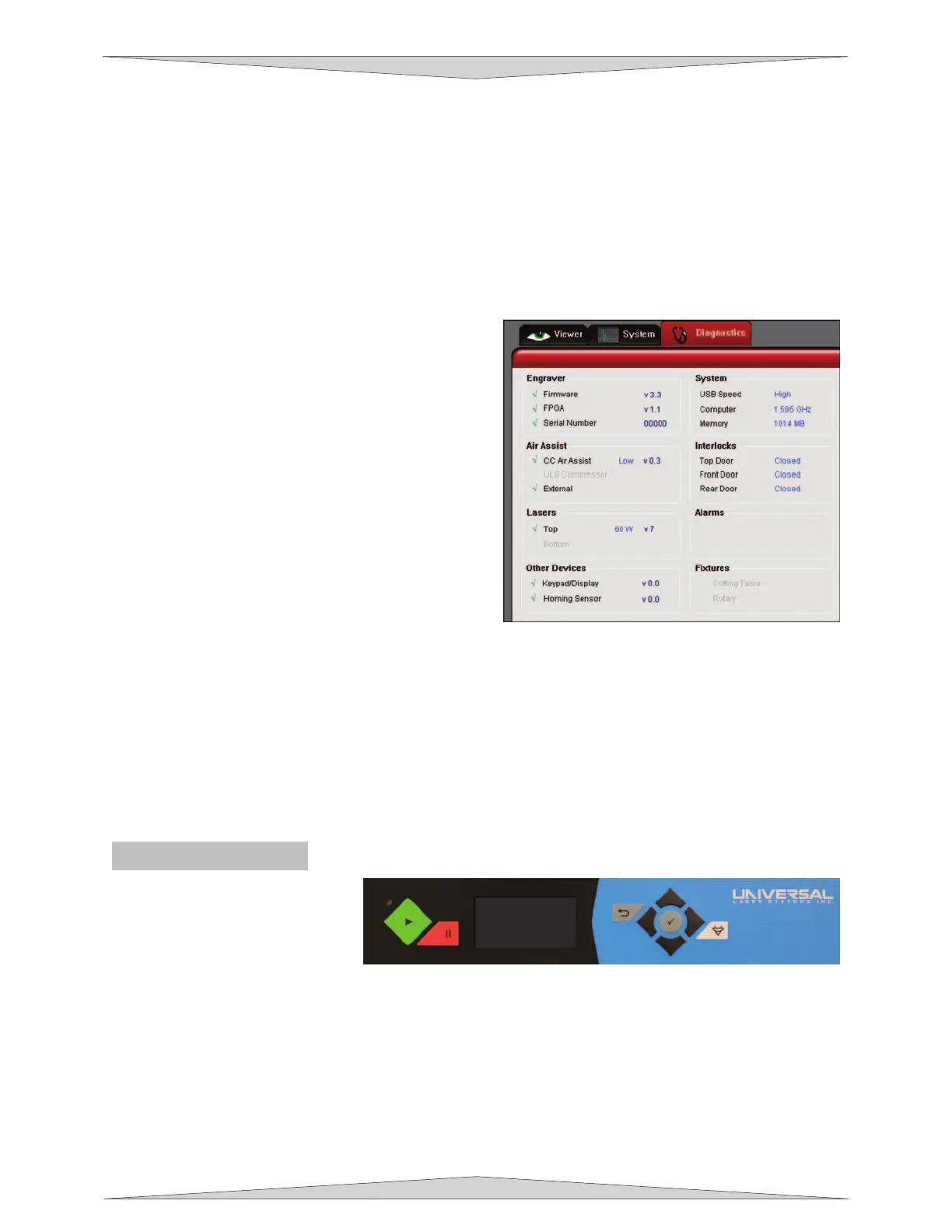
Diagnostics Tab
The Diagnostics Tab displays important information
about your laser system and personal computer.
• ENGRAVER shows the current Firmware and
FPGA version being used. It also displays the
Serial Number of your laser system. The Serial
Number is needed when calling the Technical
Support Department at ULS.
• AIR ASSIST displays the current device being
used, shown by a green check mark, to supply
compressed air to the laser system. According to
the Air Assist device being used it may show if a
Low or High setting is being used and the firmware
version.
• LASERS displays if the Top or Bottom laser tube
(if applicable) is being used and the watts being
produced by the laser. It also displays the current
version being used. If a red ‘x’ appears this
indicates that the laser tube is not functioning
properly or a door is opened on the laser system.
• OTHER DEVICES displays the current firmware version of the Keypad/Display on the laser system.
It also displays the current firmware version of the Homing Sensor on the laser system.
• SYSTEM displays information about your personal computer.
• INTERLOCKS show you if the Top, Front, or Rear Doors are Opened or Closed.
• ALARMS alert you if the inside the laser system is above the recommended temperature or if the
Thermal Sensor battery is low in power. If the Thermal Sensor inside the laser system is triggered an
alarm will sound and shut down your laser system.
• FIXTURES indicate if a cutting table or rotary is installed and properly working.
The PLS Keypad
The Keypad on the laser system
provides limited access to controls
necessary for cutting and
engraving operations. When the
laser system has finished
initializing and homing, and if all
the doors are closed, the red light on the keypad will be illuminated and ready to run a file.
The Red LED (Light Emitting Diode) will act differently depending on the current state of the laser system.
Please refer to the chart below.



 To Next Page