ACCESSORIES
Section 8-15
FOCAL LENGTH SPOT SIZE FOCAL RANGE
1.5 “ .003 “ + / - .075 “
2.0 “ .005 “ + / - .100 “
2.5 “ .007 “ + / - .125 “
4.0 “ .013 “ + / - .200 “
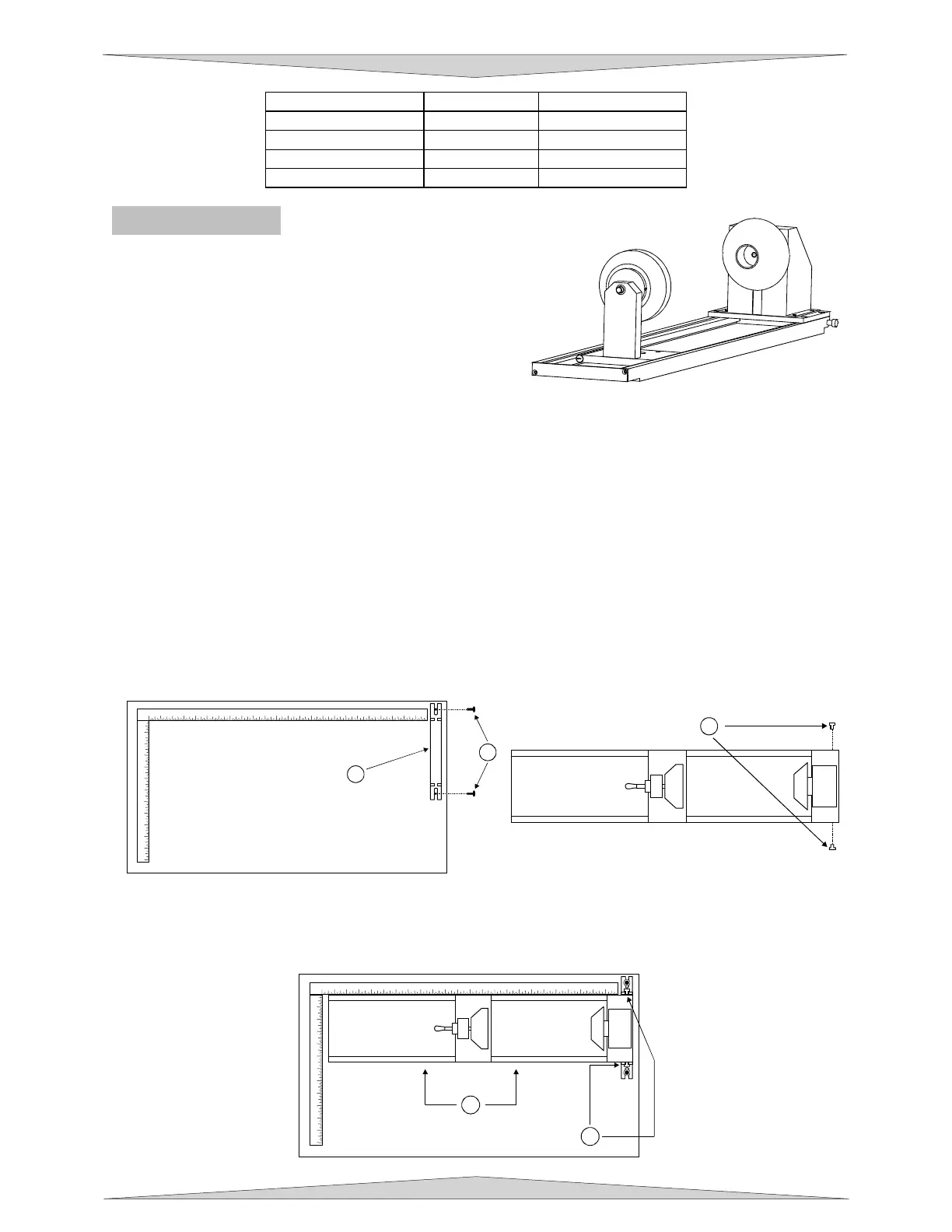
Rotary Fixture
The Rotary Fixture has been designed to engrave
cylindrical objects. Two attachments come with the fixture,
a cone shaped disk attached to the motorized end of the
fixture and an inverted cone shaped disk attached to the
adjustable end of the fixture. These attachments are used
to hold wineglasses, mugs, cups, etc. To make it easier to
understand, we will illustrate a step-by-step procedure to
engrave an image on a glass.
NOTE: These instructions apply to many different models even if your system has a smaller or
larger field size. If the rotary is installed and mounted on the table in any other manner then the
one mentioned below please contact the Technical Support Department for further instructions on
calibrating the rotary.
Installation
1. Turn the UCP and laser system ON.
2. Make sure AUTOFOCUS is NOT activated because the Rotary Fixture was not designed to work with
AUTOFOCUS.
3. Remove any materials that may be underneath the engraving table and lower the table ALL THE
WAY down to the bottom or at least far enough down so that the focus carriage will clear the top of
the Rotary Fixture when it is installed on the table.
4. Now, turn the UCP and laser system OFF.
5. Open the top door. Place the bracket on the table (1). Insert the thumbscrews and washers (2) into
the screw holes but do not tighten down completely. Leave the thumbscrews loose enough so that
the bracket can slide.
6. Place the Rotary Fixture on a flat surface. Using an Allen wrench, attach the two socket head
shoulder screws (1) to the side of the base plate.
7. Place the Rotary Fixture on top of the bracket so that its pivot bolts set into the forks in the bracket.
Gently push the fixture (1) flat up against the top ruler. NOW, tighten down the thumbscrews (2).
1
1
2
3
4
5
6
7
8
9
10
11
12
13
14
15
16
17
18
19
20 21 22 23 24
1
2
3
4
5
6
7
8
9
10
11
12
2
1
1
2
3
4
5 6 7 8 9 10 11 12 13 14 15 16 17 18 19 20 21 22 23 24
1
2
3
4
5
6
7
8
9
10
11
12
2
1



 To Next Page