MSC-400 Reference Manual
Rev 4
38
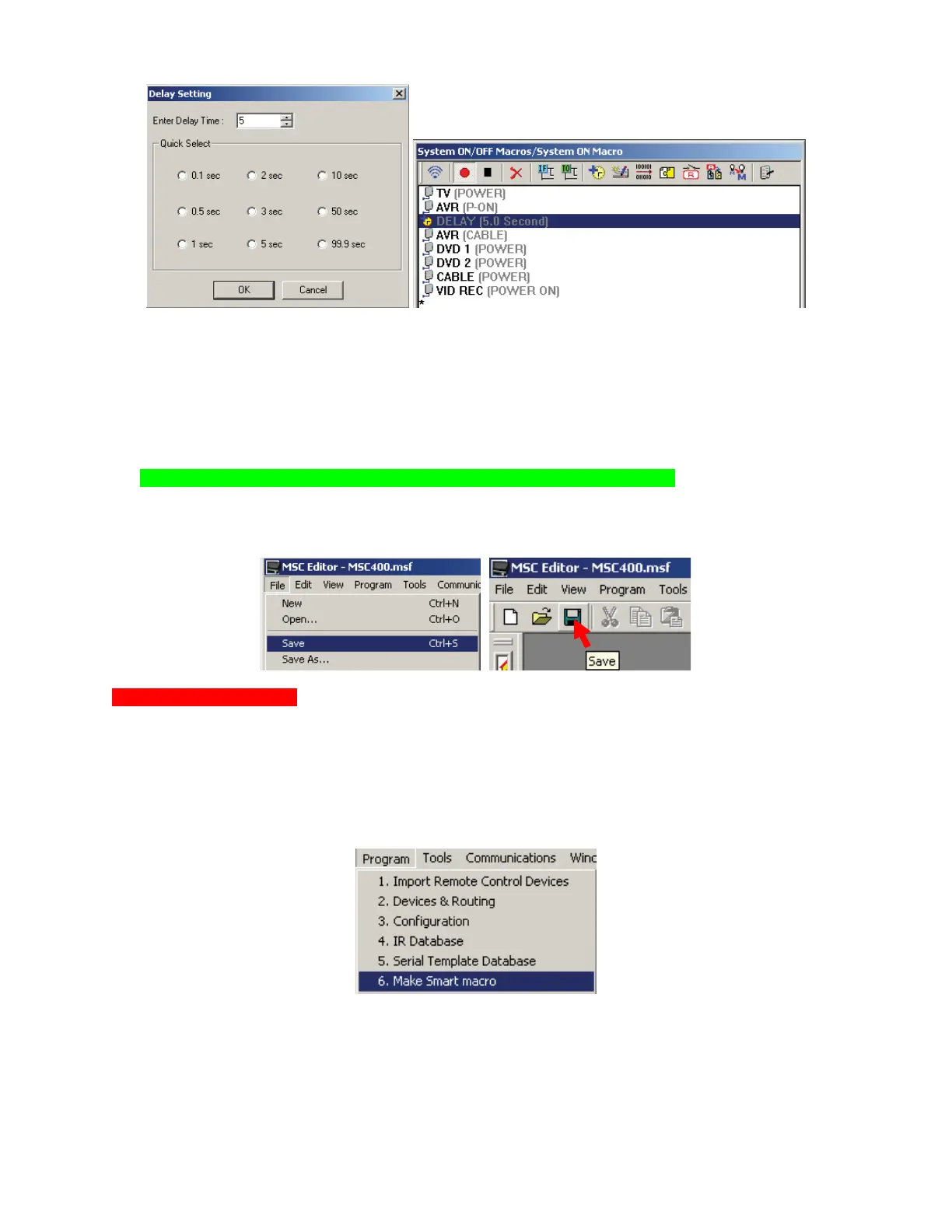
4. If necessary, DRAG AND DROP the DELAY to the proper position in the list.
5. To DELETE a DELAY do one of:
a) Highlight the DELAY and click the DELETE ICON in the SMART MACRO WINDOW TOOL BAR.
b) Highlight the DELAY and press DELETE on the PC KEYBOARD.
c) Highlight the DELAY. In the MSC EDITOR MENU BAR, click EDIT then click DELETE.
6. TEST the SMART MACRO. With the PC connected to the MSC-400 using the included USB cable,
click the TEST ICON in the SMART MACRO WINDOW TOOL BAR. The MSC will output the
commands. Adjust command order and delay duration as needed.
NOTE - All devices, emitters, etc must be connected to perform this test.
7. To SAVE the Smart Macro, do either of:
a) In the MSC EDITOR MENU BAR, click FILE, then click SAVE.
b) In the MSC EDITOR TOOL BAR, click the SAVE ICON.
Favorite Channel Macros
FAVORITE CHANNEL MACROS allow the user to press a single button on a remote to tune Cable,
Satellite, AM/FM, XM, Sirius channels, rather than having to press the individual buttons for a given
channel, i.e.: Press a single button for HBO rather than the individual buttons: 5-0-2. These macros will
consist of the numeric commands for tuning with an appropriate INTERSTEP DELAY between commands
to assure proper response by the Cable or Satellite Receiver, Tuner, etc. To program Favorite Channel
Macros:
1. In the MSC-400 EDITOR MENU BAR, click PROGRAM, then click MAKE SMART MACRO.
Add a NEW GROUP: FAVORITE CHANNELS CABLE (Satellite, etc), then add the names for the
FAVORITE CHANNEL SMART MACROS to the list. (HBO, Cinemax, ESPN, etc.) See section:
ADDING A MACRO GROUP AND SMART MACROS for additional information.
2. In MSC EDITOR TREE VIEW, click the ‘+’ next to FAVORITE CHANNELS to expand the list.
3. Right click a SMART MACRO (HBO). In the pop-ups, highlight TOOLS, then click FAVORITE
CHANNEL. The FAVORITE CHANNEL TOOL will appear.
3a
3c
6 5a
4



 To Next Page