MSC-400 Reference Manual
Rev 4
39
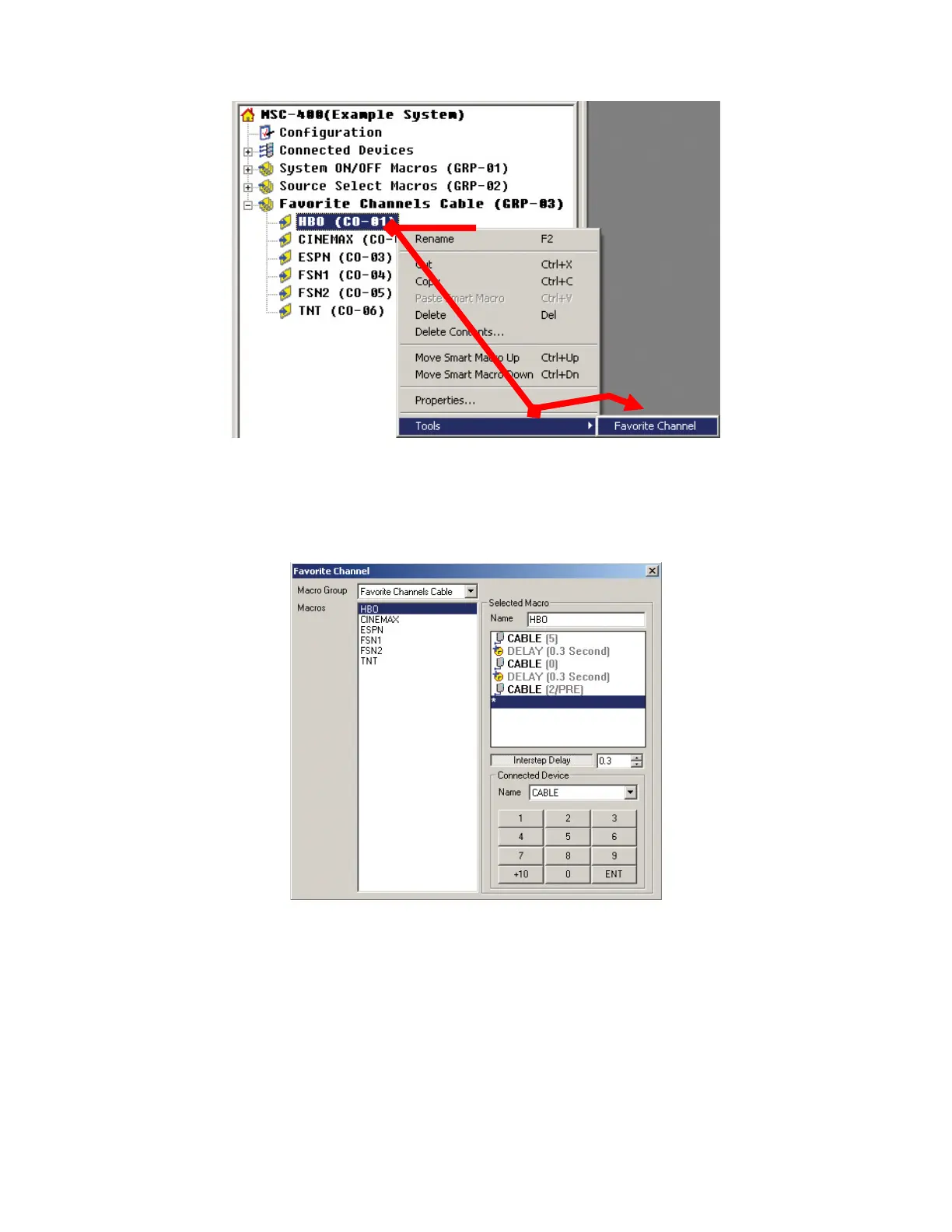
Open Favorite Channel Tool
4. If necessary, select FAVORITE CHANNELS CABLE in the FAVORITE CHANNEL TOOL WINDOW
via the MACRO GROUP pull down.
Favorite Channel Tool
5. In the MACROS BOX, click a FAVORITE CHANNEL SMART MACRO. (HBO)
6. In the SELECTED MACRO BLOCK, if necessary, click the INTERSTEP DELAY BUTTON and set an
appropriate duration for the device being controlled, by either typing a value in the box or using the
UP/DOWN Arrows. Some devices may not need a delay but others will be a little slow to process fast
sequences of commands, so a short gap, typically around .3 seconds, between commands is usually
a good idea. INTERSTEP DELAY RANGE: .1 to 32.3 seconds.
7. In the CONNECTED DEVICE BLOCK, select the device being controlled (Cable) using the PULL-
DOWN.
2
3
4
5
6
7
8
10



 To Next Page