MSC-400 Reference Manual
Rev 4
59
Dragging Smart Macro Triggers
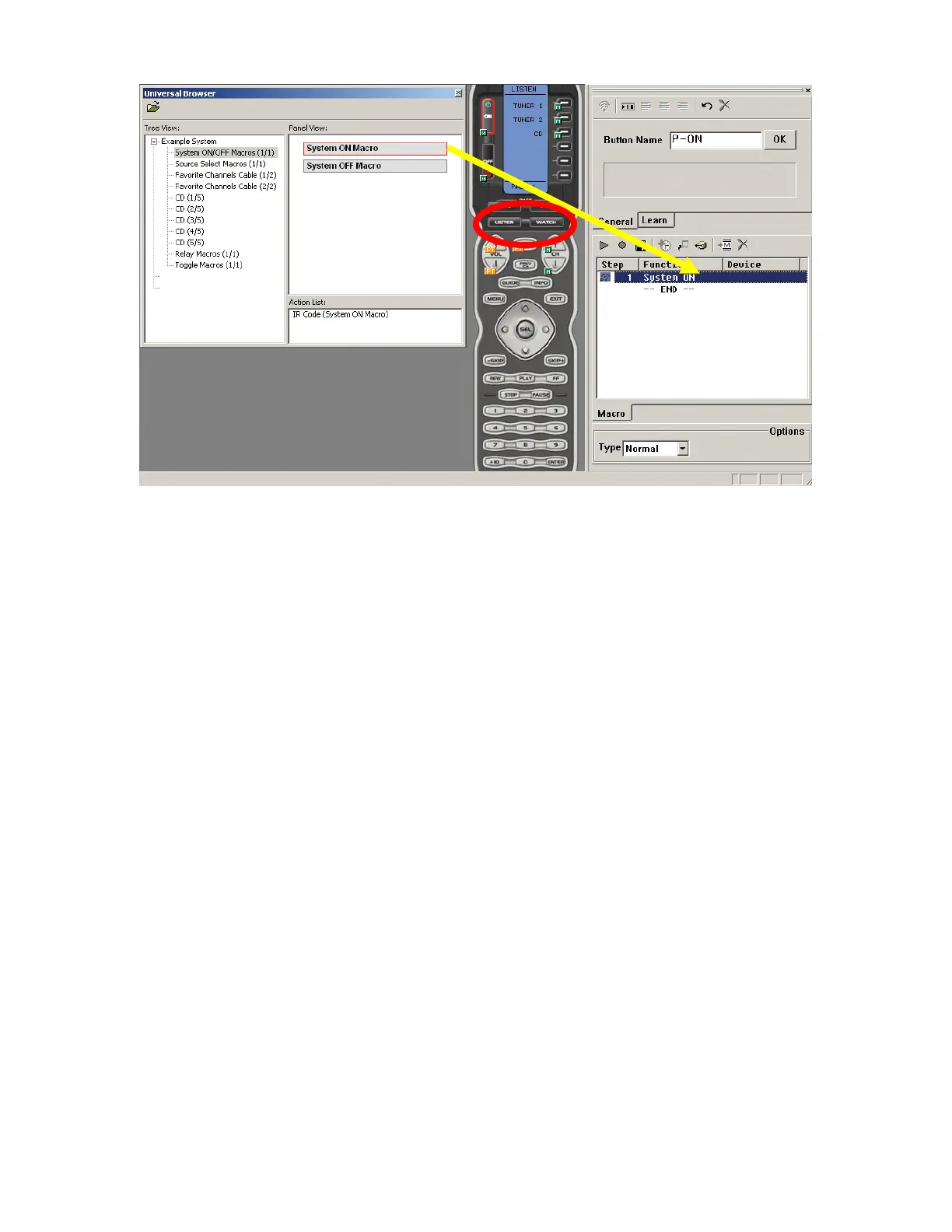
8. In the MX/TX EDITOR WINDOW, on the VIRTUAL REMOTE in SIMULATE VIEW, click LISTEN or
WATCH, depending upon which MODE the BUTTON LOCATIONS for the MACRO TRIGGERS are
located. In the Example System, DVD 1, DVD 2, Cable, VID and REC are WATCH; Tuner 1, Tuner 2,
and CD are LISTEN.
9. Click the BUTTON to which the MACRO TRIGGER is to be PROGRAMMED. (ex. ON) The selected
button will highlight RED.
10. Drag the MACRO TRIGGER to the MACRO FUNCTION WINDOW, NOT the button. A small GREEN
M will appear next to the SELECTED BUTTON indicating a Macro Trigger has been programmed to
that button.
11. Repeat STEPS 7-11 to program ALL MACRO TRIGGERS to the appropriate buttons for ALL MACRO
GROUPS.
8
9
10



 To Next Page