Page 9
4
O
PERATION
OF
THE
P
LATFORM
C
ONTROLS
L
OWER
C
ONTROL
P
ANEL
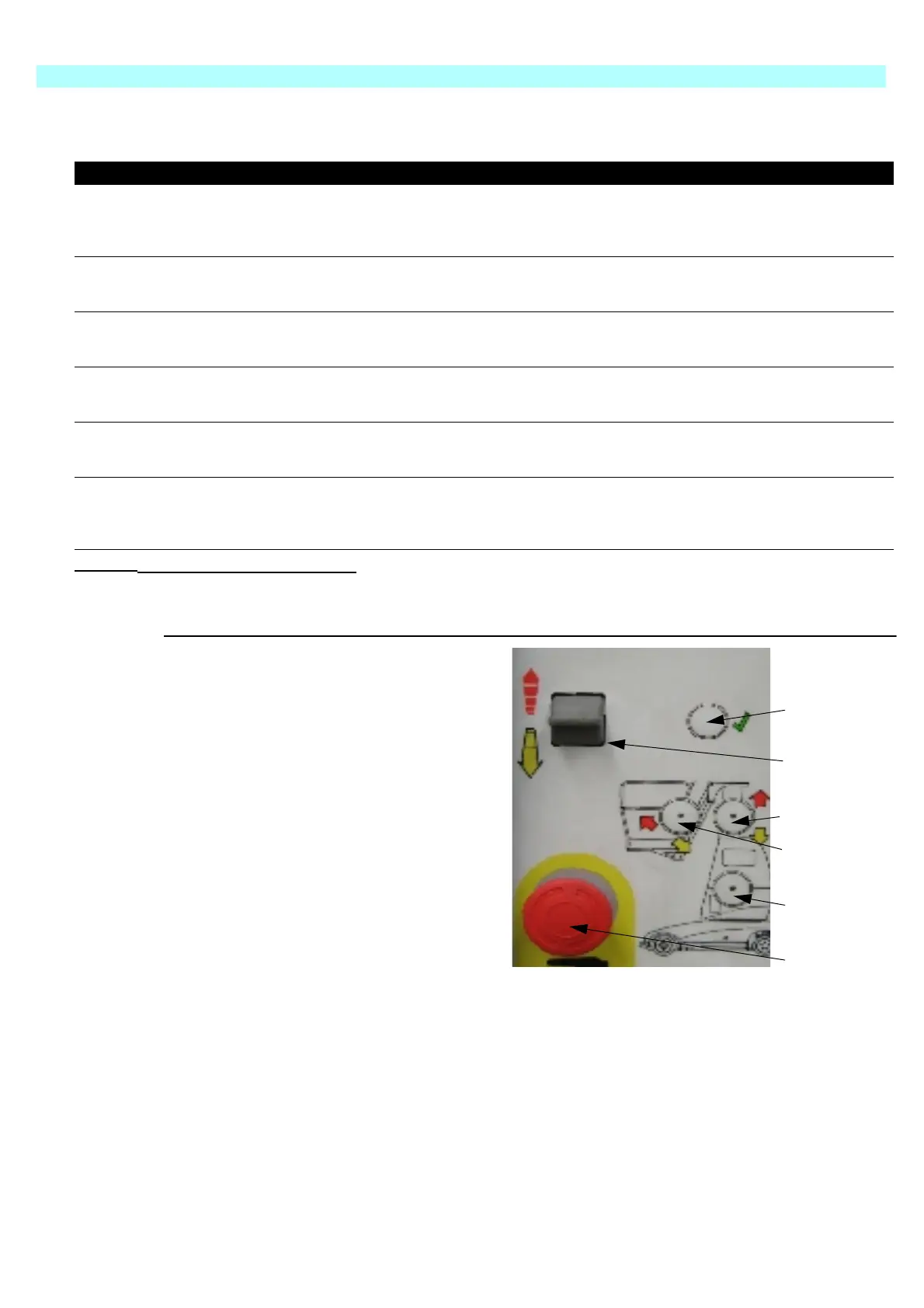
Figure 7:
T
YPICAL
O
PERATION
Raising the mast.
•The Keyswitch located on the Upper Control box must be turned on.
•Select Mast by pressing the Mast button (3)
•Press and hold the enable button (1),
•Activate the Rocker Switch (2) in the direction required.
I
TEMS
N
AMES
F
UNCTION
1 Enable Button
This button enables the Rocker Switch, and must be
held down during operation
2 Rocker Switch Activates the pre-selected operation, in either direction
3 Mast Select Button Pre-selects the Mast function.
4 Jib Select Button Pre-selects the Jib function.
5 Rotate Select Button Per-selects the Mast Rotate function.
6 Emergency Stop
Push this red button at any time to isolate power.
Turn clockwise to reset.
Table 2: Chassis Controls and Indicators
1. Enable button
2. Rocker switch
3. Mast selection button
4. Jib selection button
5. Rotate selection button
6. Emergency Stop
1
3
5
2
4
6



 To Next Page