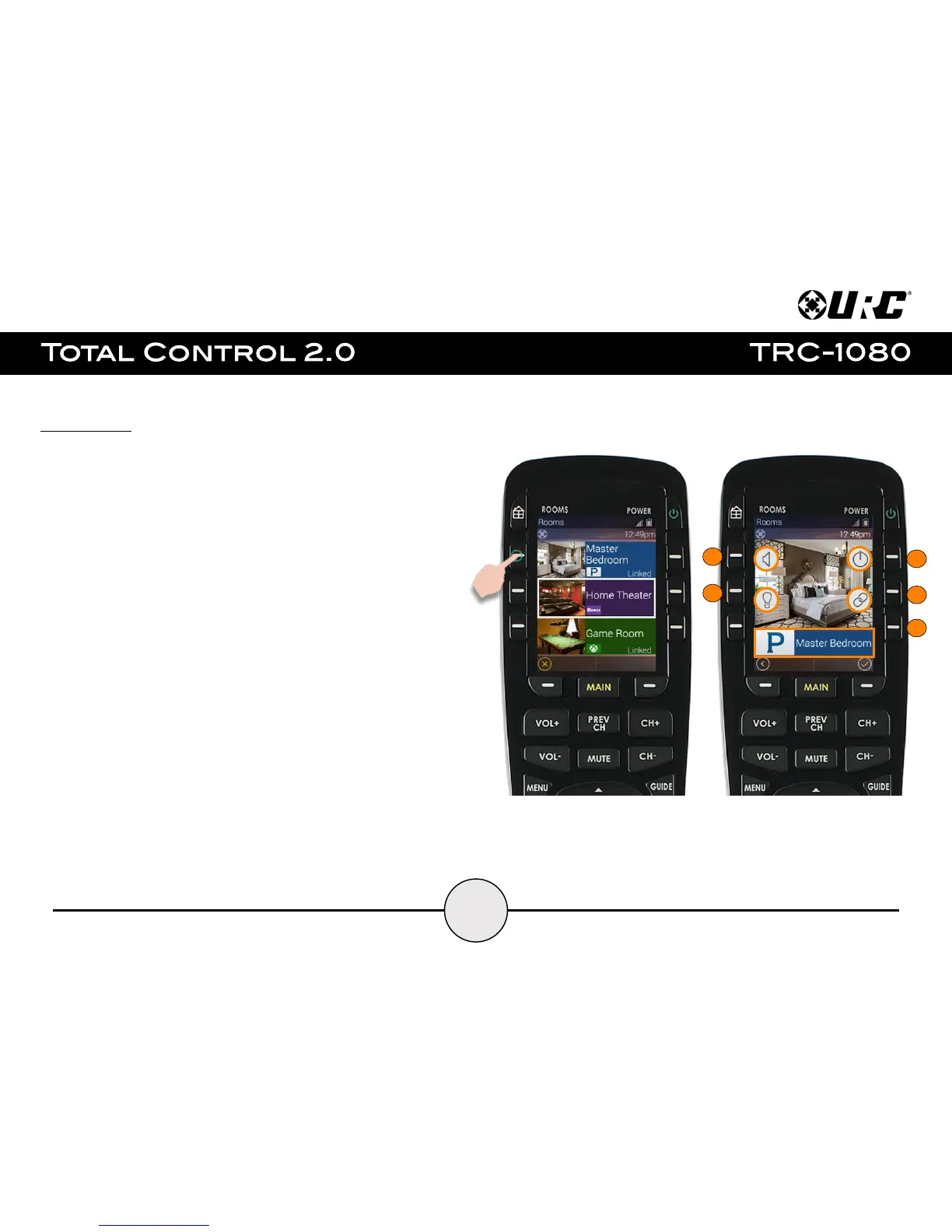
Room’s Menu:
As mentioned on the previous page, select the Rooms button to access the
Room’s Menu. The Room’s Menu provides a single location to view all the rooms
programmed into the Total Control 2.0 system.
From here it is possible to do the following:
1. Select a room.
Once a room is selected, the remote control displays available actions that
were programmed into the Total Control 2.0 system.
2. All options on this page must be programmed by the system programmer:
A. Volume Control: Select this button to raise, lower, or mute the volume
of a room without entering that room’s menu.
B. Lights Off Action Command: This button is programmed by the custom
integrator and can be set to turn off all the lights in a particular room.
C. Room Off: Select this button to turn off all the devices in that particular
room. This button can only be used to turn off a room.
D. Room Linking: This feature is only available on DMS Audio devices. It
is used to link DMS Zones/Areas. This means having one menu that
controls volume for multiple zones simultaneously or individually
E. Now Playing: This section displays what device/activity is currently
active in that room. Select this jumps the TRC-1080 to that
device/activity’s menu for control.


 To Next Page