file:///G|/CSO/T-Writer%20Repository/Networking/5455%20MAXg%20CR%20AP/Regulatory%20Preview/install.html
Note: For your wireless security settings, it is recommended that you select the WPA2
and WPA (PSK) wireless security method using TKIP and AES encryption for the most
secure wireless network.
4. Click Next.
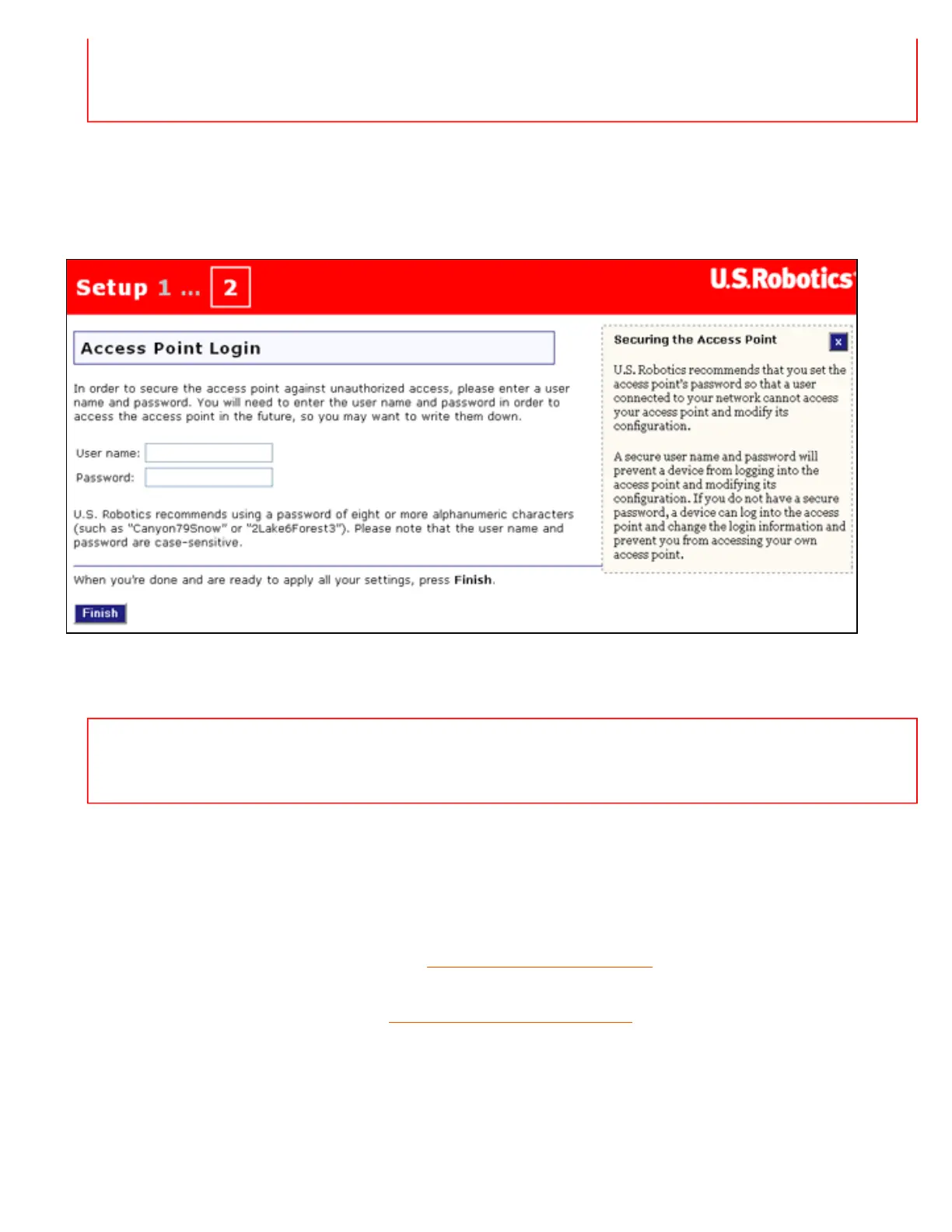
When your security settings are complete, the setup wizard displays the login setup page:
5. Enter a User name and Password and click Finish.
Note: Remember the user name and password that you enter. You will need it whenever
you access the configuration pages of the access point.
The access point displays its status page. If you intend to connect wireless devices to the access point
manually, you will need the information on the status page. Consider bookmarking the page for easy
access to the required information.
You have successfully completed the installation procedure. You can verify your network connection by
registering your Wireless MAXg Access Point at
www.usr.com/productreg/.
To connect a client to the access point, see
Connecting a Wireless Client in this user guide.
Backing Up Your Configuration Settings
Having a backup reduces the effort required in reapplying your configuration settings should you ever
restore your access point to its factory default settings. USRobotics recommends that you back up your
file:///G|/CSO/T-Writer%20Repository/Networking/5455%20MAXg%20CR%20AP/Regulatory%20Preview/install.html (9 of 10)4/24/2007 5:15:20 PM



 To Next Page