4
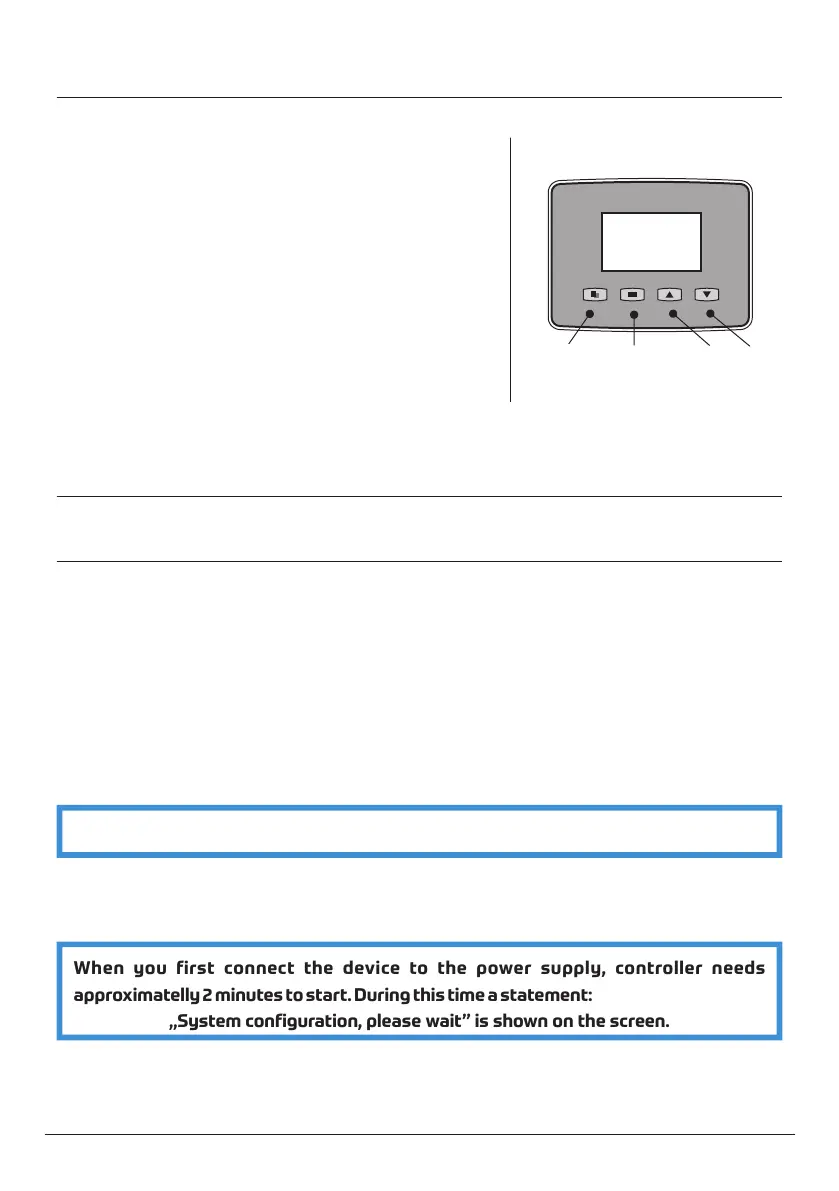
6.1 Button definition
6.2 Programming mode
6.2.1 Data input procedure:
MENU SET®EN UP+ DOWN-
MENU
SET®EN
p/+ q/-
The controller is equipped with 4 buttons.
n MENU button
n Is used to enter or exit the main menu
n Pressing and holding for 3 seconds will unlock
the keyboard
n SET/REGEN button
n Is used to select mode or to confirm the
settings
n Pressing and holding for 3 seconds will start
manual regeneration
n UP and DOWN buttons
n Are used to increase/decrease current value
n Are used to move to the next/previous menu
n Unlock the keyboard by pressing and holding the MENU button for 3 seconds
n Press the MENU button to enter the main menu
n Press the UP or DOWN button to select desired parameter
n Press the SET/REGEN button, current value will start to flash
n Press the UP or DOWN button to change the values
n Press the SET/REGEN button to save the settings
n Press the UP or DOWN button to select another parameter
n Repeat these steps until all parameters are set.
n Press the MENU button to exit the main menu
ATTENTION! Only flashing values can be changed
If no buttons are pressed for 1 minute, the controller will exit the programming mode.
If no buttons are pressed for 3 minutes, the keyboard will be locked.
When you first connect the device to the power supply, controller needs
approximatelly 2 minutes to start. During this time a statement:
„System configuration, please wait” is shown on the screen.



 To Next Page