6. BNT head programming
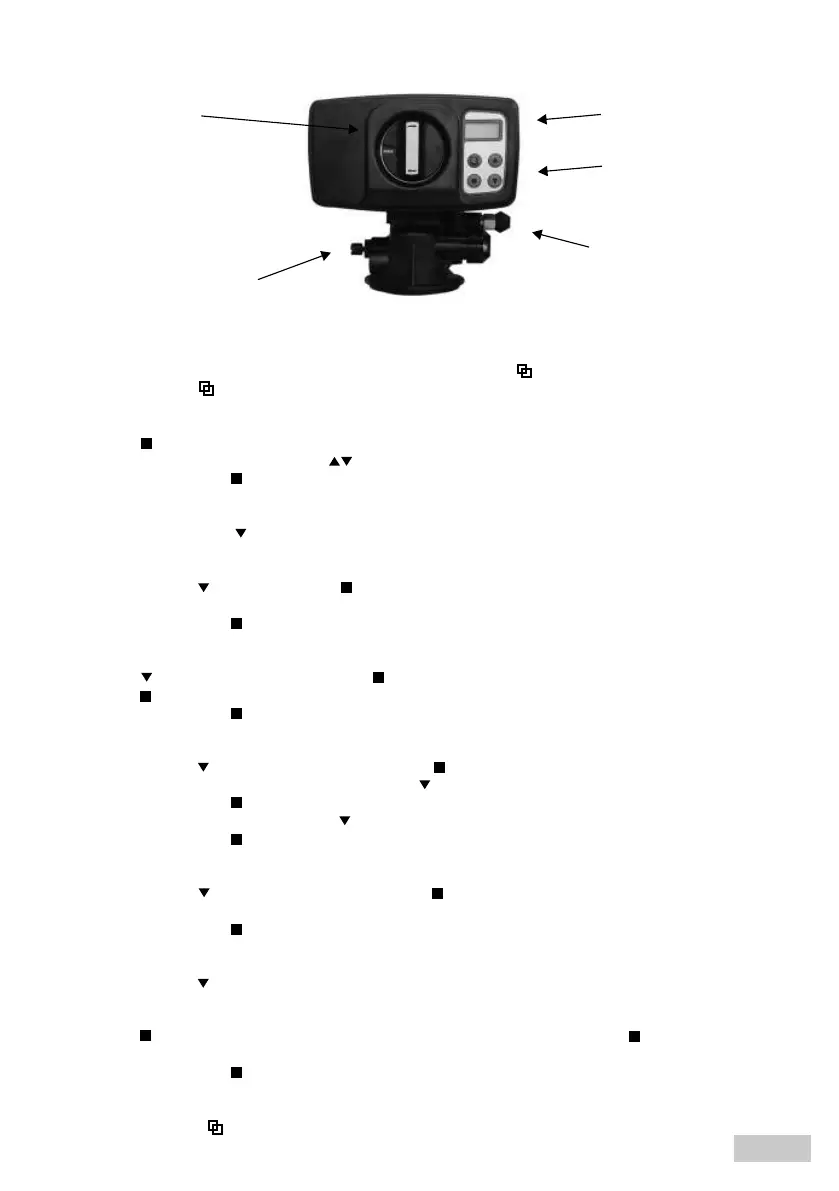
function
buttons
brine
elbow
display
programmer
knob
water hardness
adjusting screw
1. Unlock the device by pressing and holding for 3 seconds the „MENU” ( ) button
2. Press the „MENU” ( ) button
3. Language selection:
- Press the ( ) button
- Select the language using „UP / DOWN” ( ) buttons
- Confirm by pressing the ( ) button
4. Unit selection:
- Press the DOWN button ( ) leave factory pre-set unit (M3)
5. Regeneration mode selection:
- Press the „DOWN” ( ) button, press the ( ) button
- Set the regeneration mode to „METER OVERRIDE” by pressing „UP / DOWN” buttons
- Confirm by pressing the ( ) button
6. Time settings:
- Press the ( ) button, confirm by pressing the ( ) button, set the time by pressing „UP / DOWN” buttons.
- Press the ( ) button, set the minutes by pressing „UP / DOWN” buttons.
- Confirm by pressing the ( ) button
7. Setting regeneration time (factory setting 2 a.m.):
- Press the „DOWN” ( ), button, confirm by pressing the ( ) button
- Set the hour of regeneration by pressing the „DOWN” ( ) button
- Confirm by pressing the ( ) button
- Set the minutes by pressing the „DOWN”( ) button
- Confirm by pressing the ( ) button
8. Change of regeneration days:
- Press the „DOWN” ( ) button, confirm by pressing the ( ) button, change the regeneration to 20 days by
pressing „UP / DOWN” buttons
- Confirm by pressing the ( ) button
9. Volume of treated water between regenerations
- Press the „DOWN” ( ) button,
- Calculate the amount of treated water using a formula (see the table at p. 1: exchange capacity/water hardness
(German degrees))
- Press the ( ), button, enter the result (initially the value before the comma), press the ( ) button, enter the
result aer the comma
- Confirm by pressing the ( ) button
10. Enter the values for backwashing, salting, rinsing and filling from the table on page 1
11. Press the „MENU” ( ) button
Fig. 6. BNT head
20
EN



 To Next Page