Home
Utax
Printer
P-C4580DN
Page 320
Utax P-C4580DN - Page 320
360 pages
Manual
Save Page as PDF
To Next Page
To Next Page
To Previous Page
To Previous Page
Loading...
Troubleshooting
8-44
4
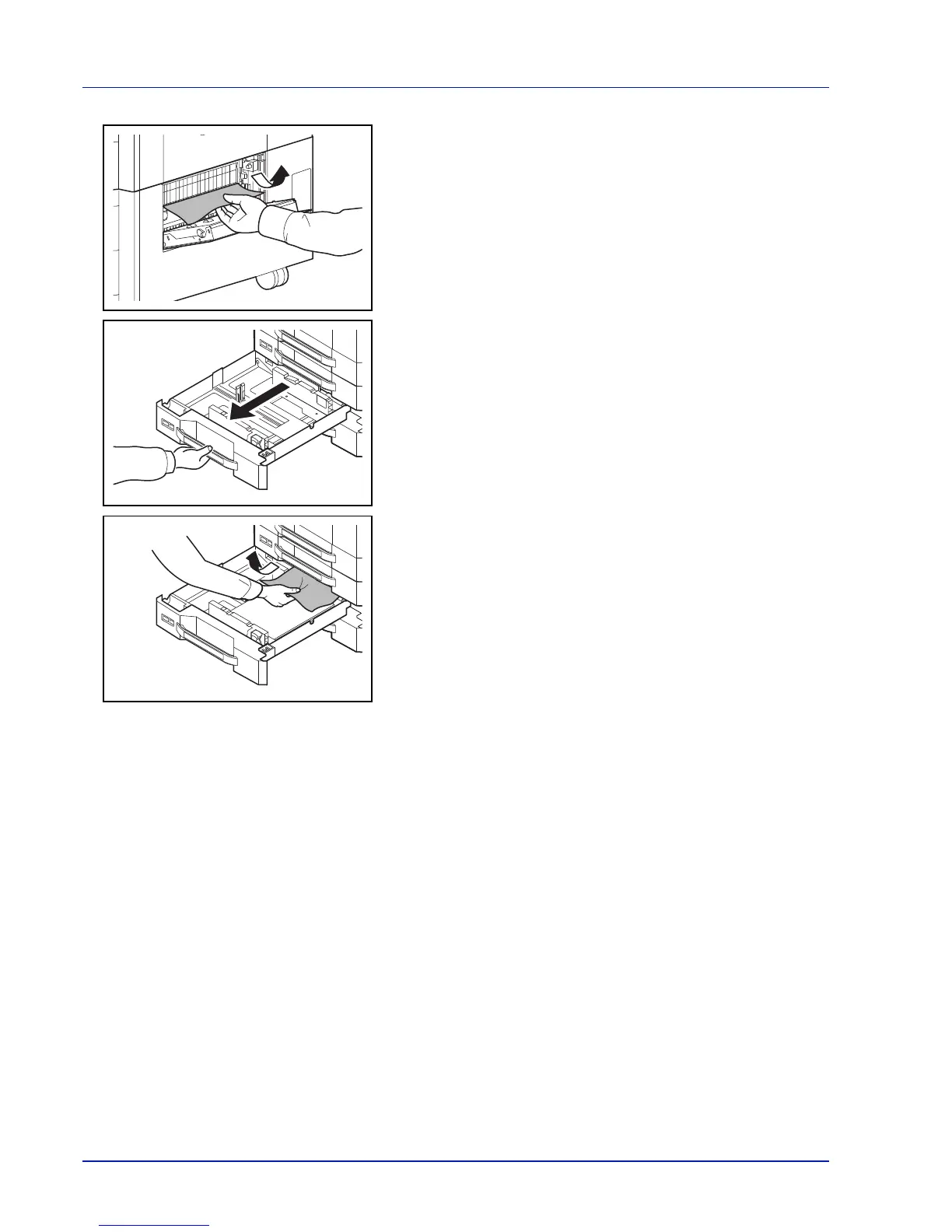
Remove the jammed paper
.
5
Pull out the cassette in use.
6
Remove the jammed paper
.
7
Push the cassette back in place securely
.
8
Close the right cover 2.
9
Connect to the multifunction machine.
319
321
Table of Contents
Main Page
Default Chapter
4
Safety Conventions in this Guide
4
Table of Contents
5
Legal and Safety Information
7
Original Ssleay License
9
Interface Connectors
11
Energy Saving Control Function
12
Energy Star Program
13
Other Precautions
14
1 Part Names
19
Exterior / Cassettes
20
Part Names
20
Interior/Connectors
21
When Options Are Installed
22
Operation Panel
23
2 Preparation before Use
25
Power On/Off
26
Changing Network Interface Parameters
27
Network Settings
28
Printing a Status Page
31
Installing Software
32
Installing Printer Driver in Windows
33
Installing Printer Driver in Macintosh
35
Status Monitor
38
Notification Settings
40
Uninstalling Software (Windows)
41
Embedded Web Server RX
42
Loading Paper
44
Before Loading Paper
45
Loading Paper in the Cassettes
46
Loading Paper in the Multi Purpose Tray
52
Registering a Page Size
60
Energy Saver Function
61
Operation Panel
62
Message Display
62
Status Information
62
Error Codes
62
Indicators in Message Display
63
Keys
64
Cancel Key
64
Canceling a Printing Job
64
Menu Key
64
Back Key
64
Arrow Keys
65
Clear Key
65
Using the Menu Selection System
67
Entering the Mode Selection Menu
67
Selecting a Menu
68
Setting a Menu
68
Setting a Mode Selection Menu
69
3 Printing
72
Printing - Printing from Applications
72
Loading Envelopes
75
Banner Printing
78
Secure Pull Printing (Optional Feature)
82
4 Document Box
83
Custom Box
85
Print a File
98
Delete a File
104
Job Box
106
Job Retention
106
Printing Additional Copies Using Quick Copy
108
Deleting a Quick Copy Job
109
5 Status Menu
119
Displaying the Status Menu Screen
120
Job Status
120
Job Log
122
USB Keyboard
123
Wireless Network
124
6 Operation Panel
125
Report Print
126
Menu Map
126
Status Page
128
Understanding the Status Page
128
Font List
130
USB Memory (USB Memory Selection)
131
Print Function Settings
133
Counter (Viewing the Counter Value)
140
Paper Settings
142
Setting the Paper Thickness
148
Print Settings
152
Paper Feed Mode (Setting the Paper Feed Source)
153
Print Quality (Setting Print Quality)
158
Network (Network Settings)
164
Optional Network (Optional Network Settings)
172
Device Common (Selecting/Setting the Common Device)
183
Def. Screen(Box) (Document Box Default Screen Settings)
184
Date Setting (Date and Time Settings)
185
Buzzer (Alarm (Buzzer) Setting)
188
Display Bright. (Display Brightness Setting)
190
Disp. Backlight (Display Backlight Setting)
190
Error Handling (Error Detection Setting)
190
Duplexpapererror (Duplex Printing Error Detection Setting)
191
Finishing Error (Setting When a Finishing Error Occurs)
191
No Staple Error (Setting When the Staples Run Out)
192
Stapling Limit (Setting When the Number of Sheets Exceeds the Stapling Limit)
192
Punch Waste Full (Setting When the Punch Waste Box Is Full)
193
Paper Mismatch (Detection Settings for Paper Size/Type Errors When the Paper Source Is Fixed)
193
MP Tray Empty (Warning When the MP Tray Is Empty)
194
Jam before Staple (Operation When Stapling Paper Jam Occurs)
194
Timer Setting
195
Colortoner Empty (Setting When Color Toner Runs Out)
195
Usb Keyboard Type (Usb Keyboard Type Selection)
201
Manual Staple (Manual Staple Setting)
201
Staple Position
203
Toneralert Level (Setting for the Alert Level for Toner Addition)
203
Display Jobs Log
205
Msg Banner Print (Preview Screen Setting for Banner Printing)
206
Security (Security Function Setting)
208
Security Level
217
First User Login Administration
222
User/Job Account (User Login Setting/Job Account Setting)
222
User Login
224
Adjust/Maint. (Adjust/Maintenance Selection/Setting)
243
Op Functions (Optional Application Settings)
253
Shut down (Shutting down the Machine)
257
7 Maintenance
259
Toner Container Replacement
260
Waste Toner Box Replacement
263
Replacing Staples
266
Emptying the Punch Waste Box (Option)
271
Cleaning
273
Transfer Roller
274
8 Troubleshooting
277
General Guidelines
278
Print Quality Problems
279
Error Messages
282
Clearing Paper Jams
292
Possible Paper Jam Locations
292
General Considerations for Clearing Jams
294
Optional Cassettes 3 and
297
Multi Purpose Tray
301
Duplex Unit
305
Ejection Section
315
Conveyor Section
316
Clearing a Staple Jam
323
Sheet Finisher
324
Appendix
327
Optional Equipment
328
Banner Tray
331
Data Security Kit
331
Character Entry Method
332
Entering Characters
333
Entering Symbols
334
Paper
335
Basic Paper Specifications
336
Supported Paper
336
Choosing the Appropriate Paper
336
Supported Paper Sizes
337
Basis Weight
337
Moisture Content
338
Special Paper
339
Choosing Special Paper
339
Thick Paper
341
Colored Paper
342
Preprinted Paper
342
Recycled Paper
342
Specifications
343
Glossary
350
Auto Paper Selection
350
Auto Sleep
350
Default Gateway
350
Ecoprint Mode
351
Printer Driver
352
Subnet Mask
352
Index
355
Related product manuals
Utax P-C3060DN
153 pages
Utax P-C2160DN
226 pages
Utax P-C3570DN
255 pages
Utax P-C2660DN
226 pages
Utax P-4030
397 pages
Utax P-4030D
312 pages
Utax P-3520D
106 pages
Utax P-4531DN
352 pages
Utax P-5531DN
352 pages
Utax P-4532DN
287 pages
Utax P-4530DN
312 pages
Utax P-5030DN
312 pages



 To Next Page