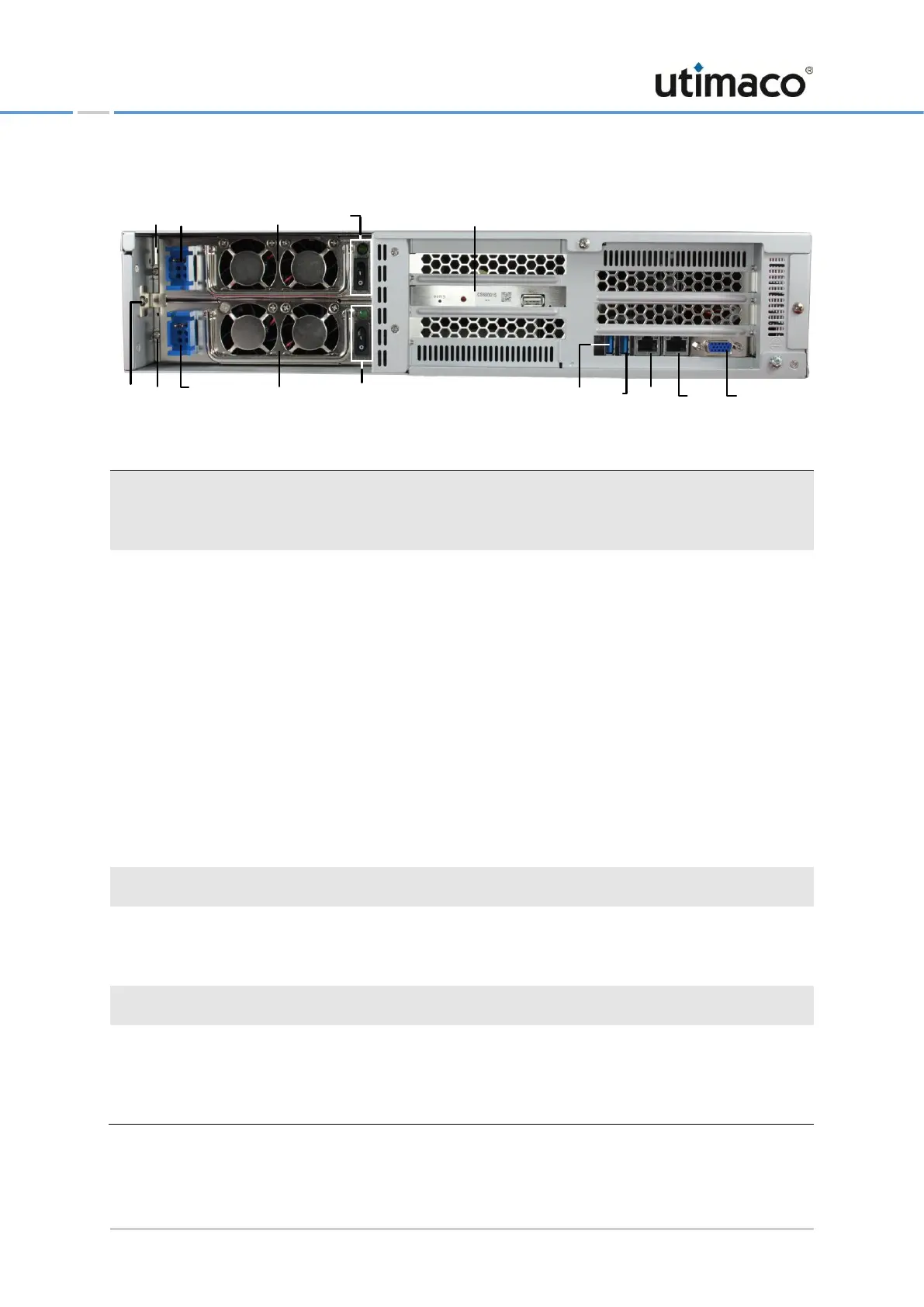
Figure 6: CryptoServer LAN V4 (DC) – Sockets and ports on the rear side (variant c)
CryptoServer LAN V4 (Figure 5 and Figure 6)
Power supply sockets 42 V ~ 60 V DC
Power supply switches (switches power on/off) plus control light (green) above
Screws for attaching the power supplies
CryptoServer plug-in card (CSe-Series or Se-Series Gen2)
eth1 - Ethernet port 10/100/1000 (RJ45)
eth0 - Ethernet port 10/100/1000 (RJ45)
CryptoServer LAN V4 in Figure 5
PS/2 power supply for a keyboard or mouse
USB 2.0 port for the CryptoServer LAN
CryptoServer LAN V4 in Figure 6
USB 2.0 ports for the CryptoServer LAN
Guard bracket protecting both power supplies against inadvertent displacement
during transport/movement.
Table 3: Ports and interfaces on the rear side of CryptoServer LAN V4 (DC)
d1d3
d4
d11
d5
d6
d10 d12
d2
d15
d9
d13
d14
d8
d7


 To Next Page