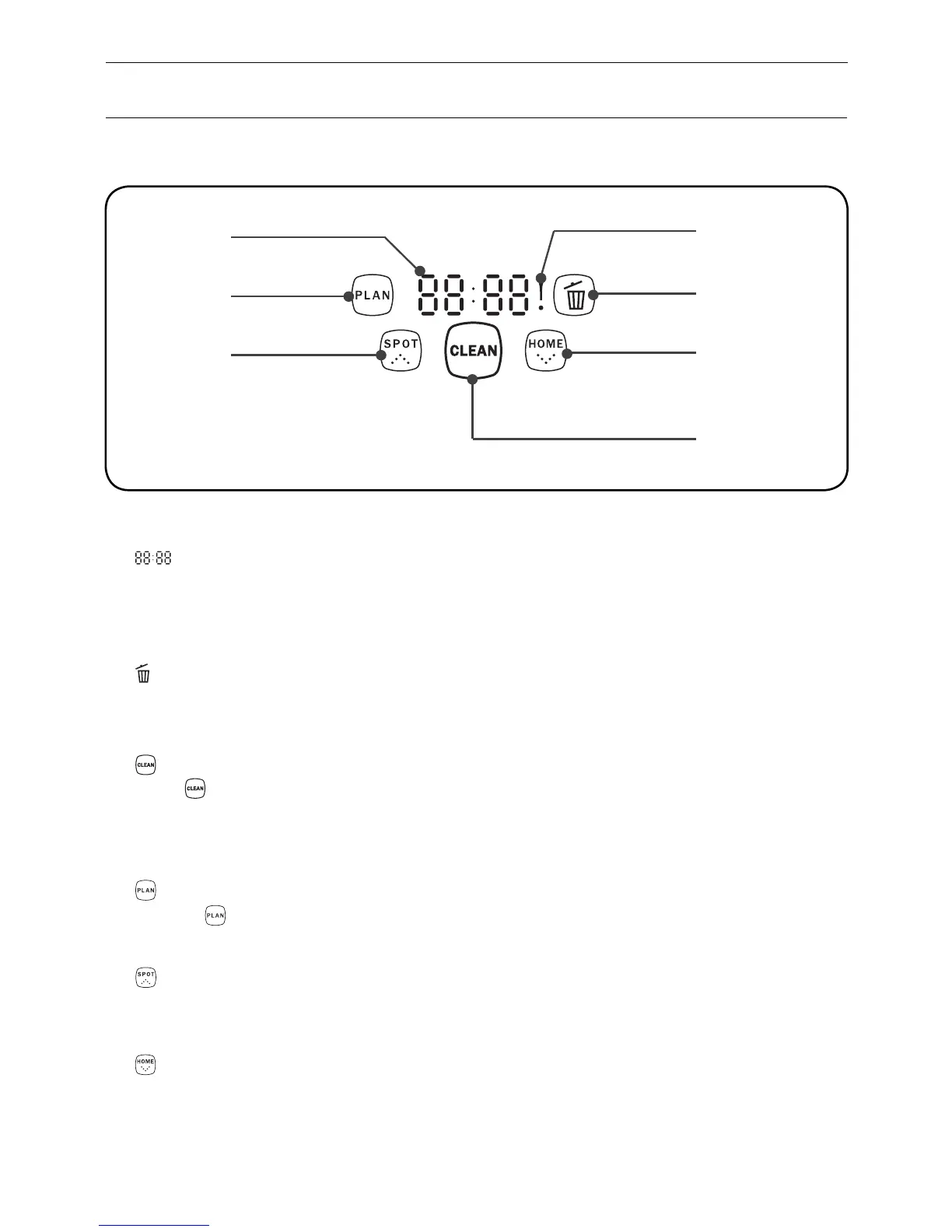
1. “ ” Number display
Shows the timer display, progress status, charging status, and error codes by using numbers,
letters and graphies.
2. “ ! ” display
Shows the error that occurs.
3. “ ” display
It flashes contantly when dust bin is full or suck passage is blocked.
4. “ ” Clean
Press “ ” to finish below operations:
A. To change from sleeping mode to selected mode;or keep press this button to change from
selected mode to sleeping mode.
B. To confirm scheduling in scheduling mode.
C. To start cleaning in selected mode.
5. “ ” Scheduling
A. Press “ ” to enter scheduling mode.
B. Press this button to exchange between hour to minute in scheduling mode.
C. Keep pressing this button for 5 seconds to cancel scheduling in scheduling mode.
6. “ ” Spot/ Increase
A. Press this button to increase number in scheduling mode.
B. Press this button to start spot cleaning.
7. “ ” Home/ Decrease
A. Press this button to decrease number in scheduling mode.
B. Press this button to return the robot to charging home base.
1
5
6
4
7
3
2
Product Parts
Display panel
7
Display part
Button part


 To Next Page