4. How Does Witty Pi Work?
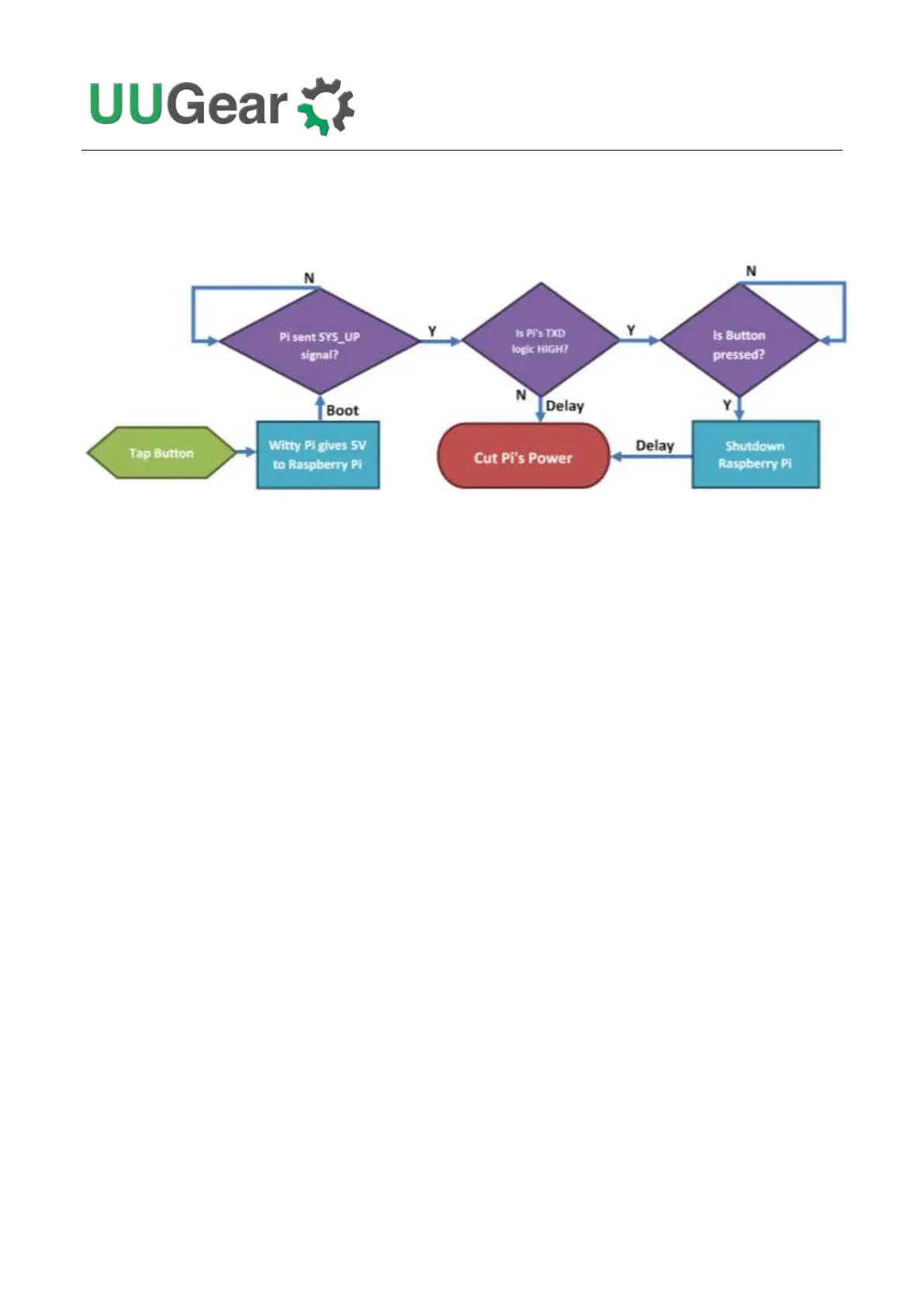
The diagram below shows the basic workflow of how Witty Pi turns on/off your Raspberry Pi.
After you tap the button on Witty Pi, it powers your Raspberry Pi via the GPIO header, and your
Raspberry Pi will boot. Witty Pi’s software will run automatically after boot, which will send the
SYS_UP signal (via GPIO-17) to Witty Pi. Witty Pi’s firmware receives the SYS_UP signal and starts
to listen to Raspberry Pi’s TXD pin (GPIO-14). If you shut down your Raspberry Pi (running shutdown
command or choose “Shutdown” in GUI), the TXD pin will go LOW and Witty Pi will cut the power
after some delay. If you tap the button again, that equals to shorting GPIO-4 to GND, and Witty Pi’s
software will run shutdown command for you.
Witty Pi has realtime clock (RTC) onboard and it always knows the time. You can schedule the
shutdown and startup of your Raspberry Pi, which are implemented with two alarms. When the alarm
is triggered, Witty Pi’s firmware will emulate a “button clicking”, which will turn on/off your Raspberry
Pi accordingly. You can either configure single alarm for shutdown and/or startup, or you can define a
simple script to plan a rather complex on/off sequence for your Raspberry Pi.
Witty Pi has Analogue to Digital Converter (ADC) in its microcontroller (MCU), which can measure
the input voltage (via the white XH2.54 connector). If the voltage is dropped below the preset
threshold, Witty Pi’s firmware will emulate a “button clicking” to turn off your Raspberry Pi. If the
voltage is raised above the preset threshold, Witty Pi’s firmware will emulate another “button clicking”
to turn on your Raspberry Pi again. This allows you to turn off/off your Raspberry Pi according to
input voltage.
Witty Pi also has temperature sensor onboard. If the temperature rises over the preset threshold,
Witty Pi’s firmware can emulate a “button clicking” to turn off or turn on your Raspberry Pi. If the
temperature drops below the preset threshold, Witty Pi can also turn on/off your Raspberry Pi. You
can define the complete logic according to your needs, and turn your Raspberry Pi to a
temperature-controlled device.



 To Next Page