9. About Schedule Script
Besides manually schedule the next shutdown/startup time, you can also use a schedule script to
plan the ON/OFF sequence for your Raspberry Pi. A schedule script is a text file with .wpi file
extension. Witty Pi’s software will load and execute it automatically after Raspberry Pi is boot up.
9.1 How does Schedule Script Work?
A schedule script defines a loop, and it put a serial of ON/OFF states into it. The duration of each
state is also specified. At the end of ON state, there should be a scheduled shutdown; while at the
end of OFF state, there should be a scheduled startup. All states in the schedule script will be
executed in sequence and repeatedly, until the END time of the loop is reached.
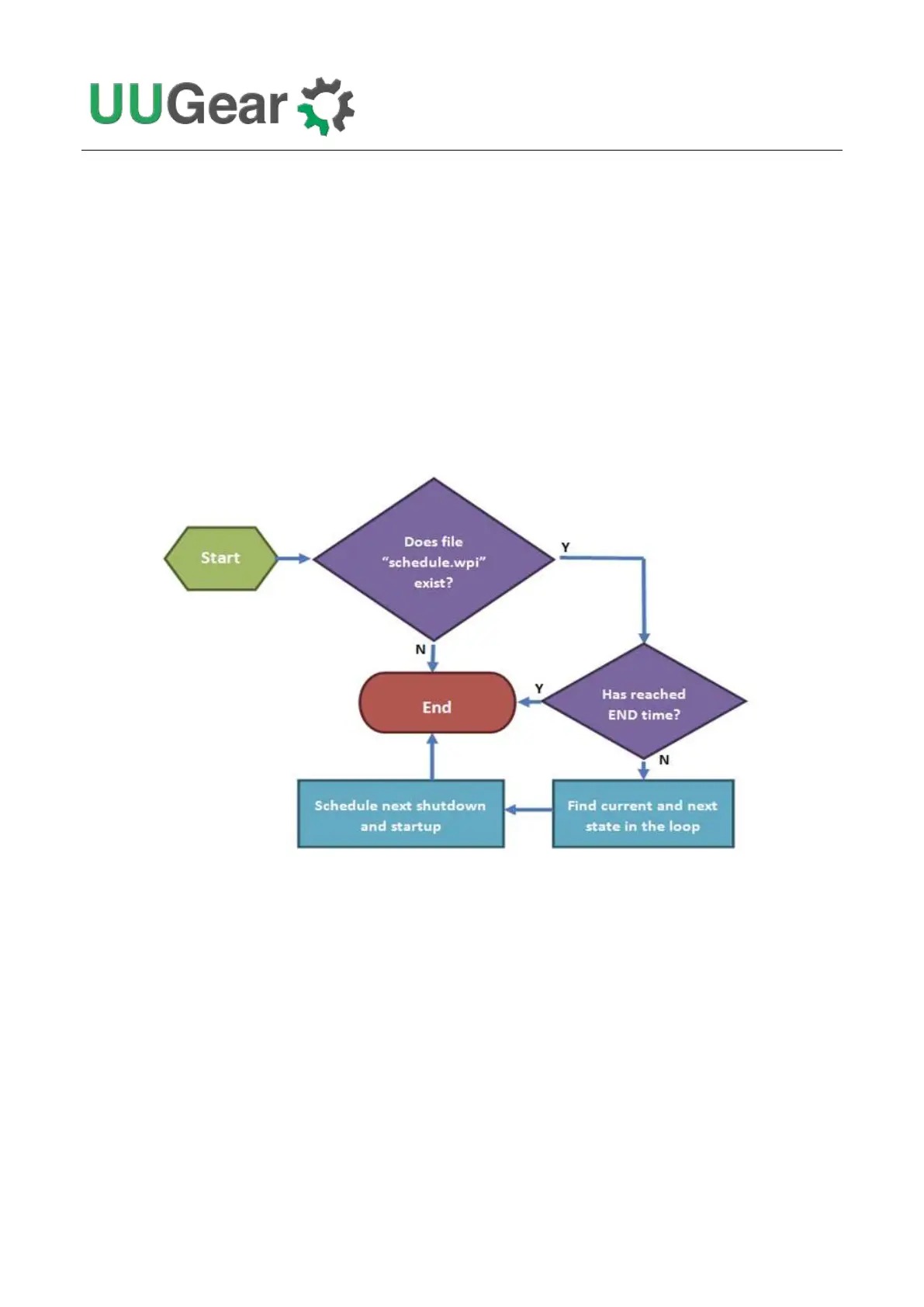
Every time your Raspberry Pi wakes up, it has a chance to run the runScript.sh file, which loads the
schedule script (“schedule.wpi” file) and run it. If the current time doesn’t reach the END time defined
in the schedule script, the next shutdown and next startup will be scheduled automatically. When
your Raspberry Pi is wakened at scheduled startup time, it will repeat this process and schedule the
next shutdown and startup. Although a schedule script only defines a few ON/OFF states, they could
become many ON/OFF states in reality.



 To Next Page