Need help?
Do you have a question about the Uwatec Smart 2 and is the answer not in the manual?
Indicates a potentially hazardous situation which, if not avoided, could result in death or serious injury.
Guidelines for the safe use of the UWATEC dive computer based on medical research and recommendations.
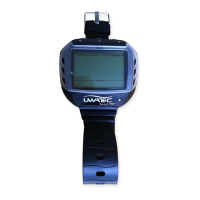
Welcome and overview of the UWATEC Smart Z dive computer.
Explanation of icons and symbols used in the operating manual for important comments and warnings.
Overview of the Smart Z dive computer's components and connectivity.
General instructions on how to operate the dive computer using its contacts.
Details on the physical contacts (B, E, +, -) used for manual operation and navigation.
Procedure for mounting the pressure transmitter onto the regulator's HP outlet.
General terms and display information during the no-stop and decompression phases.
Information displayed during the phase where no decompression stops are required.
Information displayed during the phase requiring decompression stops.
Visual and audible signals indicating specific dive situations or potential issues.
Critical audible and visual alarms that require immediate response from the diver.
Procedure to set the O2 fraction and Maximum Operating Depth (MOD).
How to select the microbubble (MB) protection level for the dive.
Steps for preparing the dive and checking the computer's functionality.
Functions monitored upon immersion and throughout the dive.
How the dive computer measures and displays the duration of the dive.
Display of current depth and maximum depth reached during the dive.
Display of water temperature and monitoring of the diver's ascent speed.
Actions and displays after completing a dive and surfacing.
Information on post-dive desaturation and recommended no-fly periods.
Alerts for potential microbubble formation and associated dive recommendations.
Understanding altitude ranges and their effect on dive planning and desaturation.
Prohibited altitude levels and ascent limitations.
Specific decompression procedures for dives in mountain lakes.
How to activate and deactivate the gauge mode on the dive computer.
Features and limitations when using the dive computer in gauge mode.
Comparing dive profiles and safety with different microbubble (MB) levels.
Using the dive planner to set up a no-stop dive, including surface intervals.
Information recorded and displayed for each dive in the logbook.
How to navigate and view logged dive data.
Key technical data and operating parameters of the dive computer.
Recommended procedures for cleaning and maintaining the dive computer.
 General
| Display Type | LCD |
|---|---|
| Decompression Algorithm | ZH-L8 ADT |
| Nitrox Compatibility | Yes, up to 50% O2 |
| Maximum Operating Depth | 100 meters |
| Operating Modes | Gauge |
| Ascent Rate Monitor | Yes |
| Altitude Adjustment | Yes |
| PC Interface | Yes |
| Depth Range | 0 to 99 m (0 to 328 ft) |

 To Next Page