ENGLISH
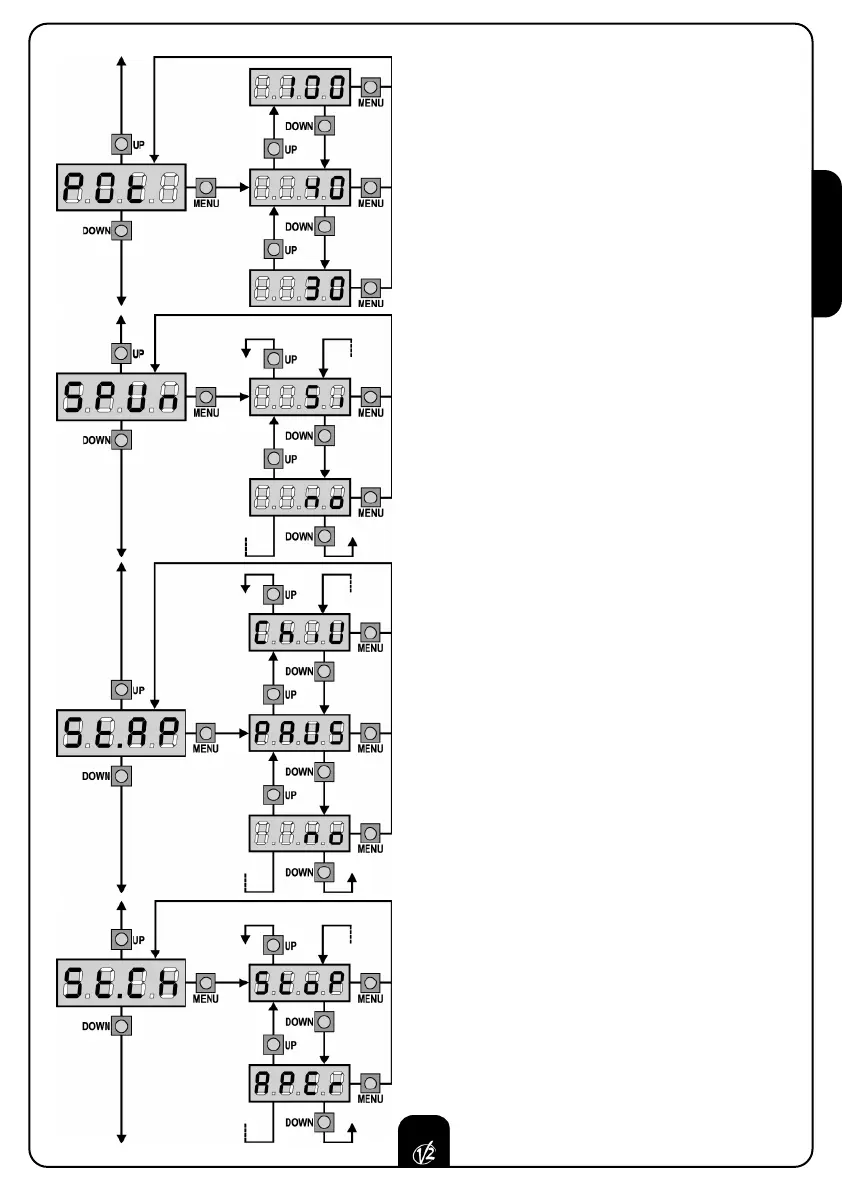
MOTOR POWER
This menu permits to adjust the motor power from
30 to 100% with a scanning of ±0,5.
START OFF
When the gate is at a standstill and is going to
move, it is contrasted by the starting inertia. As a
consequence of this, if the gate is very heavy the
gates might not move. By activating the start off
function, it is possible to win the initial inertia thanks
to the motor start to the maximum of the power for
2 seconds.
START IN OPENING
This menu permits to select the functions of start
during the opening phase.
PAUS the command START stop the gate and
goes into in PAUSE.
no the command START is not available.
ChiU the command START close the gate.
START IN CLOSING
This menu permits to select the functions of start
dur
ing the closing phase
.
StoP the command START stop the gate.
APEr the command ST
ART open the gate
33


 To Next Page