EasyManua.ls Logo

Vacron CDR-E07 - Remote Controller and OSD Interface; Remote Controller Buttons and Functions; OSD Interface Overview

Vacron CDR-E07
40 pages
Print Icon
To Next Page IconTo Next Page
To Previous Page IconTo Previous Page
Loading...
9
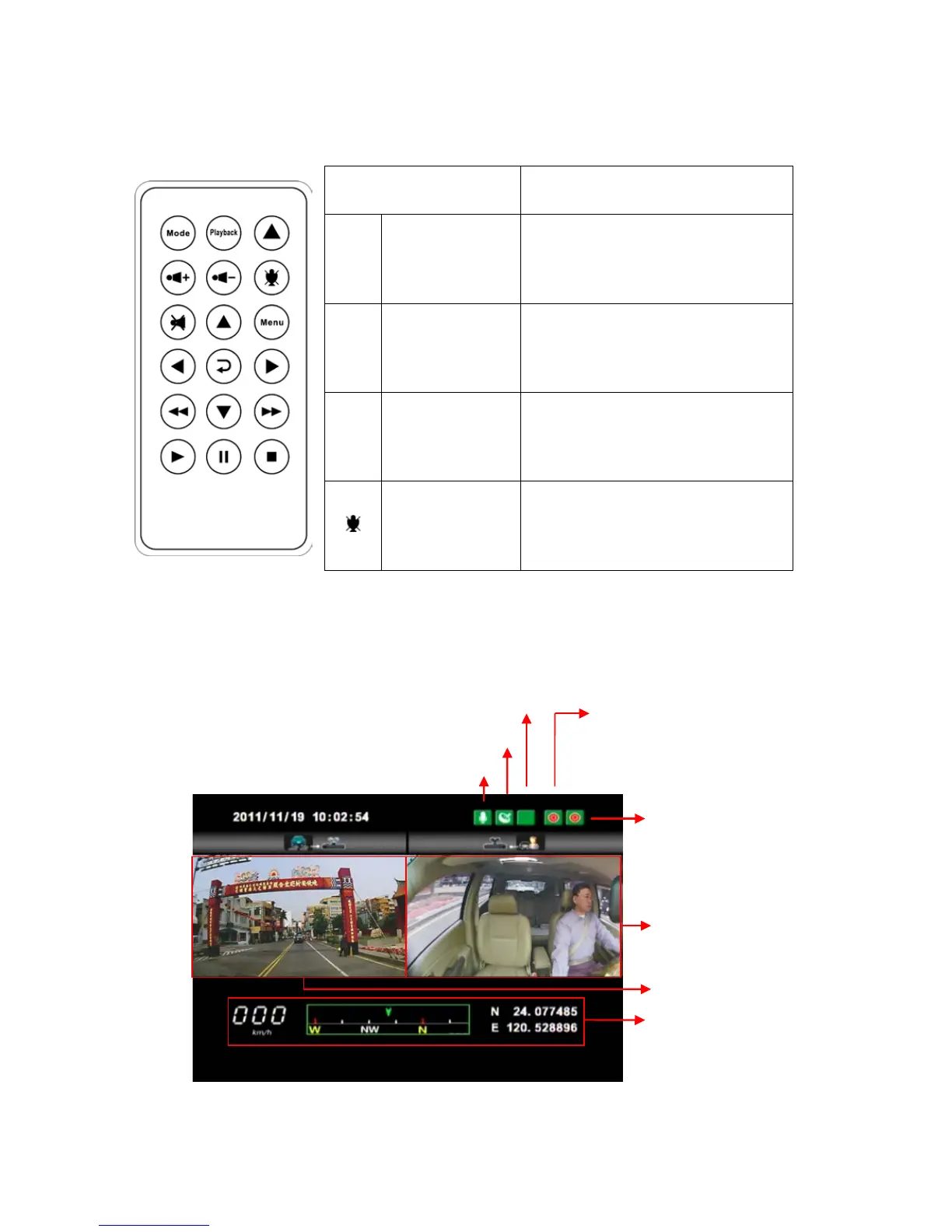
G. Functions of Remote Controller
Button Function Description
Force
Recording
Button
Manually establish a
recorded file which cannot
be overwritten.
Mode
Mode
Button
Full screen / Half screen
spilt shift
Menu Menu Button
Firmware version of the
device displayed
Mute Button Voice recording On/Off
Introduction of OSD Interface: (Video output from connecting TV-OUT
line to the device)
Forward facing lens
(
Recording)
Backward facing lens
(
Recording)
GPS positioning
Voice recording on
G-Sensor is working well
Front view (CH1)
Inner view CH(CH2)
GPS Information

Other manuals for Vacron CDR-E07

Related product manuals